Editing
To edit a file in Costanza
- Select Edit file from the Actions menu in the navigation bar, or click the Resume button on Costanza's home page
- From the list of files shown, click the file you would like to edit
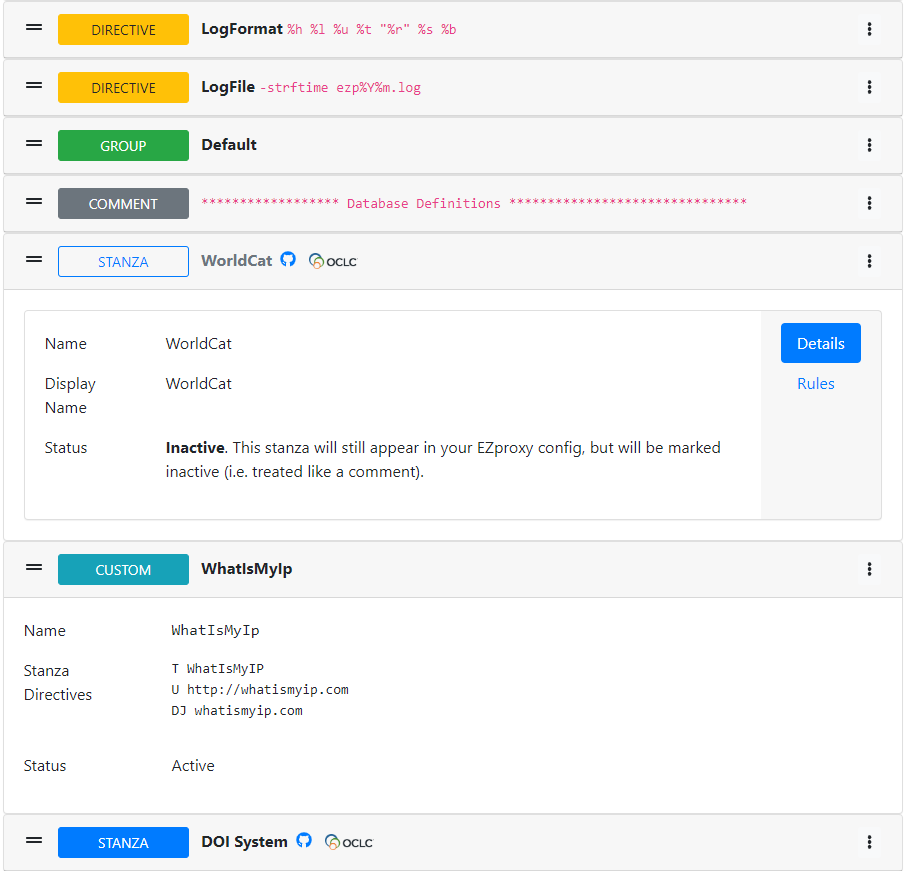
Costanza categorizes each entry in the EZproxy config as one of 5 different types: Comments, Directives Groups, Stanzas, Custom Stanzas (see Basic-Concepts for more information).
Each of these entries is color coded, making them easy to differentiate. Each entry can be marked Active or Inactive. Active entries have a solid entry type indicator; Inactive entries have an outlined entry type indicator.
Note: Most changes made in Costanza -- adding, deleting, re-ordering entries, as well as changes to processing rules for stanzas -- are saved immediately, without the need to manually save those changes.
Each entry is initially shown in a collapsed format, with just the most basic information visible -- the entry type indicator plus the first line of text (for comments), the first directive name and value (for directives), or the assigned name (for groups and stanza). For known database stanzas, a GitHub and OCLC icon may also appear. Clicking on these will open the a new window or tab with the exact stanza shown.
Clicking an entry will expand it to show the complete entry details. For Comments, this will display the entire comment; Directives will show the directive name and all assigned values; Groups will display the group name; Custom Stanzas will display the assigned name and the complete stanza; Stanzas will display the name, the OCLC hosted include file name (if one exists for that database), as well as a button -- on the right hand side -- to view any processing rules setup for that database. The active/inactive status will also appear for Directives, Groups, Custom Stanzas and Stanzas.
Entries can be reordered by simply dragging them up or down using the handle (═) on the left hand side of each entry.
On the right hand side of every entry is the action menu, identified by the ⋮ icon. This action menu allows you to add, edit or delete entries from the EZproxy config.
To add a new entry to the EZproxy config:
- Find the location where the new entry should be added.
- Click the action menu ⋮ for the entry above this location and select Add entry below
- In the dialog box that appears, select the tab for the desired entry type -- Comment, Config Directive, Group, Database Stanza or Custom Stanza
- Fill in all the details for the selected entry type (see below) then click the Add button
Comments are simple notes that do not affect how EZproxy functions. When adding a comment, no additional values beyond the comment itself are required.

Costanza refers to EZproxy directives that are not part of a database stanza as "configuration directives". These are directives that often control how EZproxy functions, rather than what databases it proxies.
The Directive name as well as the value are both required. If the directive will repeat in your EZproxy
config file -- you wish to add multiple RejectIP directives for example -- multiple values can be entered in the Value(s) field, one per line.
A comment or note specific to this directive can be added as well, using the Comment field.
The Inactive field allows you to easily mark this directive as inactive. This allows the directive to remain in the EZproxy config file, but disabled.

A complete list of all EZproxy directives can be found on the OCLC website.
Groups are a means of defining sets of databases, and the users allowed to access those databases. More detailed information about using Groups can be found on the OCLC website.
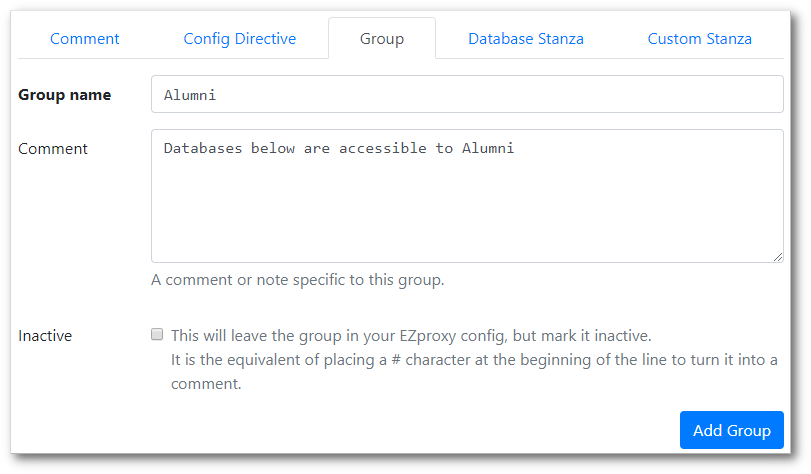
When adding a Group to Costanza, all that is required is the group name. A comment can be supplied if desired, and the group can be marked inactive using the Inactive checkbox.
OCLC maintains a lengthy list of database stanzas.
Those stanzas, along with a number of user contributed stanzas
are available in the ezproxy-stanzas GitHub repository,
which makes up the core of Costanza. When adding any of these known databases to your EZproxy config, the only field
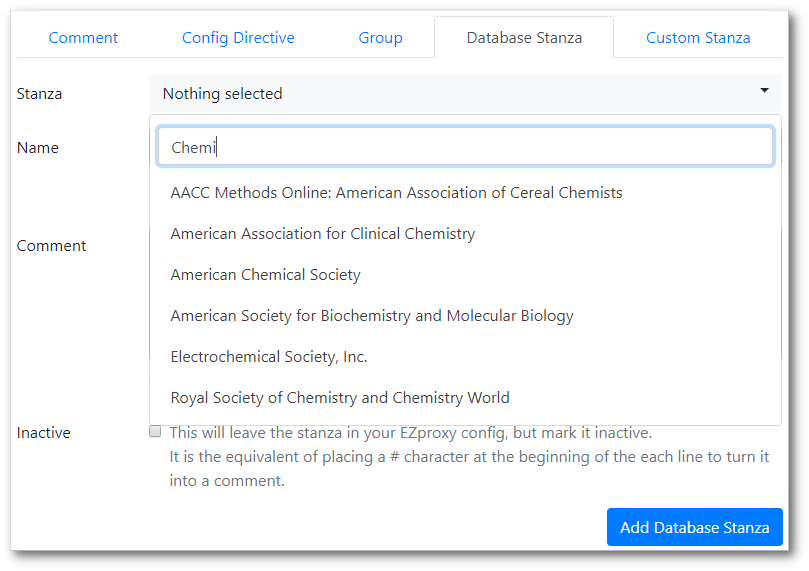
required by Costanza is which database to add. The Stanza drop-down menu contains a list of more than 760 known
databases. The list can be narrowed by typing a few characters in the Search field at the top of the drop-down.
The default name used for the stanza can be overridden by entering a value in the Name field.
A comment can be supplied if desired, and the stanza can be marked inactive using the Inactive checkbox.
For databases not maintained by OCLC, and that do not appear in the user contributed folder of the ezproxy-stanzas repo
-- such a stanzas received from vendors, or that you create yourself -- a custom stanza can be used.
The Name field is required, as are the Stanza Directives. A comment can be supplied if desired, and the stanza can be marked inactive using the Inactive checkbox.

To edit an entry:
- click the action menu ⋮ to the right of the desired entry and select Edit this entry.
- A dialog box similar to the ones shown above will appear. Make any necessary changes, then click the Update button
NOTE: Costanza does not currently ask for confirmation before removing entries. The actions below will immediately remove the entry from your EZproxy config
To delete an entry:
- Click the action menu ⋮ to the right of the desired entry and select Delete this entry.
- The entry will immediately be removed from your EZproxy config
A number of stanzas require modification before they can be used with your EZproxy server. For example, the Books24x7 stanza requires a site identifier, token and token key placeholders be replaced with custom values assigned to you by the vendor; Kanopy and Naxos require a site ID placeholder to be similarly replaced; the American Physiological Society stanza suggests the addition of extra directives if you experience issues with PDFs.
Costanza allows these processing rules to be attached to any stanza, and automatically applies them during the export process. Stanzas that need special handling therefore do not need to be manually modified before being used with EZproxy.
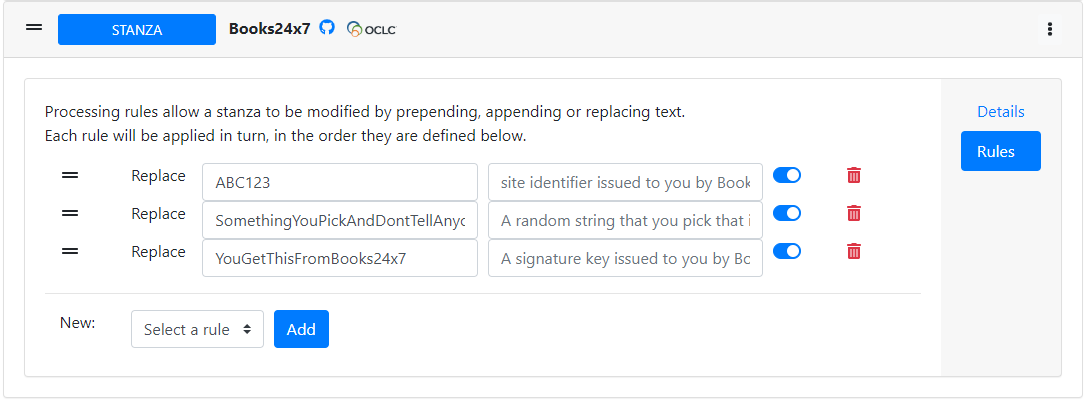
Costanza knows which OCLC stanzas require processing rules, and will include them automatically when a database is added to your EZproxy config. For example, the default set of rules assigned when you add Books24x7 look like this:
To view or manage processing rules:
- Find the stanza you wish to view/modify, and click to expand its details
- Click the Rules button on the right hand side
The interface for managing rules looks like this:
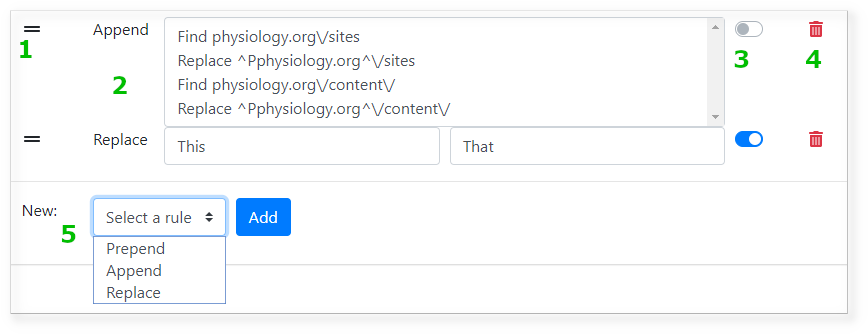
- Like EZproxy entries, rules can be re-ordered using the handle (═) on the left hand side of each
- Existing rules and their values are shown here
- Rules can be enabled and disabled easily using this toggle switch
- Rules can be deleted by clicking the delete/garbage icon
- A new rule can be added by first selecting the rules type. Costanza currently supports the ability to Prepend text to the beginning of a stanza, Append text to the end of a stanza, or search and Replace a word or phrase