


I have spent way too many hours staring at readelf output and suffering through walls of unformatted text. readelf has been around forever and it works fine for what it is, but every time I use it I end up getting nauseous.
Strix started because I wanted something better for my own workflow. When you are reversing a binary or doing security research, you end up looking at ELF headers constantly. You want to see the entry point, check what segments are executable, understand how sections are laid out, and figure out if the binary has certain protections enabled. All of this information is in readelf output somewhere, but it takes way more effort than it should to extract it.
So I wrote my own tool. The output is colored so different fields actually stand out from each other. The formatting is designed to be readable on a normal terminal without needing to scroll horizontally. It parses ELF64 binaries because that is what I work with every day, and it does so using memory-mapped IO and direct struct casts for performance and money.
This project is not trying to be a complete replacement for all of binutils. It focuses on the parts I actually use regularly and tries to do those parts well. If you spend a lot of time analyzing ELF binaries and want something nicer to look at than readelf, this might be useful for you too.
Go already simplifies this by providing an idiomatic way to build and install binaries from internet.
go install github.com/yourpwnguy/strix@latestIf you want to install it directly to your GOPATH/bin directory:
git clone https://github.com/yourpwnguy/strix.git
cd strix
make install
Make sure your GOPATH/bin is in your PATH environment variable or the command will not be found after installation.
If you wanna build from source project.
git clone https://github.com/yourpwnguy/strix.git
cd strix
make build
The compiled binary will be at ./bin/strix. You can run it directly from there or copy it somewhere in your PATH.
Currently this only works on Linux. The memory mapping code uses Linux-specific syscalls like mmap, mlock, and madvise. I have not tested it on other platforms and it will probably fail to compile or run on macOS, BSD, or Windows. Adding support for other platforms is possible but not something I have prioritized since I do all my binary analysis work on Linux anyway.
Strix has separate subcommands for different types of ELF information. Each command takes a path to an ELF binary as its argument.
The ehdr command shows the main ELF header. This includes basic information like the file class, architecture, entry point address, and the locations and sizes of the program and section header tables.
strix ehdr /bin/ls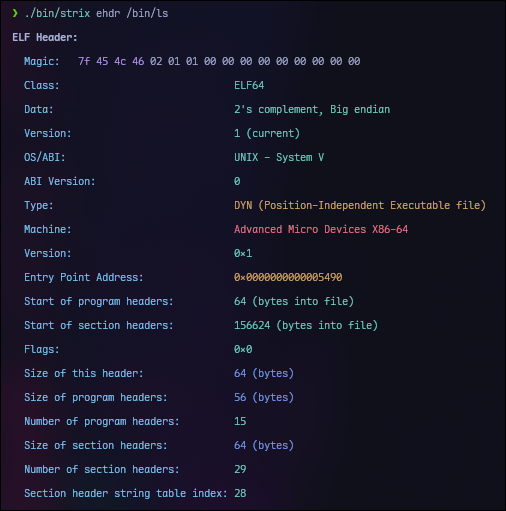
The phdr command is probably the one I use most often. It shows all the program headers which define the segments that get loaded into memory at runtime. More importantly, it also shows which sections belong to each segment right there in the same output.
strix phdr /bin/ls # program headers 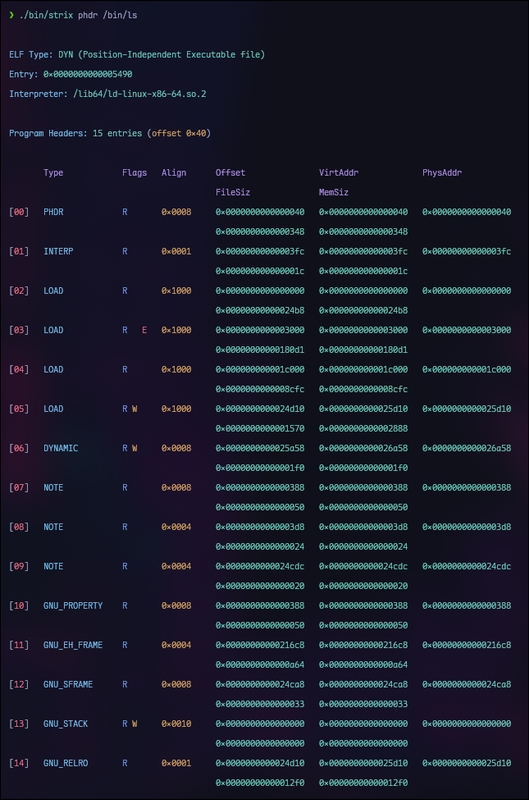
The shdr command displays all section headers with their types, flags, addresses, offsets, and sizes.
strix shdr /bin/lsThis shows you every section in the binary including debug sections, string tables, symbol tables, and everything else. The output is formatted in a table with columns aligned properly so you can actually read it without going crazy.
When you open a file with Strix, it memory maps the entire file into the process address space using mmap. This means the file contents are accessible as a byte slice without having to explicitly read the data into buffers. The kernel handles paging the actual file data into memory as needed.
The mmap is done with the MAP_POPULATE flag which tells the kernel to prefault all the pages immediately. For ELF analysis you typically end up reading most of the file anyway so this avoids page fault latency later. The MADV_SEQUENTIAL hint is also set since ELF parsing mostly reads through the file sequentially.
Memory locking via mlock is attempted to keep the mapped pages in physical memory, but this is best-effort and may fail if the process does not have sufficient privileges or if the system is under memory pressure.
All parsing happens directly on the memory mapped data using unsafe pointer casts. Instead of reading bytes into a buffer and then using encoding/binary to parse fields, the code just casts a pointer to the mapped memory directly to an ELF struct pointer. This avoids all the copying overhead and is significantly faster for large binaries.
The tradeoff is that this approach is unsafe in the Go sense. If the file is malformed or truncated in certain ways, you could get garbage data or even crash. The parser does validate the ELF magic bytes and checks that offsets and sizes are within bounds before accessing data, but it is not trying to be a fuzzer-proof validator. If you feed it intentionally corrupted binaries, expect undefined behavior.
Parsing is done lazily. When you create a parser, it only validates the ELF magic and caches a reference to the mapped memory. The actual ELF header is not parsed until you call the method to get it. Program headers and section headers are similarly parsed only when requested. Once parsed, the results are cached so subsequent accesses do not re-parse.
This means if you only want to look at the ELF header, the parser does not waste time parsing program and section headers. For interactive use this does not matter much, but it helps when you are processing many files or writing tools that only need specific information.
I will update this section soon with the benchmarks.
There are several things that do not work or are not implemented yet.
ELF32 is not supported: The entire codebase assumes 64-bit ELF structures. Adding ELF32 support would require either duplicating the parsing code with different struct definitions or using some kind of abstraction layer. Since I only work with 64-bit binaries, I have not prioritized this.
Big endian is not tested: The parsing assumes little endian byte order. ELF files do specify their endianness in the header, but the code does not check or handle big endian files. If you try to parse a big endian ELF, you will get garbage values for multi-byte fields.
Non-Linux platforms are not supported: The memory mapping code uses Linux syscalls directly. Porting to macOS would require using the mmap from syscall or x/sys/unix differently, and Windows would need a completely different approach using MapViewOfFile or similar.
These are features I plan to add at some point. No specific timeline, I work on this when I have time and motivation.
Symbol table parsing for both .symtab and .dynsym sections. This includes resolving symbol names from the associated string tables and displaying symbol type, binding, visibility, and associated section information.
Relocation entries from .rela.dyn and .rela.plt sections. This is useful for understanding how dynamic linking works and what symbols need to be resolved at load time.
Dynamic section parsing to show the dynamic linker tags like NEEDED libraries, RUNPATH, symbol versioning info, and other dynamic linking metadata.
String table dumps for examining the raw string data in .strtab, .dynstr, and other string tables.
Security mitigation detection. This would check for RELRO (looking at PT_GNU_RELRO and DT_BIND_NOW), NX (checking PT_GNU_STACK permissions), PIE (checking if type is ET_DYN and has appropriate flags), stack canaries (looking for __stack_chk_fail in symbols), and FORTIFY (checking for _chk function variants). Having this in one place would save time versus checking each thing manually.
JSON output format for people who want to process the data programmatically or integrate with other tools.
Hex dump capability to examine raw bytes of arbitrary sections or offset ranges.
Note section parsing to display build IDs, GNU properties, and other metadata stored in NOTE segments.
ROP gadget finding. This is a bigger project and there are existing tools that do it well, but having it integrated would be convenient for exploit development workflows.
Binary diffing to compare two versions of a binary and see what changed. Useful for patch analysis and understanding updates.
ELF32 support if there is demand for it.
Import and export analysis with detection of dangerous functions like gets, strcpy, sprintf without bounds checking, etc.
Strix is the genus name for wood owls. Owls are known for excellent vision in low light conditions. When you are analyzing binaries you are kind of staring into darkness trying to understand what is going on, so the name seemed appropriate.
Also most of the obvious names for ELF tools were already taken on GitHub and I did not want to use something generic with a bunch of numbers after it.
If you want to contribute, feel free to open issues for bugs or feature requests. Pull requests are welcome for fixes and new features.
One important thing: Do not submit AI generated code. I can tell when code is written by ChatGPT or Copilot versus written by a human who understands what they are doing. If you want to contribute, actually understand the problem and write the code yourself. Use AI to learn concepts if you want, but the code you submit should be yours.