


A mock proxy server that records and replays responses from multiple APIs to streamline development and testing.
- snap: snapshot, quickly capture
- perro: Spanish for "dog"
- The image of "a faithful dog that fetches data"
- 4 Modes: Proxy (passthrough) / Record (capture) / Mock (playback) / Smart (auto)
- Parameter Matching: Accurate matching by path parameters and query parameters
- State Persistence: Mode and scenario settings persist across server restarts
- TypeScript Configuration: Type-safe configuration files
Are you facing these problems during development?
- Depending on multiple APIs, making environment setup difficult
- Local development stops due to external API outages
- Preparing test data is tedious
- "I want to reproduce this state" but manually operating each time is a hassle
snaperro is a mock proxy server that saves API responses as "snapshots" and can replay them anytime.
# Install
npm install -D snaperro

# Initialize (generates .snaperro/, snaperro.config.ts)
npx snaperro init

# Start server
npx snaperro startWe provide a demo environment where you can experience snaperro in action.
npx snaperro demoYour browser will open http://localhost:3333/__snaperro__/demo.
| Feature | Description |
|---|---|
| Mode Switching | Experience the differences between Proxy/Record/Mock modes |
| Path Parameter | Save and return different responses for each ID with /users/:id |
| Query String | Save and return different responses for each query with /posts?userId=1 |
| Nested Resource | Fetch nested resources with /posts/:id/comments |
For detailed management (scenarios/files/JSON editing), use the GUI (/__snaperro__/client).
The following APIs are available without configuration:
| API | Target | Routes |
|---|---|---|
| jsonPlaceholder | https://jsonplaceholder.typicode.com | /users, /posts, /comments, etc. |
These are used by the demo page and can be overridden in your config if needed.
Intuitively operate snaperro from your browser.
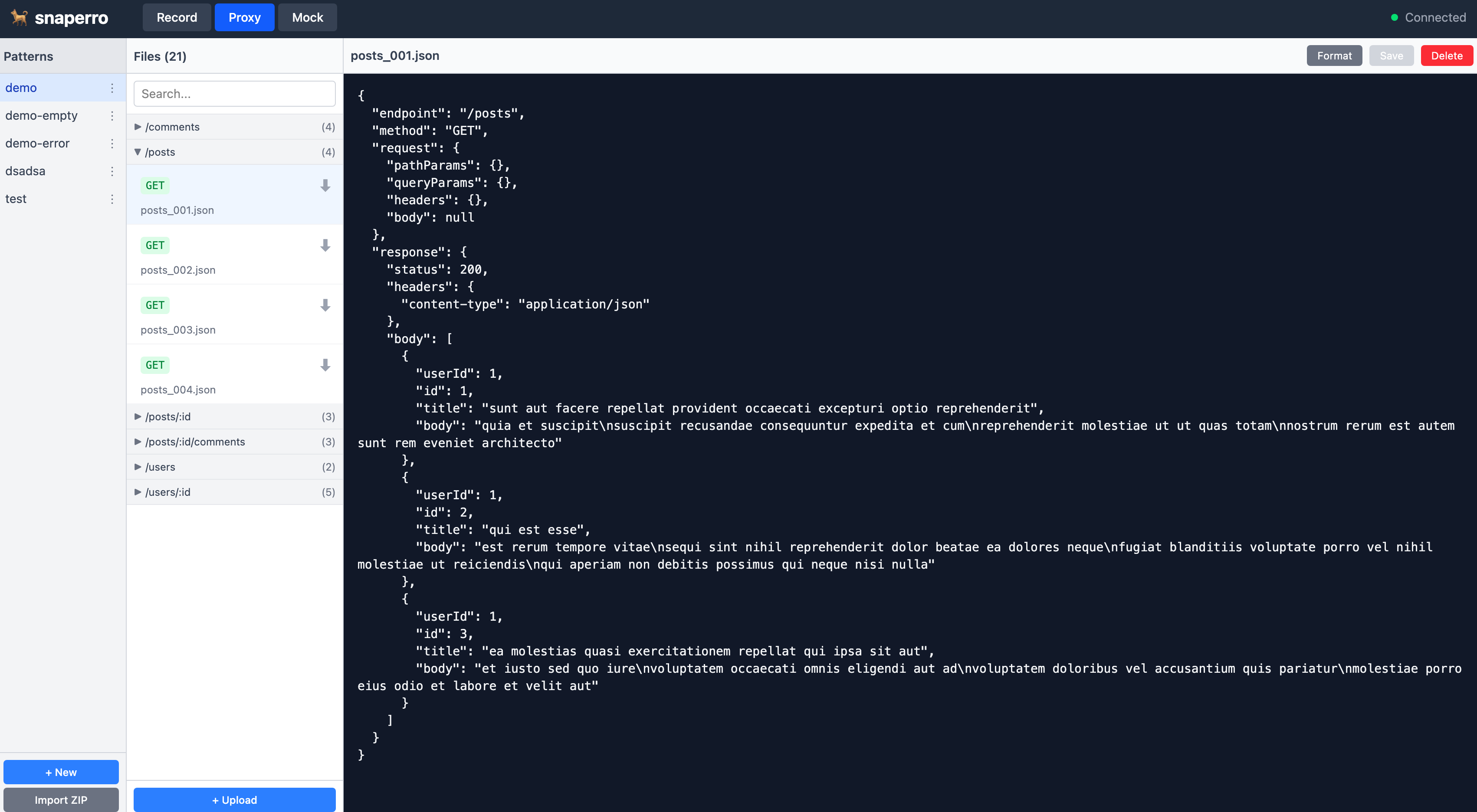
http://localhost:3333/__snaperro__/client
The browser opens automatically when the server starts.
| Feature | Description |
|---|---|
| Mode Switch | Switch between Proxy/Record/Mock with one click |
| Scenario Management | Create, delete, duplicate, and rename scenarios |
| File Management | List and delete recorded JSON files |
| JSON Editor | View and edit responses |
| Real-time Updates | Instantly reflect state changes via SSE |
import { defineConfig } from 'snaperro'

export default defineConfig({
  port: 3333,

  apis: {
    userService: {
      name: "User Service",
      target: "https://api.example.com",
      headers: {
        "X-Api-Key": process.env.API_KEY!,
      },
      routes: [
        "/api/users",
        "/api/users/:id",
        "/api/users/:id/profile",
      ],
    },

    orderService: {
      name: "Order Service",
      target: "https://order-api.example.com",
      routes: [
        "/api/orders",
        "/api/orders/:id",
        "/api/users/:userId/orders",
      ],
    },
  },
})# Sensitive information such as API keys
API_KEY=your-api-key-here| Option | Type | Description |
|---|---|---|
port |
number | Server port (default: 3333) |
filesDir |
string | File storage directory (default: .snaperro/files) |
mockFallback |
string | Fallback behavior when mock file is not found (default: "404") |
maskRequestHeaders |
string[] | Headers to mask when recording (applied to all APIs) |
apis |
object | API definitions object |
| Option | Type | Required | Description |
|---|---|---|---|
name |
string | Yes | API display name |
target |
string | Yes | Proxy target URL |
routes |
string[] | Yes | Matching route patterns |
headers |
object | No | Headers to add |
maskRequestHeaders |
string[] | No | Headers to mask when recording |
If you're behind a corporate proxy, configure upstream proxy settings:
Via config file:
export default defineConfig({
  upstreamProxy: {
    url: "http://proxy.company.com:8080",
  },
  // ...
})
Via environment variable:
export HTTPS_PROXY=http://proxy.company.com:8080
# or with authentication
export HTTPS_PROXY=http://username:[email protected]:8080
Config file takes priority over environment variables.
Important: When using an upstream proxy, add localhost to NO_PROXY to ensure local requests bypass the proxy:
export NO_PROXY=localhost,127.0.0.1| Command | Description |
|---|---|
npx snaperro init |
Initialize project |
npx snaperro start |
Start server |
npx snaperro start -p 4000 |
Start with specified port |
npx snaperro demo |
Start demo environment |
npx snaperro postman |
Export Postman collection |
- Create
.snaperro/directory - Create
.snaperro/files/directory - Create
snaperro.config.tstemplate (if it doesn't exist) - Add
.snaperro/to.gitignore
| Option | Description |
|---|---|
-p, --port <port> |
Specify port number |
-c, --config <path> |
Specify config file path |
-e, --env <path> |
Specify env file path (default: .env in config directory) |
-v, --verbose |
Show detailed logs |
| Mode | Real API | Save JSON | Returns |
|---|---|---|---|
| Proxy | Access | No | Real response |
| Record | Access | Yes | Real response |
| Mock | No access | No | Saved JSON |
| Smart | Conditional | Conditional | Mock or Real |
Connects to the actual API with headers (API Key, etc.) defined in the configuration file.
Request → snaperro → Real API → Response
Connects to the actual API while recording responses to JSON files.
Request → snaperro → Real API → Response
                ↓
           Save to JSON file
- Same endpoint, same parameters → Overwrite
- Same endpoint, different parameters → Create new file
Returns responses from saved JSON files. Does not access the actual API.
Request → snaperro → Search JSON files → Response
Automatically returns mock data if it exists, otherwise proxies to the real server and records the response.
Request → snaperro → Search mock files
                ↓
         Found? → Yes → Return mock (no API access)
                ↓ No
         Proxy to real API & Record
                ↓
         Return response
This is the recommended mode for daily development:
- Prevents unnecessary API calls when mock data already exists
- Automatically records new endpoints
- Reduces API rate limit concerns
When a mock file is not found, you can configure the fallback behavior with mockFallback:
| Value | Description |
|---|---|
"404" |
Return 404 error (default) |
"proxy" |
Forward request to real server |
"proxy&record" |
Forward to real server and record the response |
export default defineConfig({
  mockFallback: "proxy&record",  // Fallback to proxy and record
  // ...
})A "scenario" is a folder that manages a set of mock data.
.snaperro/
├── state.json              ← Server state (mode, scenario)
└── files/
    ├── normal-full/           ← Scenario "normal-full"
    │   ├── api_users_001.json
    │   ├── api_users_{id}_001.json
    │   └── api_orders_001.json
    ├── empty-data/             ← Scenario "empty-data"
    │   └── api_users_001.json
    └── error-cases/             ← Scenario "error-cases"
        └── api_users_001.json
By switching scenarios, you can use different mock data sets. The previous mode and scenario are restored even after server restart.
Define path parameters with :param format.
routes: [
  "/api/users",           // Exact match
  "/api/users/:id",       // :id is a parameter
  "/api/users/:id/orders/:orderId",  // Multiple parameters
]routes: ["/api/users/:id"]| Request | Match | pathParams |
|---|---|---|
/api/users/123 |
Yes | { id: "123" } |
/api/users/abc |
Yes | { id: "abc" } |
/api/users |
No | - |
/api/users/123/profile |
No | - |
- Same parameter request → Overwrite existing file
- New parameter request → Create new file
- Return file with exact match of path parameters and query parameters
- Return 404 error if no matching file
your-project/
├── snaperro.config.ts     # Config file (Git managed)
├── .env                   # Sensitive info (Not Git managed)
├── .env.example           # Env template (Git managed)
└── .snaperro/             # Recorded data (Not Git managed)
    ├── state.json         # Server state
    └── files/
        ├── normal-full/
        │   ├── api_users_001.json
        │   └── api_users_{id}_001.json
        └── error-cases/
            └── api_users_001.json
An SSE endpoint is provided for GUI and clients to detect state changes in real-time.
GET /__snaperro__/events
# curl
curl -N http://localhost:3333/__snaperro__/events

# Browser console
const es = new EventSource('http://localhost:3333/__snaperro__/events');
es.addEventListener('connected', (e) => console.log(JSON.parse(e.data)));
es.addEventListener('file_created', (e) => console.log(JSON.parse(e.data)));| Event | Description |
|---|---|
connected |
Connection complete (includes initial state) |
mode_changed |
Mode changed |
scenario_changed |
Scenario switched |
file_created |
File created (during recording) |
file_updated |
File updated |
file_deleted |
File deleted |
scenario_created |
Scenario created |
scenario_deleted |
Scenario deleted |
scenario_renamed |
Scenario renamed |
# 1. Install dependencies
pnpm install

# 2. Build
pnpm build

# 3. Run CLI locally
npx . init
npx . start
During development (run directly without build):
npx tsx src/cli/index.ts init
npx tsx src/cli/index.ts startWhen you want to:
| Goal | Command |
|---|---|
| Watch code changes during development | pnpm dev |
| Build for production | pnpm build |
| Run tests | pnpm test |
| Run tests in watch mode | pnpm test:watch |
| Format code | pnpm format |
| Check type errors | pnpm type-check |
| Develop GUI | pnpm dev:client |
| Build GUI | pnpm build:client |
| Develop demo | pnpm dev:demo |
| Build demo | pnpm build:demo |
snaperro/
├── cli/                      # CLI commands
│   ├── index.ts
│   └── commands/
│       ├── init.ts
│       ├── postman.ts
│       └── start.ts
├── server/                   # Hono server
│   ├── handlers/
│   │   ├── handler.ts
│   │   ├── proxy.ts
│   │   ├── recorder.ts
│   │   ├── mocker.ts
│   │   └── control-api.ts
│   ├── core/
│   │   ├── config.ts
│   │   ├── state.ts
│   │   ├── storage.ts
│   │   └── matcher.ts
│   └── types/
├── client/                   # React GUI
│   └── src/
├── demo/                     # Demo application
│   └── src/
└── doc/                      # Documentation
| Category | Choice |
|---|---|
| Server | Hono |
| CLI | Commander |
| GUI | React + Tailwind CSS |
| Schema | Zod |
| Logging | Consola |
| Path Matching | Picomatch |
| Build | tsup, Vite |
| Linter/Formatter | Biome |
| Test | Vitest |
- Node.js 18 or higher
- tsx must be installed (peerDependencies)
MIT