

A full-stack application featuring a Laravel backend with a recruitment system and task management, paired with a React frontend implementing a Kanban board interface.
Assessment Link: Full-Stack Developer Assessment Task
- Features
- Tech Stack
- Backend Setup
- Frontend Setup
- API Documentation
- Database Schema
- SQL Query Examples
- Demo Credentials
- Deployment
- Author
- Task Management: Complete CRUD operations for tasks with status tracking
- Recruitment System: Job postings, candidate applications, and interview scheduling
- Application Workflow: State machine pattern for application stages
- Authentication: Laravel Breeze with Sanctum API tokens
- API Documentation: Integrated with Scribe/Request Docs
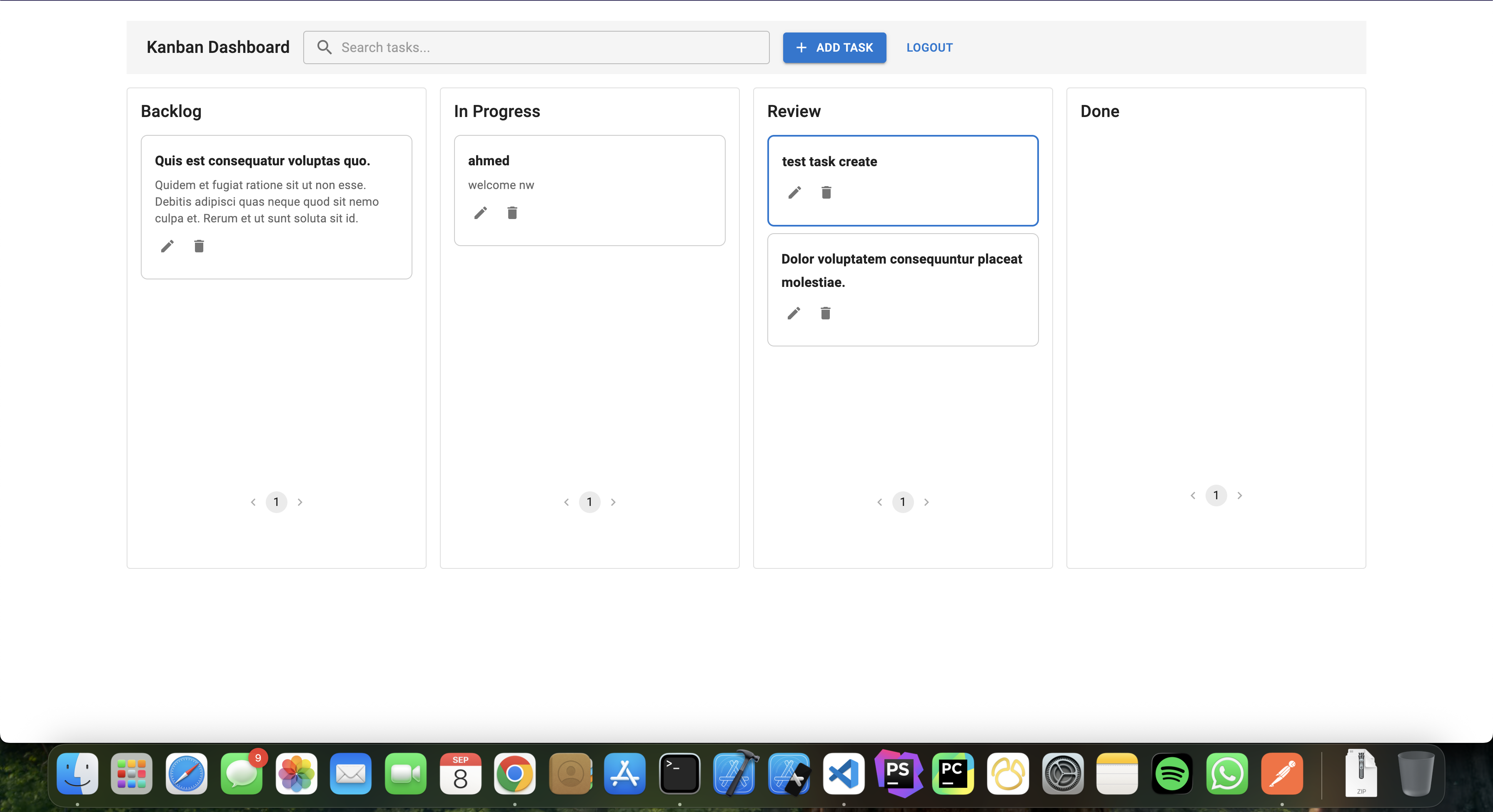
- Kanban Board: Drag-and-drop task management across columns
- Real-time Updates: React Query for optimistic updates
- Search & Filter: Quick task search functionality
- Pagination: Built-in pagination for task lists
- Responsive Design: Material-UI components for modern interface
- Framework: Laravel 11.x
- Authentication: Laravel Breeze + Sanctum
- Database: MySQL/MariaDB
- API: RESTful API with Resource transformers
- Framework: React 18 + Vite
- State Management: TanStack React Query
- UI Library: Material-UI (MUI)
- Drag & Drop: @hello-pangea/dnd
- HTTP Client: Axios
- Create Laravel Project
composer create-project laravel/laravel MindLuster
cd MindLuster- Install Dependencies
composer require laravel/breeze
composer require nunomaduro/collision- Setup Breeze
php artisan vendor:publish
php artisan breeze:install- Configure Environment
cp .env.example .envUpdate .env with your database credentials:
DB_CONNECTION=mysql
DB_HOST=127.0.0.1
DB_PORT=3306
DB_DATABASE=your_database_name
DB_USERNAME=your_username
DB_PASSWORD=your_password- Run Migrations & Seed
php artisan migrate --seed- Start Development Server
php artisan serveThe backend will be available at http://localhost:8000
php artisan route:listKey API Endpoints:
POST /api/auth/login- User authenticationPOST /api/auth/logout- Logout (requires auth)GET /api/tasks- List all tasks (requires auth)POST /api/tasks- Create new task (requires auth)PUT /api/tasks/{id}- Update task (requires auth)DELETE /api/tasks/{id}- Delete task (requires auth)GET /api/jobs- List jobsPOST /api/application- Submit application
- Create Vite Project
npm create vite@latest frontend
cd frontend
npm install- Install Dependencies
npm install @hello-pangea/dnd @mui/icons-material @mui/material @tanstack/react-query axios- Configure Environment
cp .env.example .envUpdate .env with your API URL:
VITE_API_URL=http://localhost:8000
VITE_API_PREFIX=/api- Start Development Server
npm run devThe frontend will be available at http://localhost:5173
npm run buildLogin
POST /api/auth/login
Content-Type: application/json

{
  "email": "[email protected]",
  "password": "password"
}
Response:
{
  "token": "your-api-token",
  "user": {
    "id": 1,
    "name": "Demo User",
    "email": "[email protected]"
  }
}Create Task
POST /api/tasks
Authorization: Bearer {token}
Content-Type: application/json

{
  "title": "Complete project documentation",
  "description": "Write comprehensive README",
  "column": "in_progress",
  "priority": 2
}
Update Task
PUT /api/tasks/{id}
Authorization: Bearer {token}
Content-Type: application/json

{
  "title": "Updated task title",
  "column": "done",
  "priority": 1
}Submit Application
POST /api/application
Content-Type: application/json

{
  "job_id": 1,
  "candidate": {
    "first_name": "John",
    "email": "[email protected]"
  }
}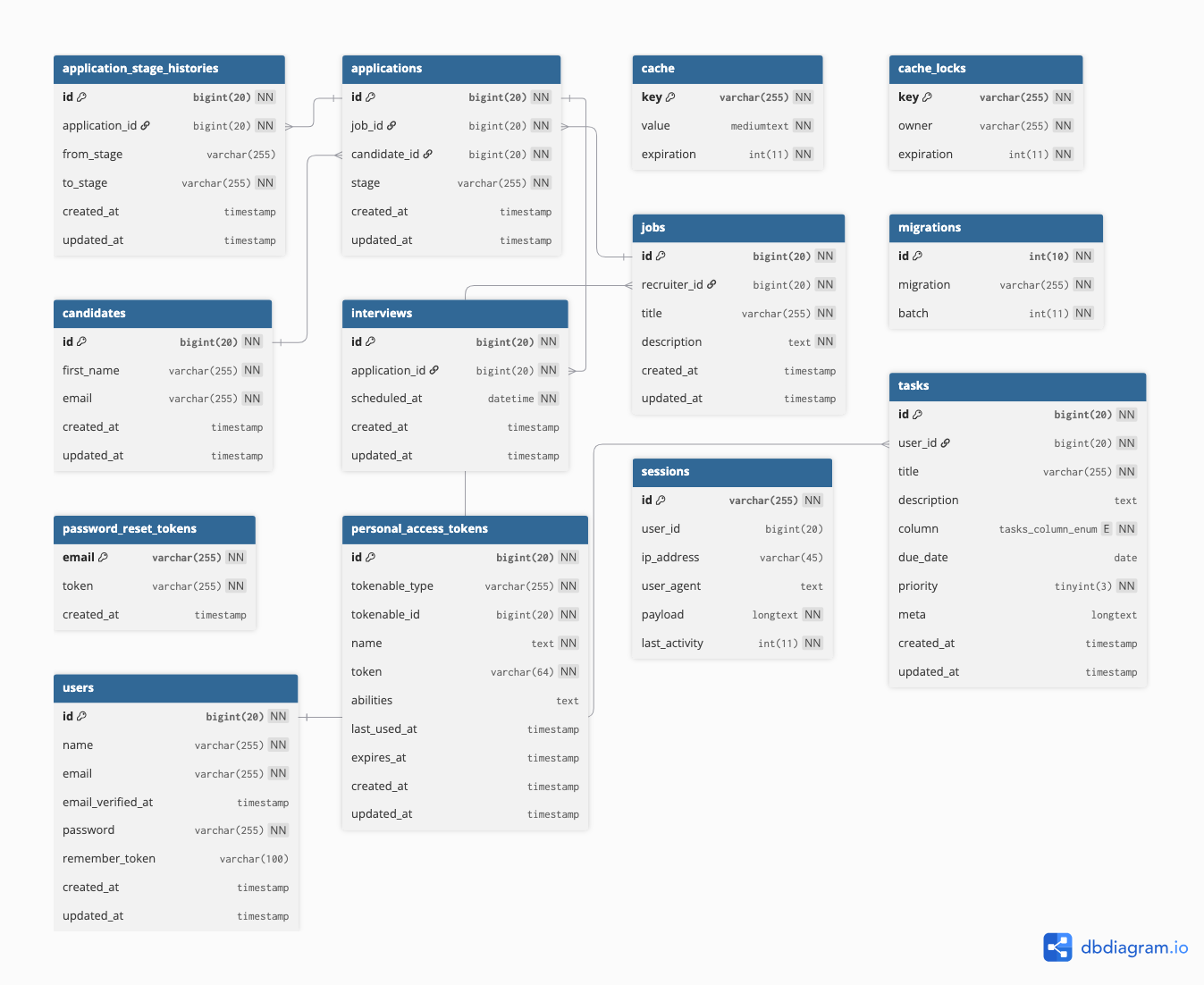
- users: System users and recruiters
- tasks: Task management with columns (todo, in_progress, done)
- jobs: Job postings created by recruiters
- candidates: Job applicants
- applications: Job applications with stage tracking
- application_stage_histories: Audit trail for application stages
- interviews: Scheduled interviews for applications
SELECT *
FROM tasks
WHERE user_id = 1
  AND `column` = 'in_progress'
ORDER BY created_at DESC;All Users:
SELECT `column`, COUNT(*) AS total_tasks
FROM tasks
GROUP BY `column`;
Specific User:
SELECT `column`, COUNT(*) AS total_tasks
FROM tasks
WHERE user_id = 1
GROUP BY `column`;SELECT
tasks.id,
tasks.title,
tasks.description,
tasks.column,
tasks.priority,
tasks.due_date,
users.id AS user_id,
users.name AS user_name,
users.email AS user_email
FROM tasks
INNER JOIN users ON users.id = tasks.user_id
ORDER BY tasks.created_at DESC;- Email:
[email protected] - Password:
password
{
  "email": "[email protected]",
  "password": "password"
}- Production URL: Online Backend
- API Documentation: PostMan Collection
- Deployed on: Vercel
- Live Demo: Kanabn Dashboard
Ahmed Saeed
- 🌐 Website: coder79.me
- 💼 LinkedIn: devahmedsaeed
- 📺 YouTube: AhmedSaeedcoder79
- 📧 Email: [email protected]
This project is part of a technical assessment for MindLuster.
- Laravel Community for excellent documentation
- React and Vite teams for modern tooling
- Material-UI for beautiful components
- TanStack for React Query
Note: For detailed implementation specifics, please refer to the individual files in the repository.