Minimalistic web-based folder-ed links/documents/knowledge manager/repository written in PHP and JS.
See https://l.xif.fr/.
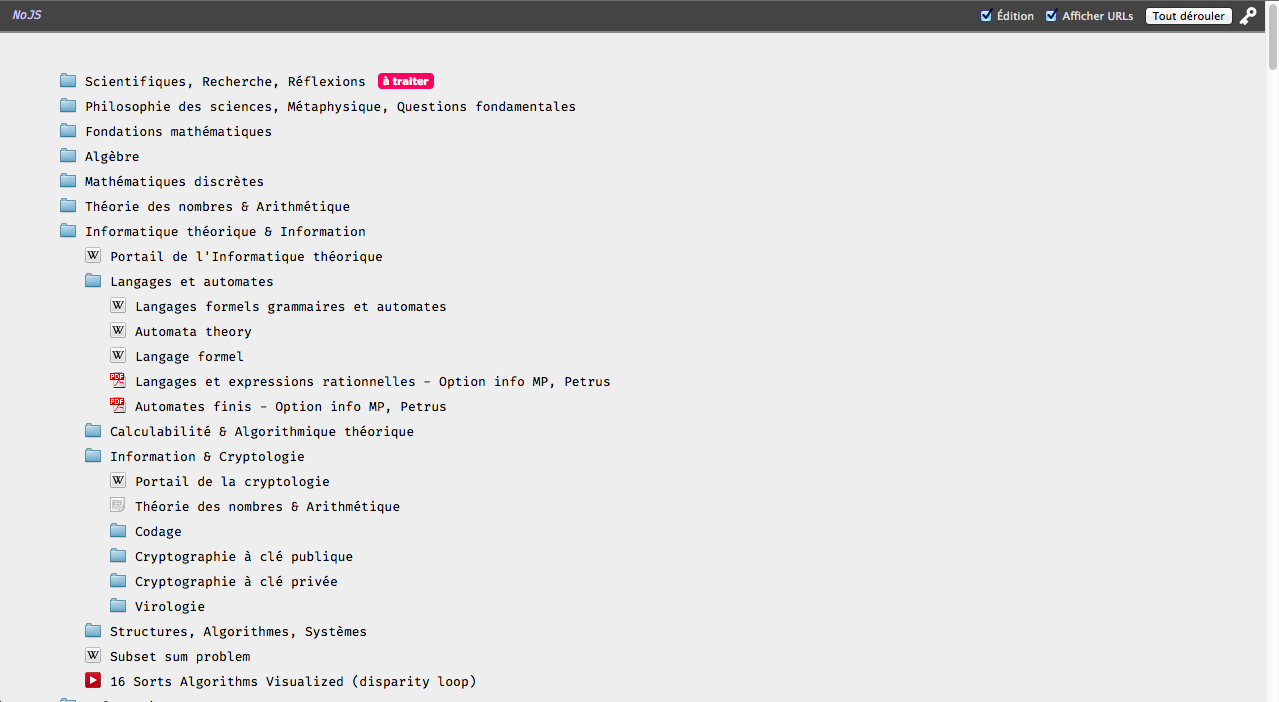
This was originally a simple tool to store web links, notes and videos in a filesystem-like way, ie. with folders. It gradually expanded with my needs : backup of documents and videos, tags, aliases, authentication...
Each item metadata is stored in simple JSON files, and items are related to each other as a tree structure with unique identifiers. The JSON files are stored in the ./metadata/ directory. It is very easy to exploit such data in external tools or scripts, or to manually modify/fix items. In addition, backed-up files are stored on the underlying filesystem in the ./files/ directory in exactly the same directory structure as on the web app, so they can be easily browsed without the web app.
Browsing the repository is done by clicking on the folders, with AJAX loading or as static links.
Items can be :
- folders, which are just a collection of items, the "+" icon on the front-end is used to create items in a folder
- documents (with an associated URL and/or an associated uploaded file); a few types of extensions are recognized (pdf, mp4, png) and an icon is attributed; when no file is uploaded and an URL is provided, the document is downloaded and stored
- web links
- youtube videos (which can be automatically backed-up, together with comments and metadata, with the
ytdl.pyscript; for this script to work, the list of videos has to be generated on thescript.phppage) - text notes
- separator
- alias to an other item
Except for separators and aliases, each item has an UID, a filesystem name, and a description.
Contrarily to usual filesystems, folders are ordered, ie. each item has a position and can be moved up or down. New items are added at the bottom.
By default, access is public. Basic authentication by passphrase is provided to prevent unauthorized modifications and browsing of some "locked" folders, but this should not be considered as a way to prevent access as files are stored in a publicly accessible directory. It is stongly advised to, at least, add a robots.txt to prevent indexing. The only thing I kind of guarantee is the prevention of modifications. Alternatively, the repository can be made entierly private (access by passphrase).
Each item has a little menu (wrench icon) where an action can be choosen : deletion, renaming, reordering, tagging... The description can be changed through this menu, or (when the edition checkbox is checked) by double-clicking the item description.
The front-end is written in french, but this can be very easily modified.
Other features :
- when a document is added with the URL
stor:somefilename.ext, rather than downloading the document, a symbolic link is created to a file stored in an alternative location on the server (specified by$_CONF['altstor-path']); this can be useful for storage of large files on a second hard drive - when a document is added with the URL
import:somefilename.ext, the document is moved from this alterative storage location and to thefiles/directory as any regular document; this is useful when uploaded or automatic downloading fails (large files for exemple)
Some features are unfinished or not very polished. This whole thing has been hacked together rather quickly and the code is far from being clean, especially the frond-end...
- To install, simply copy the content of
_default_in the root directory. - If authentication is needed, then move
auth.jsonsomewhere inaccessible by the http server (e.g. in/etc/webapps/whatever-you-choose/auth.json) and edit$_CONF['authfilepath']inconf.phpaccordingly. - Modify
conf.phpas wanted, especially$_CONF['private-repository']and$_CONF['titlebase'].
Files ytdl.py and video.php, scripts.php, nojs.php, auth.php (if public-edit=true in auth.json), ytchannels.php can be deleted without problems if minimalism is wanted.
Structure of an item JSON file :
- 'parent' : parent folder ID (
falsefor root item) - 'refby' : array of item ID that reference this item
- 'type' : type of the item : folder, yt, web, doc, hr, alias
- 'public' :
trueif item is visible without auth (default),falseif not - 'tags' : array of tag names
- 'item' : type-specific field :
- folder :
- 'name', 'descr'
- 'children' : array of children items ID
- yt :
- 'name', 'descr'
- 'url' : youtube url
- web :
- 'name', 'descr'
- 'saved' :
trueif the website is saved (as a directory [name].save/),falseif not - 'url' : url of the ressource
- doc :
- 'name', 'descr'
- 'ext' : extention of the file
- 'url' : url of the document if specified,
nullif not
- hr :
- [nothing]
- alias :
- 'orig' : ID of the original item (must be a non-nameless item)
- 'descr' : if null, the 'descr' field of the original item is used
- txt :
- 'descr' : the text note
- folder :
The 'name' field is the short name for the item (lowercase, no spaces or special chars, no underscore, hyphens allowed, some accentuated characters allowed), unique inside a specified folder, and used as filename in the underlying filesystem, if applicable.
The 'descr' field is the full title of the item, as displayed on the interface, if applicable.
This structure is sent to the JS frond-end (recieved by PrepareItem in indexmain.js), with the following changes :
- fields in the 'item' array merged with other fields
- for web, doc types :
- 'localurl' : relative url of the saved document/website
- for the alias type :
- 'origdata' : data that would be sent to frontend for the original item
Minor notes :
- The PHP session (and the cookie deposited) only when the
auth.phpform is submitted - Editing the description field of an alias does not change the original item description
- Addition of a link : if
http://... descriptionis pasted (with a blank in between the URL and the description), the URL and description are automatically split
- URL rewrite for
index.php?path=...($_CONF['urlrewrite']) - Load aliased folder -> open at orig location if reachable through the same page + move focus ; open in new tab if not
if (data[i]['type'] == 'error')-> error item, with error message as description- Web page backup/sucking. Maybe
die("item ".$_ID." requires manual removing")?