Using Timelines for State and Logic

First of let us address the elephant in the room. There is a portion of people that really dislike programming or at least the look of code. I even would say that Hype has many users that are using the tool to avoid dealing with code and would like to do everything visually. Hype is built on a runtime and abstracts away much of the need to learn code or offers the Action Stack to use the parts of the runtime through stackable form inputs. Eventually, learning code is the best way of using logic in Hype and JavaScript is actually pretty beginner-friendly. That said, there are times only simple logic is needed and before going full on JavaScript the animation engine in Hype actually offers ways to manage these use cases …
Before reading this article one should understand the use of timelines as a value change over time. The computational aspect additionally allows animators to only define key frames instead of every single value and let the computer determine intermediary steps. This said, for state, progress and process management one usually only needs hard so-called hold key frames and uses binary choice rather than approaches of fuzzy logic.
The other important precursor and Hype specific distinction is the difference between relative and absolute timelines. The latter is usually understood by all user right away. For more on the topic read about the difference between relative and absolute timelines.
Apart from the obvious examples of transform and appearance values changing the most effective demonstration of state change is modifying the inner HTML property using Hype. Consider this simple and quick example of an counter:
- Place a rectangle on stage and edit its content to contain the number "1"
- Hit record and move the play head to the next full second and edit the number to display next higher number ("2", "3", "4"…). Repeat the step a couple of times until you reach the ten seconds
- Preview your Hype document and you just created a count down
- If you place this value change in a new timeline it can be triggered whenever needed and it will be independent of the main timeline
- The countdown could trigger a scene change as its final action and hence becomes a state/progress display (time) and process management utility (end of game etc.)
 The timeline itself contains already an essential state component: the play head or time progression. In plain English, the time code the timeline is currently at while being played back. Combine this with Timeline Actions and additional timelines and you're able to mange a simple application state without coding. Let us think about a timeline as a rail we are driving our train down using the Action Stack to trigger other action in our document once we reach them. Imagine this simple setup to start and stop a timeline when pressing a button.
-
Create in a timeline called
toggle play -
The first Timeline Action key frame on
toggle playstops theMain timelineand stops itself -
The second Timeline Action key frame on
toggle playcontinues theMain timelineand also allows it to restart and pausestoggle play -
Create a button on stage (or any other place that allows the Action Stack) that triggers "Continues Timeline" on the
toggle playtimeline and can also restart it
This simple setup will do the following:
-
The first click on the button continues the timeline
toggle playand then the Timeline Action pauses theMain timelineandtoggle play -
The second click on the button again continues the timeline
toggle playand then the Timeline Action continuesMain timelineand pausestoggle playagain - … starts over
This leads to a state change of the Main timeline alternating from pauses to continues and loops through these two states every time you click the button.
The option can restart timeline is also essential on the button triggering Continue Timeline and the Timeline Action continuing the Main timeline for this logic to work endlessly, as the default behavior in Hype when using Continue Timeline stops at the end of a timeline and doesn't restart it.
I hope this illustrates how easy it is to create a simple state using the time progression in an additional timeline to drive and mange a state.
First let us address the elephant in the room. Hype still lacks named anchors on the timelines and even though often requested by users Tumult has refrained from implementing them until now.
You can obviously use jumps and play direction on timelines to accomplish some neat effects and state choices. The easiest ones are switches. After creating a switch (maybe a dot on a pill shaped background) you would create a "Switch Timeline" for it and animate the switch from the on to the off position (dot moving from left to right).
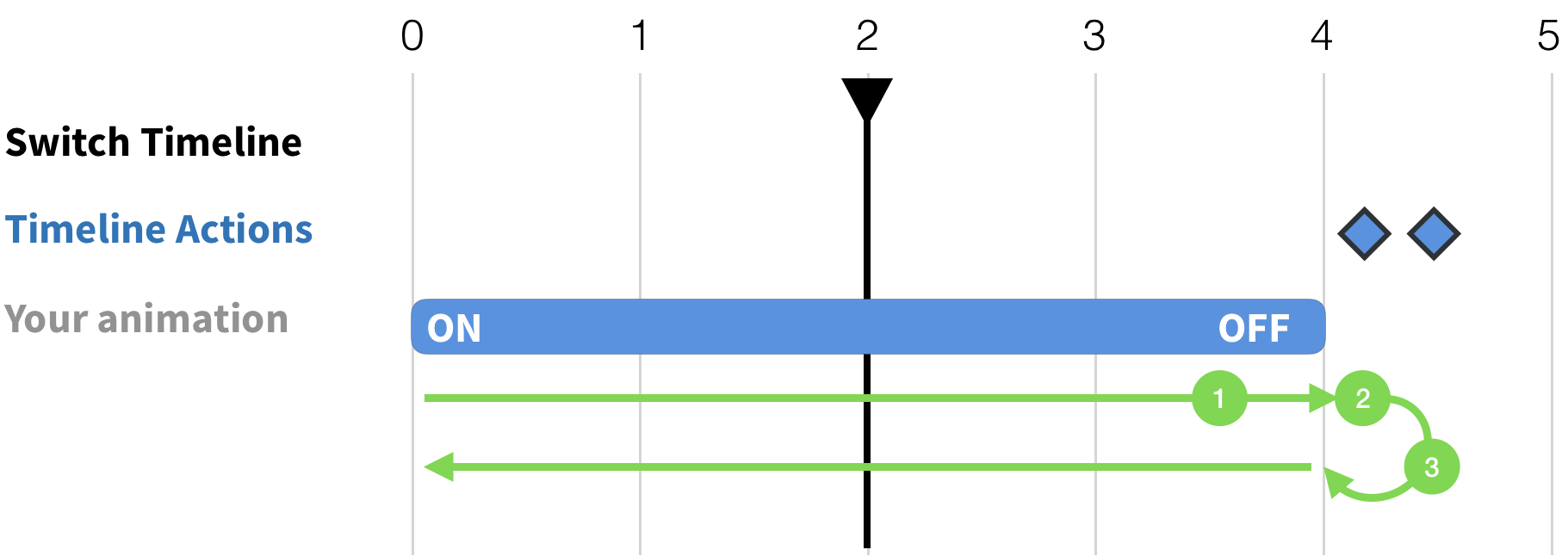
Then let us follow the above timeline setup:
- Every click on the switch element continues the timeline "Switch Timeline".
- The playback is then paused when it has reached its off position at something like 00:04,02 shortly AFTER the fourth second on the timeline using Pause Timeline
- The next click on the switch element continues the timeline "Switch Timeline" and then reaches the final Timeline Action that triggers a Go to Time in Timeline jumping back 00:04,00 and then Continue Timeline playing the "Switch Timeline" backwards until it automatically stops again on the first frame.
You just created a switch that will play to nearly its end and when clicked again continues to the final timeline action to then jump over the previous pause and continue again to the beginning to the animation while playing backwards. Hence, you now have a switch without using any code what so ever.
If you add some JavaScript or a minimal extension like Hype Command Pipeline you can even achieve advanced logic. That said, JavaScript gives you many possibilities of state management without even using any timelines but using the Hype API it can immensely enhance timeline actions with conditional logic. One example to illustrate this usage would be a timeline action that only pauses a timeline if triggered on a timeline running forward:
// element - DOMHTMLElement that triggered this function being called
// event - event that triggered this function being called
function pauseIfPlayingForward(hypeDocument, element, event) {
	if ( hypeDocument.currentDirectionForTimelineNamed(event.timelineName) == hypeDocument.kDirectionForward) {
		hypeDocument.pauseTimelineNamed(event.timelineName);
	}
}
So, going back to the switch example from the previous paragraph the jump can be avoided using this little snippet on as timeline action calling the above JavaScript. As this code would only stop playing if the timeline is playing forward any subsequent timeline action that continues the timeline backwards would play through until the beginning without being paused. This illustrates how code can benefit timeline driven state management and for example makes the creation of switches even easier.

Steps happening when using the above JavaScript snippet:
- On every click on the switch the "Switch Timeline" is continued. At second 00:04,00 the timeline is paused through the above Timeline Action calling the JavaScript function
pauseIfPlayingForward. - If the user clicks on the switch again the "Switch Timeline" continues as setup in (1) an encounters the second timeline action playing the timeline backwards. This time it won't stop because the timeline is only stopped when playing forward.
This example illustrates how JavaScript can be used to create reusable Timeline Actions helper to create and manage state in timelines. In case of the switch example and comparing it to the previous approach this shows how to avoid a specific time and resulting jump point and making the timeline-based switch concept generic.
If you use the pen tool to edit the content you can insert JavaScript and direct HTML snippets into the timeline property innerHTML. This has been used to some advantage in the forum but has some downsides. First it is executed in the window level and hence doesn't "know" about the Hype document it is currently executing. Secondly, any value interpolation (ease, tween) will be set on every frame even though it seems like a sudden change in the timeline. So, beware that animation fires the code multiple times and that fact can lead to some confusion (or benefit depending on your insight into it). I have used this approach in experimentation but mostly refrain from using it in production favoring more established patterns like Mutation Observer or Animation Frames.
- Choose another topic from the sidebar
- Visit the topic index
- Return to the welcome page
- Learn about contributing
- Consider making an one-time donation
- Visit the landing page for this project
