


A plugin for Cotonti Siena that enables flexible replacement of the header template header.$location.tpl for all pages in a chosen parent Page category and its child categories, including individual articles. It supports automatic routing for both SEO-friendly URLs and legacy URL parameters (?c=, ?id=), does not require changes to the core, and works with any Cotonti theme.
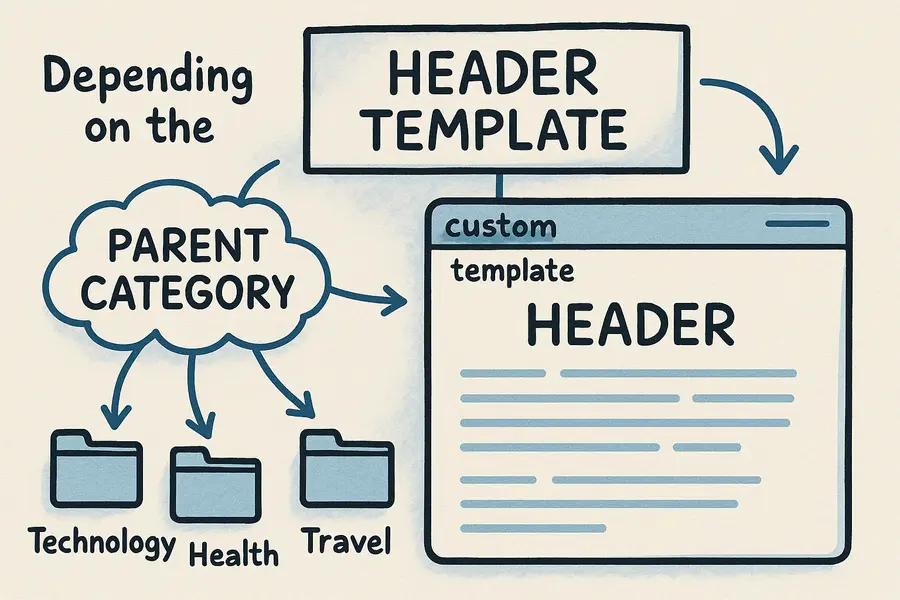
pagemycatheader is a Cotonti Siena extension designed to:
- Use different header templates (
header.tpl) for various sections of your site; - Automatically set the header according to the selected parent category and all its descendants;
- Keep site structure clean—no need to create duplicate templates for every subcategory.
Perfect for documentation sites, blogs, portals, and any site where unique headers for section groups are important.
- Automatic header replacement: For pages, categories, and articles inside the tree of the selected parent category.
- SEO URLs support: Correctly identifies the current category from the URL structure.
- Legacy compatibility: Works with old-style links such as
?c=categoryor?id=page. - Flexible setup: One configuration parameter—parent category code (
parentcat). - Zero core modifications: Works as a regular plugin without changing Cotonti itself.
- Requirements: PHP 8.4+, Cotonti Siena ≥0.9.26.
These examples show the templates used by Cotonti, especially in relation to the $cfg['enablecustomhf'] setting.
/themes/2waydeal/header.tpl
Function: The Mandatory Default Template (Fallback). Used when no other specific template file is found.
Condition: Used regardless of the `$cfg['enablecustomhf']` setting.
/themes/2waydeal/header.list.tpl
Function: The default template for displaying Page lists (article lists) in any category.
Condition: Used if `$cfg['enablecustomhf'] = true;`.
/themes/2waydeal/header.pages.tpl
Function: The default template for displaying a single Page (article) in any category.
Condition: Used if `$cfg['enablecustomhf'] = true;`.
/themes/2waydeal/header.page.user-guide.tpl
Function: The Custom Template outputted by the pagemycatheader plugin. It is applied to the user-guide category and all its descendants.
Condition: Used if `$cfg['enablecustomhf'] = true;`.
-
Copy plugin files
Place the plugin directorypagemycatheaderinto your site'splugins/folder:plugins/pagemycatheader/ ├─ pagemycatheader.setup.php ├─ pagemycatheader.functions.php └─ pagemycatheader.header.first.php -
Activate the plugin
- Go to Cotonti admin panel: Plugins menu.
- Enable the
pagemycatheaderplugin.
-
Configure the
parentcatparameter
In plugin settings, enter the parent category code, e.g.,user-guide.
It must exactly match the category code in Cotonti structure. -
Create the header template
Create a template file:themes/your_theme/header.page.user-guide.tplThe filename must be precisely:
header.page.+ category code +.tpl -
Clear cache
- After installation or updating templates, clear Cotonti's cache:
Admin → Tools → Clear Cache.
- After installation or updating templates, clear Cotonti's cache:
-
Uses
header.firsthook
The plugin runs on Cotonti'sheader.firstevent, allowing flexible processing of page parameters before the theme loads. -
Detects current category
- SEO URLs:
The category segment is extracted from the URL (immediately after the language code—/ru/user-guide/...meansuser-guide). - Legacy URLs:
From URL parameters:?c(category code) or?id(page ID, with category fetched from DB).
- SEO URLs:
-
Checks parent-child relationship Uses:
pagemycatheader_is_descendant($cat, $parentcat)
Checks if:
- Current category matches the parent;
- Is a descendant (any level of nesting).
-
Template override
For a matching category, Cotonti's location variable is set:Cot::$env['location'] = 'page.' . $parentcat;Cotonti then loads:
header.page.user-guide.tplBoth parent and child categories will use this header template.
-
Legacy compatibility Without SEO URLs, or on old-style links (
?c=or?id=), the plugin retains its logic—category is detected via parameter or from page ID.
Example URLs:
/ru/user-guide/projects-manual/tasks-general→ Loadsheader.page.user-guide.tpl/index.php?c=projects-manual→ Checks tree hierarchy, replaces header ifprojects-manualis a child ofuser-guide/index.php?id=123→ Determines category by page ID, checks hierarchy
Summary:
If the page belongs to the user-guide category or any of its subcategories, the plugin will use header.page.user-guide.tpl as the header.
| Parameter | Type | Description |
|---|---|---|
| parentcat | string | Parent category code for Page (e.g., user-guide) |
- All subcategories inherit the parent’s header template automatically.
- You can make separate templates for different parent categories.
| Problem | Cause | Solution |
|---|---|---|
| Custom header is not loaded | Wrong category code or missing template file | Check parentcat setting and template file presence |
| Doesn't work on subcategories | Wrong URL segment order or $_GET['c'] is empty | Plugin parses the URL itself; ignores $_GET['c'] in SEO mode |
| File not found | Wrong directory or filename | Must be in: themes/your_theme/header.page.user-guide.tpl |
| Default header after theme switch | Template is left in your old theme | Copy the custom template to the current theme folder |
| Root category issue | Driver or missing trailing slash | Now handled—works for either URL format |
| Cache not updated | Template changes not showing | Clear Cotonti cache in the admin panel |
-
Can I use multiple parent categories at the same time?
— No, current version works with one parent category per plugin setup. For different branches, use separate templates and changeparentcatas needed. -
Are deeply nested categories supported?
— Yes, any hierarchy is supported; the plugin checks the full parent chain. -
Does it affect permissions/access?
— No, plugin only modifies the header template; Cotonti controls permissions as usual. -
What if there’s no header override?
— The standardheader.tplfrom the theme will be used.
- Works only with the
pagemodule; - Does not check user permissions;
- Does not handle other modules (news, forums, etc.);
- Uses a single override template based on one parent category.
- Cotonti Siena ≥0.9.26
- PHP ≥8.4
- Modules: page and structure (installed and active)
plugins/pagemycatheader/
├─ pagemycatheader.setup.php            # Metadata, registration, settings
├─ pagemycatheader.functions.php        # Core function: checks parent/child relationship
├─ pagemycatheader.header.first.php     # Main logic: URL detection, header switching
BSD License © 2025 webitproff
© webitproff, 27 Nov 2025, License BSD.
send me a message on this page
Author: webitproff
GitHub: https://github.com/webitproff/cotonti-pagemycatheader
For questions, bugs, or suggestions, open an issue on GitHub.
This plugin helps organize flexible, section-based page headers for your Cotonti site, without duplicating template files!
If you need dynamic, category-aware headers for your users, pagemycatheader is the solution.
Плагин для Cotonti Siena — позволяет гибко подменять шаблон заголовка header.$location.tpl на страницах выбранной родительской категории Page и всех её дочерних категорий, включая отдельные статьи. Поддерживает автоматическую обработку ЧПУ и старых URL-параметров (?c=, ?id=), не требует изменений ядра, интегрируется с любой темой.
pagemycatheader — это расширение для Cotonti Siena, которое позволяет:
- Использовать разные шаблоны заголовков (
header.tpl) для различных разделов сайта; - Автоматически подставлять заголовок по выбранной родительской категории и её дочерним;
- Сохранять чистоту структуры — не нужно плодить шаблоны для каждой подкатегории.
Плагин подойдет для сайтов-документаций, блогов, порталов, где важна уникальность заголовка для раздела или группы материалов.
- Автоматическая подмена header: для страниц, категорий и статей, входящих в дерево выбранной родительской категории;
- ЧПУ поддержка: корректное определение категории из структуры URL;
- Обратная совместимость: работает для старых ссылок вида
?c=категорияили?id=страница; - Гибкая настройка: меняете только один параметр — код родительской категории (
parentcat); - Работает без вмешательства в ядро Cotonti;
- Совместимость: PHP 8.4+, Cotonti Siena ≥0.9.26.
примеры шаблонов
/themes/2waydeal/header.list.tpl
- шаблон по умолчанию для списков страниц (статей) и/в любой категории, если
$cfg['enablecustomhf'] = true;
/themes/2waydeal/header.pages.tpl
- шаблон по умолчанию для любой страницы(статьи) в любой категории, если
$cfg['enablecustomhf'] = true;
/themes/2waydeal/header.tpl
- шаблон по умолчанию, обязательный, НЕ ЗАВИСИТ от
$cfg['enablecustomhf'] = true;
/themes/2waydeal/header.page.user-guide.tpl
- шаблон, который выводим при помощи плагина "pagemycatheader", если
$cfg['enablecustomhf'] = true;
-
Копирование файлов
Поместите папку плагинаpagemycatheaderвplugins/вашего сайта:plugins/pagemycatheader/ ├─ pagemycatheader.setup.php ├─ pagemycatheader.functions.php └─ pagemycatheader.header.first.php -
Активация
- Перейдите в админ-панель Cotonti: меню “Плагины”.
- Включите плагин
pagemycatheader.
-
Настройка параметра
parentcat
В настройках укажите код родительской категории, например:user-guide.
Это значение должно точно соответствовать коду в структуре. -
Создание шаблона
Сгенерируйте файл:themes/ваша_тема/header.page.user-guide.tplНазвание должно быть строго:
header.page.+ код категории +.tpl -
Очистка кэша
- После установки или изменений шаблонов очистите кэш Cotonti:
Админка → Инструменты → Очистить кэш (Clear Cache).
- После установки или изменений шаблонов очистите кэш Cotonti:
-
Хук
header.first
Плагин работает на момент первого вызова заголовка (header.first). Это даёт максимальную гибкость в обработке параметров страницы до загрузки темы. -
Определение текущей категории
- ЧПУ:
Извлекается сегмент URL (сразу после языка —/ru/user-guide/...даётuser-guide). - Старые ссылки:
Если передан параметр?c— берётся код категории; если?id— определяется категория страницы по БД.
- ЧПУ:
-
Проверка принадлежности Используется функция:
pagemycatheader_is_descendant($cat, $parentcat)
Она проверяет:
- Совпадает ли текущая категория с родительской;
- Является ли дочерней (на любом уровне вложенности).
-
Подмена шаблона
Для совпадающей категории формируется переменная Cotonti:Cot::$env['location'] = 'page.' . $parentcat;Далее Cotonti подгружает файл шаблона:
header.page.user-guide.tplВсе дочерние и родительская категория используют этот заголовок.
-
Обратная совместимость При отсутствии ЧПУ, либо при старых типах адресов (
?c=или?id=), логика плагина остаётся такой же — категория берётся из параметра или по ID из БД.
URL-примеры:
/ru/user-guide/projects-manual/tasks-general→ шаблон:header.page.user-guide.tpl/index.php?c=projects-manual→ проверяется дерево, подмена, еслиprojects-manualявляется дочерней дляuser-guide/index.php?id=123→ определяется по ID категория, далее — по дереву
Итог:
Если страница относится к категории или подкатегории user-guide, плагин использует для неё заголовок header.page.user-guide.tpl.
| Параметр | Тип | Описание |
|---|---|---|
| parentcat | string | Код родительской категории Page (например: user-guide) |
- Все подкатегории автоматически наследуют шаблон родителя.
- Для разных родительских категорий можно создавать отдельные шаблоны.
| Проблема | Причина | Решение |
|---|---|---|
| Не подключается кастомный header | Неправильный код категории, нет шаблона | Проверьте значение parentcat и наличие файла-шаблона |
| Не работает на подкатегориях | Порядок сегментов URL не тот, $_GET['c'] пуст (ЧПУ) | Плагин сам разбирает URL, не зависит от $_GET['c'] |
| Файл не найден | Перепутана директория или имя файла | Должен лежать строго: themes/ваша_тема/header.page.user-guide.tpl |
| После смены темы — дефолтный header | Файл шаблона остался в старой теме | Скопируйте шаблон для каждой новой темы |
| Не работает на корневой категории | Особенность URL-драйвера или отсутствие слеша | Исправлено — работает с любым вариантом |
| Кеш не сброшен | Изменения шаблона не применяются | Очистите кеш Cotonti через админку |
-
Можно ли работать с несколькими родительскими категориями одновременно?
— Нет, текущая версия работает только с одной категорией за установку. Для разных веток используйте отдельные шаблоны и перенастраивайтеparentcat. -
Вложенные категории
— Любая вложенность дерева поддерживается, поиск по цепочке родителей. -
Права доступа
— Плагин влияет только на шаблон заголовка. Права доступа к категориям берутся из Cotonti. -
Возвращение стандартного заголовка
— Если категория не соответствует настройке — будет использован стандартныйheader.tpl.
- Плагин работает только с модулем
page; - Не проверяет права доступа пользователя;
- Не обрабатывает другие модули (например, news, forums и т.д.);
- Одновременно использует только один шаблон по выбранной родительской категории.
- Cotonti Siena ≥0.9.26
- PHP ≥8.4
- Модули: page и structure (установлены и активны)
plugins/pagemycatheader/
├─ pagemycatheader.setup.php            # Метаданные, регистрация и настройки
├─ pagemycatheader.functions.php        # Базовые функции: проверка принадлежности к дереву категории
├─ pagemycatheader.header.first.php     # Главная логика подключения, работа с URL и настройками
BSD License © 2025 webitproff
Автор: webitproff
GitHub проекта: https://github.com/webitproff/cotonti-pagemycatheader
Вопросы, баги, предложения — issues на GitHub.
Плагин помогает организовать гибкое визуальное оформление для рубрик и их содержимого без лишнего дублирования шаблонов!
Если вашей задаче нужен динамический заголовок пользователю для группы категорий — pagemycatheader именно для этого.
Если плагин оказался полезным — поставьте ⭐ на GitHub!
© webitproff, 27 Nov 2025, License BSD.
напишите в личные сообщения на этой странице