Test program for calculating online stats: min, max, mean
- BigDecimal support
- Thread Safe
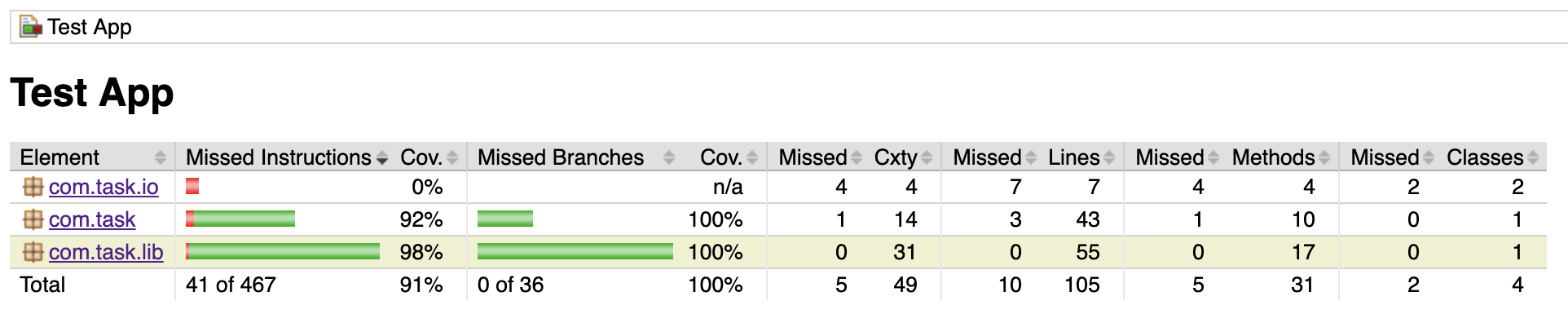
- 100% branch test coverage:
- Java 8
mvn clean package
java -jar target/tst-1.0-SNAPSHOT.jar
Enter number. Press CTRL-C or type 'exit' to exit. Enter S for stats
12.3E+7
Enter number. Press CTRL-C or type 'exit' to exit. Enter S for stats
12
Enter number. Press CTRL-C or type 'exit' to exit. Enter S for stats
3
Enter number. Press CTRL-C or type 'exit' to exit. Enter S for stats
s
min 3.0000000000 [3]
max 123000000.0000000000 [1.23E+8]
mean 41000005.0000000000 [41000005]
Enter number. Press CTRL-C or type 'exit' to exit. Enter S for statsexit
18.2E+120
Enter number. Press CTRL-C or type 'exit' to exit. Enter S for stats
s
min 3.0000000000 [3]
max 18200000000000000000000000000000000000000000000000000000000000000000000000000000000000000000000000000000000000000000000000.0000000000 [1.82E+121]
mean 4550000000000000000000000000000000000000000000000000000000000000000000000000000000000000000000000000000000000000030750004.0000000000 [4550000000000000000000000000000000000000000000000000000000000000000000000000000000000000000000000000000000000000030750004]
Enter number. Press CTRL-C or type 'exit' to exit. Enter S for stats
- Enter numbers in the following format:
optional sign, '+' ( '\u002B') or '-' ('\u002D'), followed by a sequence of zero or more decimal digits ("the integer"), optionally followed by a fraction, optionally followed by an exponent.
- To get list of statistics, type
sand press Enter. Each statistics is rendered in two formats:- optional sign, '-' ('\u002D') for negative numbers, followed by a sequence of decimal digits ("the integer"), followed by 10 fraction digits.
- string representation of BigDecimal format in square brackets:
optional sign, '+' ( '\u002B') or '-' ('\u002D'), followed by a sequence of zero or more decimal digits ("the integer"), optionally followed by a fraction, optionally followed by an exponent.
- To exit, type
exitand press Enter. Or just pressCTRL+C