

A simple bot to download Manhwa Chapters as PDF from AsuraScans/Asuracomics
Bug report
·
Feature request


-
Download Individual or Multiple Manga/Manhwa Chapters
-
View and Manga/Manhwa Download as PDF Documents
-
Supports Multiple Manga/Manhwa Sources
-
Parallel Downloading
-
Download multiple chapters in parallel to save time.
- Available Manga sources:-
| SITE | STATUS |
|---|---|
| MangaPill | WORKING |
- Adding More sources
-
Start a chat with the bot by mentioning
@AsuraScans_boton Telegram. -
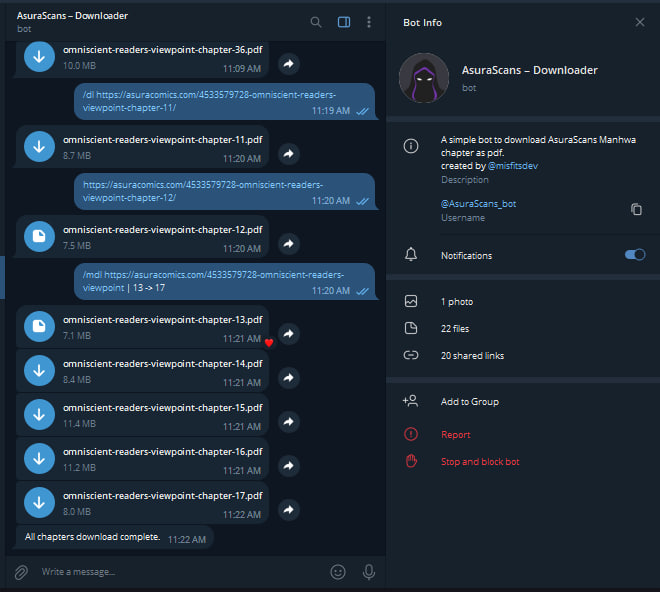
Use the available commands to interact with the bot:
{chapter_url} | {start_chapter} -> {end_chapter}: Download a range of chapters./help: View available commands and instructions.
-
Wait for the bot to process your request, and it will provide you with the requested manga/manhwa chapters in PDF format.
Run the following command to clone the repository, and install the dependencies:
git clone https://github.com/tas33n/AsuraScans-DL-Bot.git
cd AsuraScans-DL-Bot
npm install #or yarn install
start the server with the following command:
npm start #or yarn startNow the server is running on http://localhost:3000
Host your own bot in Repl.it using the button below.
- Fork the repository
- Clone your fork to your local machine using the following command (make sure to change
<your_username>to your GitHub username):
git clone https://github.com/<your-username>/AsuraScans-DL-Bot.git- Create a new branch:
git checkout -b <new-branch-name>(e.g.git checkout -b my-new-branch) - Make your changes.
- Stage the changes:
git add . - Commit the changes:
git commit -m "My commit message" - Push the changes to GitHub:
git push origin <new-branch-name>(e.g.git push origin my-new-branch) - Open a pull request.
Manga/Manhwa
Your feedback and suggestions are very welcome. Please open an issue. This project will still be maintained.
This project is licensed under the MIT License.