It is a WordPress plugin that allows you to edit htaccess online
Author: Roberto Aleman
Web: ventics.com
WP Safe HTAccess Manager: Official Documentation
Web security and performance optimization often require modifying the .php file.htaccess, a powerful, central configuration file on Apache servers. However, this file is notoriously sensitive to syntax errors . A single misplaced character can result in a 500 Internal Server Error , rendering your entire website inaccessible—sometimes even to you.
Users need a fast, secure, and auditable way to implement critical security rules (such as blocking XML-RPC or adding security headers) without the constant fear of breaking their site.
WP Safe HTAccess Manager solves this problem by providing a simple, controlled interface within WordPress. Its main purpose is to:- Ensure Stability: Each change is subjected to a simulated "Atomic Stability Test ." If the write fails (due to permission or potential syntax errors), the plugin doesn't save the configuration to the WordPress database and alerts you, acting as a 500 error prevention mechanism .
- Offer Key Rules: Provides a set of predefined templates for the most common and recommended security rules.
- Maintain Auditability: All applied rules are embedded with delimiters, timestamps, and attribution , facilitating future debugging and change tracking.
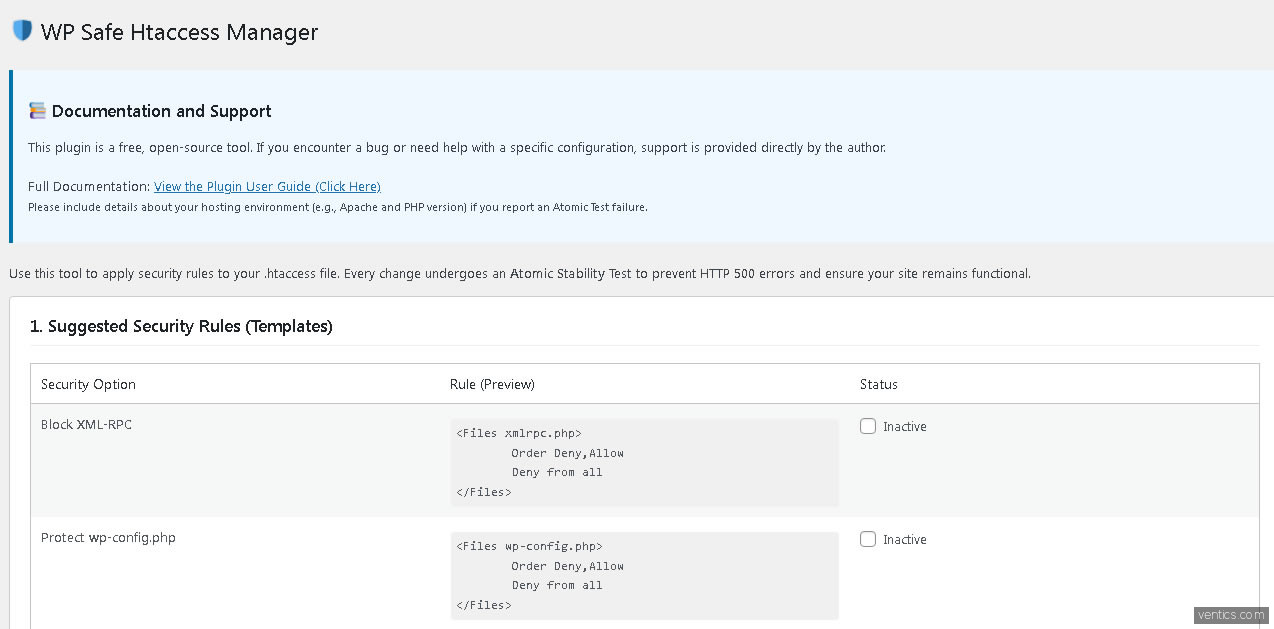
- Upload File: You need to place the plugin code in a folder called wp-safe-htaccess-manager , zip it up, and upload it to your WordPress installation. (or plugin folder, if packaged) to the
wp-content/plugins/. - Activate: Go to Plugins in your WordPress dashboard and click Activate for WP Safe HTAccess Manager .
- Access: The settings menu will appear under Settings WPSHtaccess Manager
- To Enable: Check the box next to the rule name (example: “Protect wp-config.php”).
- To Disable: Uncheck the checkbox .
- The Active/Inactive state reflects the configuration that will be saved.
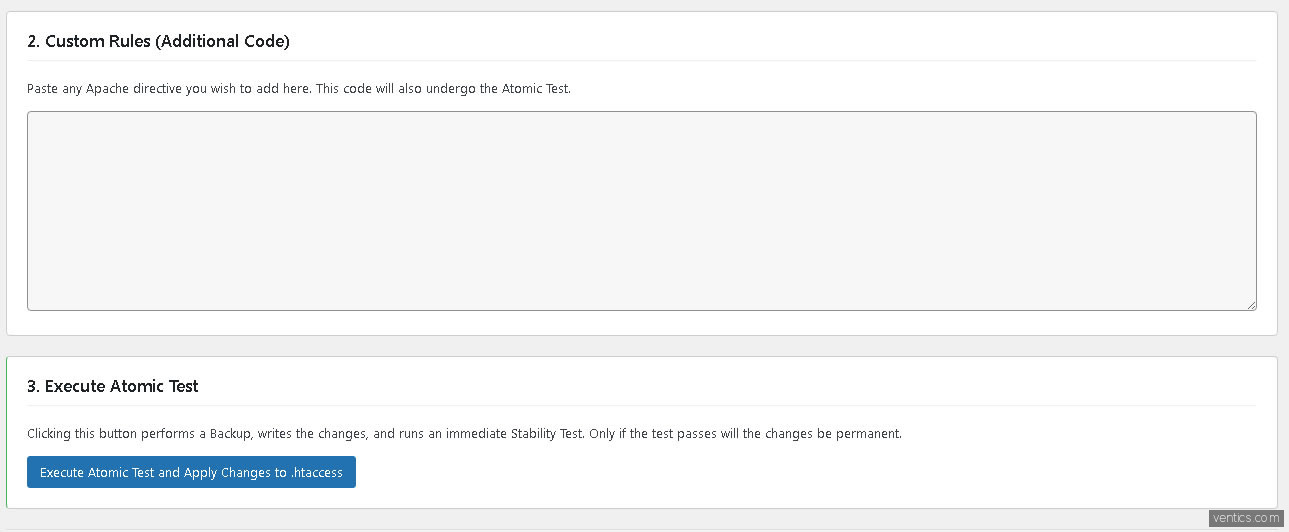
- Important: Enter only valid Apache directives. Remember that these will also be tested by the Atomic Test!
- Once you've selected your rules and added custom code, click the main button: Execute Atomic Test and Apply Changes to .htaccess .
- Successful Result: If the operation is successful (writing to the file works), you will receive a message saying “Changes applied successfully! Atomic Test passed.” and your new rules will appear in the file
.htaccesswith their timestamps. - Failed Result: If the operation fails (usually due to file permissions), you will receive an error message and your file
.htaccesswill not be modified , preventing a 500 error.
admin_init .
- Form Handling (
handle_form_submission) :- Check the user capacity (
manage_options). - Nonce Check: Performs strict nonce verification (
shield_apply_changes) to protect against CSRF attacks. Failure to do so will stop the process and display the error "Security check failed." - Collects the database configuration.
- Check the user capacity (
- Content Generation (
generate_rules_block_content) :- This function takes the active rules and custom code.
- Create an audit line:
# Added by WP Safe HTAccess Manager on [Fecha y Hora]. - Compiles all active rules into a single block of text, including the audit trail for each rule.
- Secure Writing (The Simulated «Atomic Test») :
- The plugin uses the core WordPress function:
insert_with_markers( $htaccess_path, $marker, $rules_to_insert ). - This function finds the marker (
# BEGIN WP SHIELD RULES) and replaces all the delimited content with the new rules. - The Atomic Test is simulated: If
insert_with_markersit returns , the stability testTRUEis considered passed, and the configuration is saved to the database ( ). If it returns (usually due to file permissions), the test fails, the database is not modified, and the user receives the error message.update_optionFALSE
- The plugin uses the core WordPress function:
# BEGIN WP SHIELD RULES
# — Rule: Block XML-RPC —
# Added by WP Safe HTAccess Manager on 2025-10-01 20:25:28.
<Files xmlrpc.php>
Order Deny,Allow
Deny from all
</Files>
# — Rule: Custom HTAccess Code —
# Added by WP Safe HTAccess Manager on 2025-10-01 20:25:28.
# (Tu código personalizado aquí)
END WP SHIELD RULES The plugin saves its state and configuration in the table
wp_options:
| Clave (Option Key) | Use | Data Type |
wp_safe_htaccess_rules |
Associative array ['rule_key'] => 1 o 0for predefined rules. |
array |
wp_safe_htaccess_custom_code |
The custom HTAccess code entered by the user. | string |
wp_shield_messages |
Used transientto display success or error messages after redirection. |
transient |