mpcc stands for mpc client.
MPD is controlled by mpc and supports folder-based music playback at web browser.
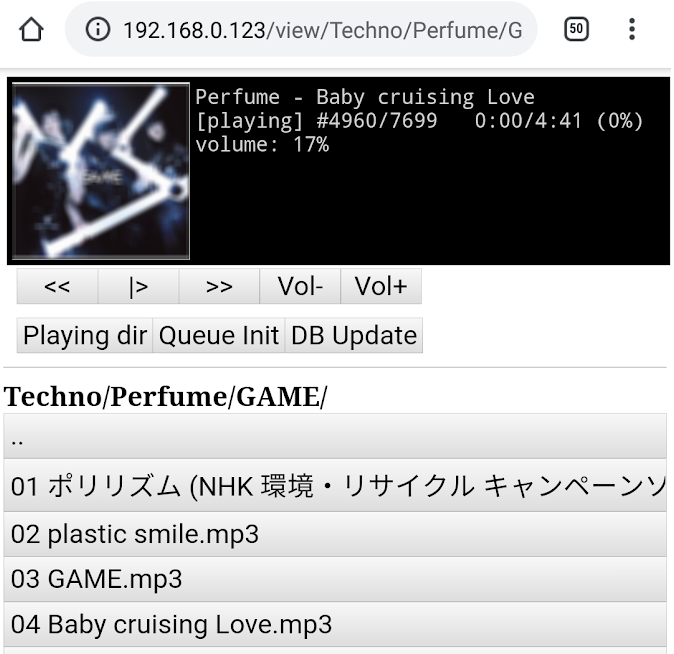
Require python3, mutagen(MP3 tag liblary for coverart display), MPD(playing mp3), mpc(controll MPD).
Run install.sh and reboot your Linux machine.
install.sh performs the following operations:
- Install mutagen by "pip install" if needed.
- Install MPD and mpc by "apt install" if needed.
- Copy mpcc.py to /opt/mpcc
- Regist mpcc.service by systemctl.
$ git clone https://github.com/pushback/mpcc.git
$ cd mpcc
$ ./install.sh
- Copy MP3 file to "/media/music"
- Edit "/etc/mpd.cfg", music_directory to "/media/music".
- Open web browser http://localhost or IP Address of server(from other machine or phone).
- At first time, you must click two button("DB Update" -> "Init Queue").
- Select file at folder/file list
- "<<" button : play previous file.
- "|>" button : toggle play/pause.
- ">>" button : play next file.
- "V-" button : Volume Down.
- "V+" button : Volume Up.
- "Playing dir" button : move directory to now playing file exists.
- "Init Queue" button : (add all music file to play queue for folder based playing).
- "DB Update" button : music file rescan
# modify
sudo vim /opt/mpcc/mpcc.py

# restart
sudo systemctl restart mpcc
This program execute "mpc xxx" for controll MPD. For example,
- Play next file is "mpc next"
- Play select file is "mpc searchplay filename [select file path]"
I wrote this program for small music player used Raspberry Pi.
I wanted to control the player with a desktop computer or smartphone.