Design: Dashboard layout tool
This is a work in progress.
The original contents are here.
User cannot visually design a layout of dashboard widgets. This layout tool will allow a user to re-arrange dashboard widgets by drag & drop.
There are several requirements that this layout tool should satisfy.
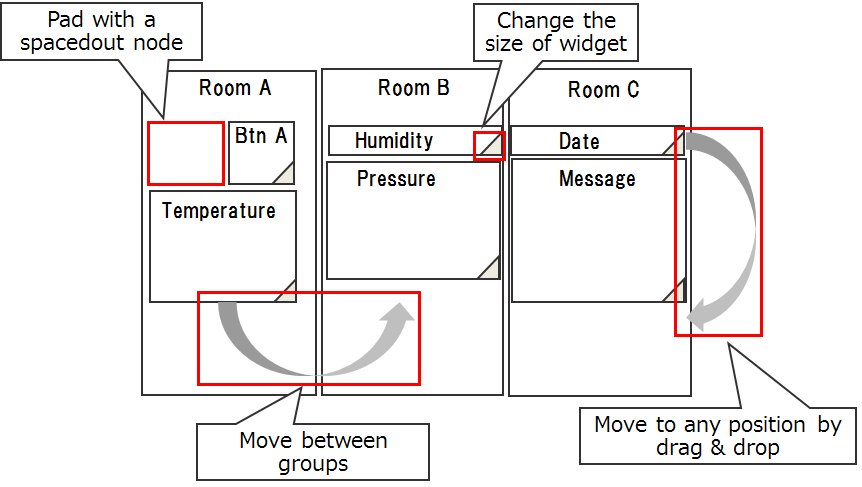
- Change the order of widgets in a group by drag & drop.
- Change the size of a widget.
- Pad using
ui_spacerwidgets when blank spaces are needed. - Move a widget from one group to the another.
- (optional) Change the size of a group.
To show the layout tool of dashboard, Add layout button on the tab menu.
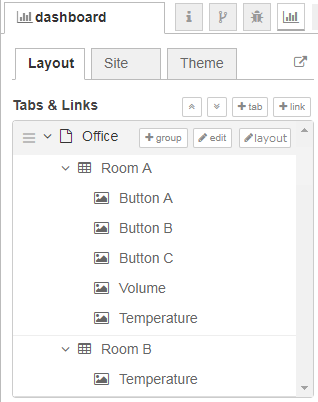
When a user clicks the layout button, the window of a layout tool will appear. It should look like the maximized window of function node.
After a user adjusts the layout on the window:
- If the user clicks
Donebutton:- inserts and/or removes ui_spacer widgets as necessary.
- updates the layout of sidebar and workspace.
- If the user clicks
Cancelbutton, the change will be discarded.
- Gridstack - http://gridstackjs.com/
- Muuri - https://github.com/haltu/muuri
-
Add a node on the layout tool.
-
Add/remove a group.
-
Move layout editor to "top" level
- add sidebar on left with the tab names
- allow re-ordering of tabs (up/down list)
- allow each tab to be drop target for groups dragged from layout editor
- add sidebar on left with the tab names