



High-performance TCP/UDP proxy with modern web management interface
Features • Installation • Usage • Web UI • Configuration • API
- High Performance: Built with Rust and Tokio for maximum throughput
- Dual Protocol: Support for both TCP and UDP proxying
- Web Management: Intuitive web interface with modern design
- IP Filtering: Flexible allow/deny lists for access control
- Persistent Storage: Automatic configuration persistence
- Real-time Monitoring: Live statistics and connection tracking
- REST API: Complete automation interface
git clone https://github.com/nils010485/voidproxy.ggit
cd voidproxy
cargo build --release- Rust 1.70+
- Tokio runtime
# Start with default settings
./voidproxy

# Custom web interface
./voidproxy --web-listen-ip 0.0.0.0 --web-listen-port 9000

# Enable verbose logging
./voidproxy --verbose

# Custom config file
./voidproxy --config-path /path/to/instances.toml| Option | Description | Default |
|---|---|---|
--web-listen-ip |
Web UI listen IP | 127.0.0.1 |
--web-listen-port |
Web UI listen port | 8080 |
--config-path |
Configuration file path | instances.toml |
--verbose |
Enable verbose logging | false |
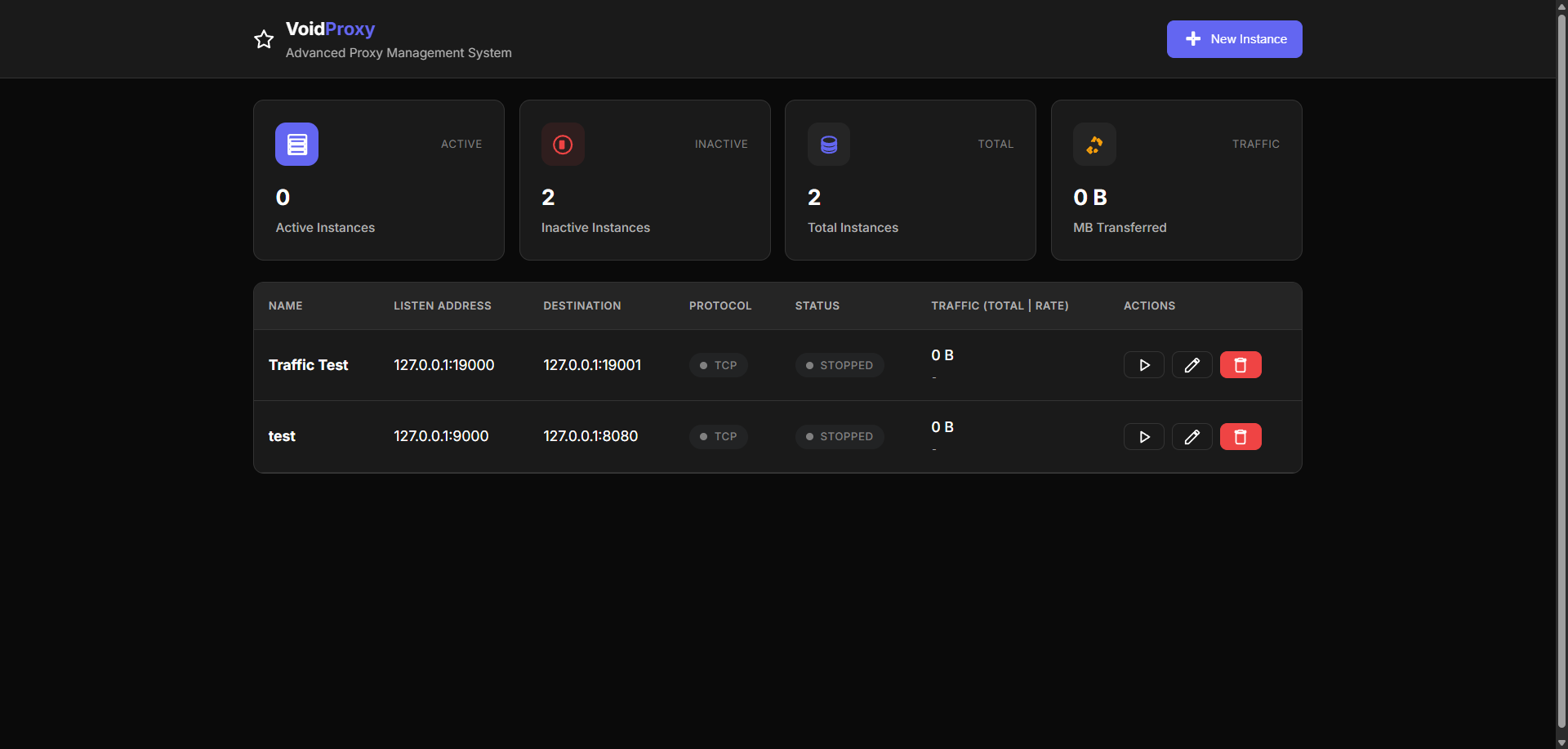
Access the web interface at http://localhost:8080 (or your custom port):
[proxy]
listen_ip = "127.0.0.1"
listen_port = 8080
dst_ip = "192.168.1.100"
dst_port = 80
protocol = "tcp"

[ip_filter]
allow_list = ["192.168.1.10", "192.168.1.20"]
# deny_list = ["10.0.0.1", "10.0.0.2"]- listen_ip: IP address to listen on
- listen_port: Port to listen on
- dst_ip: Destination IP address
- dst_port: Destination port
- protocol: Protocol type (
tcporudp)
- allow_list: List of allowed IP addresses (optional)
- deny_list: List of blocked IP addresses (optional)
GET /api/instances- List all instancesPOST /api/instances- Create new instanceGET /api/instances/{id}- Get instance detailsPUT /api/instances/{id}- Update instanceDELETE /api/instances/{id}- Delete instancePOST /api/instances/{id}/start- Start instancePOST /api/instances/{id}/stop- Stop instance
GET /api/stats- Get system statisticsGET /api/instances/{id}/stats- Get instance statistics
curl -X POST http://127.0.0.1:8080/api/instances \
  -H "Content-Type: application/json" \
  -d '{
    "name": "Web Proxy",
    "listen_ip": "127.0.0.1",
    "listen_port": 8081,
    "dst_ip": "93.184.216.34",
    "dst_port": 80,
    "protocol": "tcp",
    "auto_start": true,
    "allow_list": ["192.168.1.0/24"]
}'voidProxy/
├── src/
│ ├── lib.rs # Main library entry point
│ ├── main.rs # Application entry point
│ ├── config.rs # Configuration management (15 unit tests)
│ ├── instance.rs # Proxy instance implementation
│ ├── instance_manager.rs # Instance lifecycle management
│ ├── tcp_proxy.rs # TCP proxy implementation
│ ├── udp_proxy.rs # UDP proxy implementation
│ ├── buffer_pool.rs # Memory management with three-tier buffer system
│ ├── ip_cache.rs # IP filtering with TTL and LRU eviction
│ ├── storage.rs # Configuration persistence (3 unit tests)
│ ├── metrics.rs # Statistics collection and monitoring
│ ├── web_api.rs # REST API endpoints
│ └── web_ui.rs # Web UI server with embedded static files
├── tests/ # Integration tests (10 tests total)
│ ├── config_tests.rs # Configuration validation (2 tests)
│ ├── instance_tests.rs # Instance lifecycle management (2 tests)
│ ├── metrics_tests.rs # Performance metrics (2 tests)
│ ├── ip_cache_tests.rs # IP caching functionality (2 tests)
│ └── buffer_pool_tests.rs # Buffer pool operations (2 tests)
├── static/ # Web assets (embedded in binary)
│ ├── html/
│ │ └── index.html # Main UI page
│ ├── js/
│ │ ├── app.js # Application logic
│ │ ├── core.js # Core utilities
│ │ └── icons.js # SVG icon definitions
│ └── css/
│ ├── style.css # Main styles
│ └── ui.css # UI component styles
├── Cargo.toml # Project dependencies
├── instances.toml # Default configuration
└── README.md # This file
The project includes comprehensive test coverage with 27 total tests:
- 17 unit tests embedded in source files
src/config.rs: 15 tests for configuration validation and IP filteringsrc/storage.rs: 3 tests for persistence operations
- 10 integration tests organized by module
- Configuration validation and creation
- Proxy instance lifecycle management
- Performance metrics with overflow protection
- IP caching with TTL and LRU eviction
- Buffer pool memory management
# Run all tests (27 total)
cargo test

# Run specific test modules
cargo test config_tests     # Configuration tests
cargo test instance_tests   # Instance management tests
cargo test metrics_tests    # Performance metrics tests
cargo test ip_cache_tests   # IP caching tests
cargo test buffer_pool_tests # Buffer management tests

# Run with verbose output
cargo test -- --nocapture

# Run specific test function
cargo test test_config_creation┌─────────────────┐ ┌─────────────────┐ ┌─────────────────┐
│ Web Client │ │ REST API │ │ Instance Mgr │
│ (Embedded) │ │ (Axum) │ │ (Arc<RwLock>) │
└─────────────────┘ └─────────────────┘ └─────────────────┘
│ │ │
└───────────────────────┼───────────────────────┘
│
┌─────────────────┐ ┌─────────────────┐
│ TCP/UDP │ │ Metrics & │
│ Proxy Core │ │ Monitoring │
│ (Tokio) │ │ (Atomic) │
└─────────────────┘ └─────────────────┘
│ │
┌─────────────────┐ ┌─────────────────┐
│ Buffer Pool │ │ IP Cache │
│ (Memory Mgmt) │ │ (TTL/LRU) │
└─────────────────┘ └─────────────────┘
│
┌─────────────────┐
│ Storage │
│ (TOML) │
└─────────────────┘
- Embedded Assets: All static files (HTML, CSS, JS) are embedded in the binary
- Thread Safety: Uses
Arc<RwLock<T>>for concurrent instance management - Async Performance: Built on Tokio for high-performance I/O operations
- Smart Caching: IP address filtering with TTL-based expiration and LRU eviction
- Efficient Memory: Three-tier buffer pool system for optimal memory usage
- Fork the repository
- Create your feature branch (
git checkout -b feature/amazing-feature) - Commit your changes (
git commit -m 'Add amazing feature') - Push to the branch (
git push origin feature/amazing-feature) - Open a Pull Request
This software is provided "as is", without warranty of any kind, express or implied, including but not limited to the warranties of merchantability, fitness for a particular purpose and noninfringement. In no event shall the authors or copyright holders be liable for any claim, damages or other liability, whether in an action of contract, tort or otherwise, arising from, out of or in connection with the software or the use or other dealings in the software.
The author of this software cannot be held responsible for any damages or issues that may arise from its use. Use at your own risk and discretion.
This project is licensed under the MIT License
Made with passion by Nils