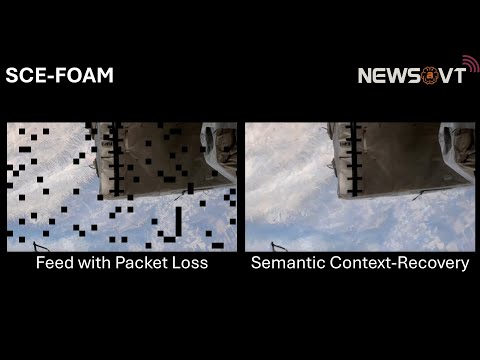


Title: Artificial Intelligence (AI)-based Semantic Communications with Multimodal Data: Framework and Implementation
Author: Jean-Luc Aristide DeRieux
Publisher: Virginia Tech
Date: September 22, 2025
URL: Access Paper
Abstract: Semantic communication (SC) has emerged as an effective paradigm for reducing the bandwidth needs of wireless services by exploiting the so-called "semantics" or meaning behind the data. To date, existing works in this area either focus on multimodal approaches only and omit context-aware recovery or embed it in cross-modal settings, such as audio-to-video, rather than providing a unified, modality-agnostic method. These works also impose substantial architecture redesigns for additional modalities support and are not easily extensible. In contrast to prior work, in this thesis, a novel semantic framework called the semantic context-aware framework for adaptive multimodal reasoning (SCE-FOAM) is proposed. SCE-FOAM is a multimodal semantic framework that enables compact transmission, efficient reconstruction, and contextually-aware predictions using a unique microservice-based architecture. This unique design simultaneously offers an extensible and modular platform for incorporating new modalities and enabling scalable deployment strategies. Experimental results show that SCE-FOAM can achieve data reductions up to 50% for text, 94.56% for audio, and 98.70% for images, respectively. Lastly, the proposed contextual‑prediction model achieves an average accuracy of 90% across all modalities. In addition, a heuristic-based extension of the deferred acceptance (DA) matching algorithm is proposed. The extension enables network node matches that incorporate exploration, coverage, and diversification heuristics. In summary, this thesis presents a unified, extensible, context-aware, multimodal SC framework and a heuristic extension to the DA matching algorithm.
# Set up environment
python3 -m venv .venv
source .venv/bin/activate
pip install uv
uv sync

# Run translators
wsl python3 src/text_translator.py
wsl python3 src/image_translator.py
wsl python3 src/audio_translator.pywsl python3 src/image_translator.py
wsl python3 src/audio_translator.py
wsl python3 src/text_translator.pywsl npm test src/tests/timing_image.test.js
wsl npm test src/tests/timing_audio.test.js
wsl npm test src/tests/timing_text.test.js
wsl npm test -- --runInBand# Install uv
pip install uv
# Create or update a virtual environment
uv sync
# Activate uv shell
uv shell# Install a package
uv pip install PackageName
# Run Jupyter Notebook server
uv run jupyter notebook
# Install CPU dependencies
uv sync --extra cpu --extra eval --extra data
# Install project with extras
python3 -m uv pip install --extras cpu -e .source .venv/bin/activate
python src/text_translator.py
# Alternative
wsl python3 -m uv run python src/text_translator.pyTo fix DNS resolution issues inside WSL:
wsl sudo bash -c 'cat > /etc/resolv.conf <<EOF
nameserver 8.8.8.8
nameserver 1.1.1.1
EOF'

sudo rm /etc/resolv.confuv pip install torch==2.5.1 --extra-index-url https://download.pytorch.org/whl/cu121 --upgrade
uv pip install fairseq2==v0.3.0rc1 --pre --extra-index-url https://fair.pkg.atmeta.com/fairseq2/whl/rc/pt2.5.1/cu121 --upgradepython3 -m venv .venv
source .venv/bin/activate # Run in every new shell session
python -m ensurepip --upgrade
python -m pip install --upgrade pip uvuv sync# Replace torch + torchaudio with CUDA build
uv pip install --upgrade --force-reinstall --extra-index-url https://download.pytorch.org/whl/cu118 torch==2.5.1+cu118 torchaudio==2.5.1+cu118
# Remove CPU fairseq2n
uv pip uninstall fairseq2n
# Install CUDA fairseq2n build
uv pip install --pre --extra-index-url https://fair.pkg.atmeta.com/fairseq2/whl/rc/pt2.5.1/cu118 fairseq2n==0.3.0rc1python - <<'PY'
import torch, import importlib.metadata as im
print("torch :", torch.__version__, torch.version.cuda)
print("fairseq2n :", im.version("fairseq2n"))
print("CUDA OK? :", torch.cuda.is_available())
PYExpected output:
torch     : 2.5.1+cu118 11.8
fairseq2n : 0.3.0rc1+cu118
CUDA OK?  : True
python src/text_translator.py