


A neural network implementation using TensorFlow to classify fashion items from the Fashion MNIST dataset. This project demonstrates image classification fundamentals including data preprocessing, model building, training, and evaluation.

- Project Overview
- Dataset Details
- Model Architecture
- Training Process
- Callbacks Implementation
- Convolutions & Pooling
- Results
- Improving MNIST with Convolutions
- Installation & Usage
- Exploration Exercises
- Key Learnings
- Future Improvements
This project builds a neural network model to recognize and classify clothing items from grayscale images. Unlike traditional "Hello World" examples that learn simple linear relationships, this project tackles a more challenging computer vision problem that showcases the power of neural networks in image recognition tasks.
Key Objectives:
- Load and preprocess the Fashion MNIST dataset
- Build and train a neural network classification model
- Visualize and understand the training process
- Evaluate model performance on unseen data
- Experiment with different model architectures and parameters
The Fashion MNIST dataset includes 70,000 grayscale images of clothing items (28x28 pixels):
- 60,000 training images
- 10,000 test images
Each image is labeled with one of 10 clothing categories:
| Label | Description | Example |
|---|---|---|
| 0 | T-shirt/top | 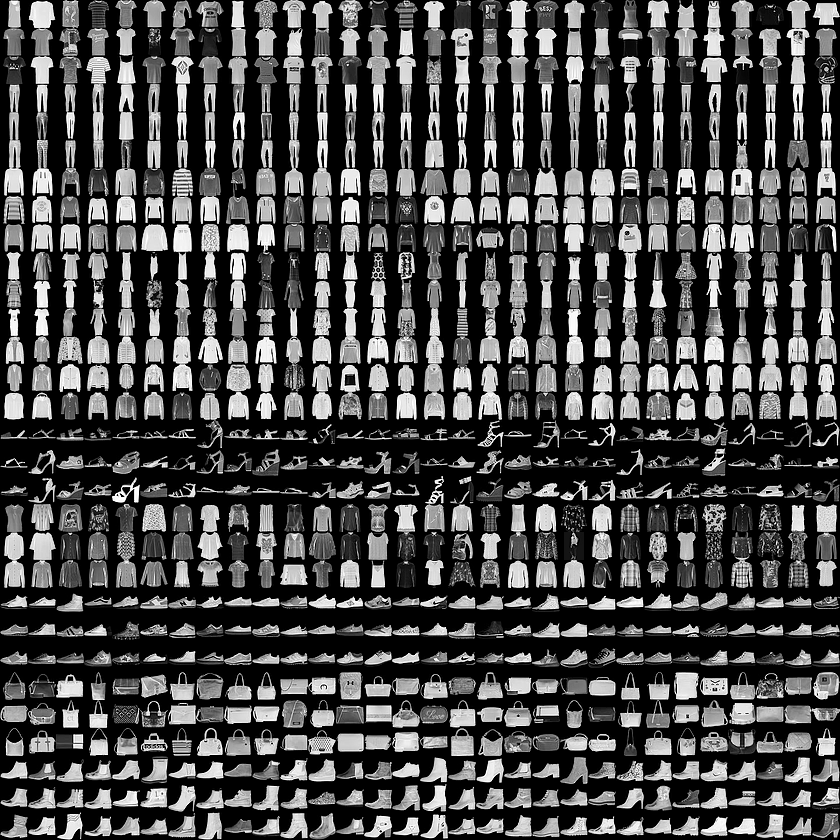 |
| 1 | Trouser | |
| 2 | Pullover | |
| 3 | Dress | |
| 4 | Coat | |
| 5 | Sandal | |
| 6 | Shirt | |
| 7 | Sneaker | |
| 8 | Bag | |
| 9 | Ankle boot | |
Data Preprocessing:
- Images are normalized from 0-255 pixel values to 0-1 range
- Labels are represented as integers from 0-9
The project explores two neural network architectures: a simple dense network and a more advanced convolutional neural network (CNN).
Our baseline model uses a straightforward architecture:
model = tf.keras.models.Sequential([
    tf.keras.Input(shape=(28,28)),
    tf.keras.layers.Flatten(),
    tf.keras.layers.Dense(128, activation=tf.nn.relu),
    tf.keras.layers.Dense(10, activation=tf.nn.softmax)
])

model.compile(optimizer=tf.optimizers.Adam(),
              loss='sparse_categorical_crossentropy',
              metrics=['accuracy'])
Architecture Breakdown:
- Input Layer: Accepts 28x28 grayscale images
- Flatten Layer: Converts 2D image arrays (28x28) to 1D arrays (784)
- Hidden Layer: 128 neurons with ReLU activation
- Output Layer: 10 neurons (one per clothing category) with Softmax activation
- Optimizer: Adam (adaptive learning rate)
- Loss Function: Sparse Categorical Crossentropy
For improved accuracy, we implemented a CNN architecture:
model_cnn = tf.keras.models.Sequential([
    tf.keras.layers.Conv2D(64, (3,3), activation='relu', input_shape=(28, 28, 1)),
    tf.keras.layers.MaxPooling2D(2, 2),
    tf.keras.layers.Conv2D(64, (3,3), activation='relu'),
    tf.keras.layers.MaxPooling2D(2,2),
    tf.keras.layers.Flatten(),
    tf.keras.layers.Dense(128, activation='relu'),
    tf.keras.layers.Dense(10, activation='softmax')
])
CNN Architecture Breakdown:
- First Conv2D Layer: 64 filters with 3x3 kernels, ReLU activation
- First MaxPooling Layer: 2x2 pooling, reducing spatial dimensions by half
- Second Conv2D Layer: 64 filters with 3x3 kernels, ReLU activation
- Second MaxPooling Layer: Further dimension reduction
- Flatten Layer: Converts feature maps to 1D array
- Dense Hidden Layer: 128 neurons with ReLU activation
- Output Layer: 10 neurons with Softmax activation
The CNN architecture excels at image classification by learning hierarchical features directly from the pixel data.
The model is trained for 5 epochs using the prepared dataset:
# Train the model
history = model.fit(training_images, training_labels, epochs=5)

# Evaluate on test data
test_loss, test_accuracy = model.evaluate(test_images, test_labels)
print(f"Test accuracy: {test_accuracy:.4f}")
Training Visualization:

The graph shows steady improvement in accuracy across the training epochs, with the model quickly learning to distinguish between different clothing items.
Callbacks provide a powerful way to customize the training process by executing code at specific points during training. They can monitor metrics, stop training early, adjust learning rates, and more.
class AccuracyThresholdCallback(tf.keras.callbacks.Callback):
    def on_epoch_end(self, epoch, logs={}):
        if logs.get('accuracy') >= 0.98:
            self.model.stop_training = True
print("\nReached 98% accuracy - stopping training!")- Early Stopping: Stop training when a specified accuracy threshold is reached
- Model Checkpointing: Save the model at regular intervals or when improvements occur
checkpoint_cb = tf.keras.callbacks.ModelCheckpoint(
    'fashion_mnist_model.h5',
    save_best_only=True
)
- Learning Rate Scheduling: Adjust learning rate during training for better convergence
lr_scheduler = tf.keras.callbacks.ReduceLROnPlateau(
    factor=0.5,
    patience=3
)
- TensorBoard Integration: Visualize training metrics in real-time
tensorboard_cb = tf.keras.callbacks.TensorBoard(
    log_dir='./logs'
)
- Custom Metrics Logging: Track and record specific metrics during training
# Create callback instances
accuracy_cb = AccuracyThresholdCallback()
checkpoint_cb = tf.keras.callbacks.ModelCheckpoint('fashion_mnist_model.h5')

# Use in model training
history = model.fit(
    training_images,
    training_labels,
    epochs=10,
    callbacks=[accuracy_cb, checkpoint_cb]
)
This approach improves efficiency by preventing unnecessary training iterations once desired performance is reached, saving computational resources and time. Callbacks also enable automated model saving, which helps preserve the best-performing model versions throughout the training process.
After training for just 5 epochs, the model achieves impressive results:
| Metric | Training Set | Test Set |
|---|---|---|
| Accuracy | ~83% | ~82% |
| Loss | ~0.48 | ~0.50 |
Classification Visualization:
For an ankle boot image (label 9), the model outputs probability scores:
[1.0767830e-06 1.8923657e-07 9.3867056e-06 1.4331826e-05 3.1927171e-05
 1.6217418e-01 1.6793387e-05 2.9690662e-01 4.1863704e-03 5.3665912e-01]
The highest probability (0.536) correctly corresponds to class 9 (ankle boot).
Building on our work with Fashion MNIST, we've applied convolutional neural networks to the classic MNIST handwritten digits dataset to achieve significantly higher accuracy with minimal architecture changes.
- Reach 99.5% accuracy on MNIST using a minimal CNN architecture
- Achieve this performance in less than 10 epochs
- Implement an early stopping mechanism to halt training once target accuracy is reached
Similar to our Fashion MNIST implementation, we prepare the MNIST data through two key steps:
- Reshaping: Add an extra dimension to the image data (28×28→28×28×1) to accommodate the channel dimension used by convolutional layers
- Normalization: Scale pixel values from 0-255 to 0-1 range for more effective training
def reshape_and_normalize(images):
    # Reshape to add the channel dimension
    images = images.reshape(images.shape[0], images.shape[1], images.shape[2], 1)

    # Normalize pixel values
    images = images / 255.0

return imagesTo efficiently monitor training progress and stop when we reach our accuracy target, we implemented a custom callback:
class EarlyStoppingCallback(tf.keras.callbacks.Callback):
    def on_epoch_end(self, epoch, logs={}):
        if logs.get('accuracy') >= 0.995:
            self.model.stop_training = True
            print("\nReached 99.5% accuracy so cancelling training!")
This callback checks the model's accuracy after each epoch and automatically halts training when we reach our target, saving computational resources.
Our experiments showed that a surprisingly minimal CNN architecture could achieve the 99.5% accuracy target:
model = tf.keras.models.Sequential([
    # Convolutional layer with 32 filters
    tf.keras.layers.Conv2D(32, (3, 3), activation='relu', input_shape=(28, 28, 1)),
    # Pooling layer to reduce spatial dimensions
    tf.keras.layers.MaxPooling2D(2, 2),
    # Flatten layer to connect to dense layers
    tf.keras.layers.Flatten(),
    # Dense hidden layer
    tf.keras.layers.Dense(128, activation='relu'),
    # Output layer (10 digits)
    tf.keras.layers.Dense(10, activation='softmax')
])| Model Architecture | Test Accuracy | Epochs to 99.5% | Parameters |
|---|---|---|---|
| Dense-only (baseline) | ~98.2% | N/A (max: 98.2%) | 101,770 |
| Single Conv + MaxPool | >99.5% | 5-7 | 93,322 |
- Adding just one convolutional layer dramatically improved accuracy compared to dense-only networks
- The architecture achieved >99.5% accuracy in approximately 5-7 epochs, well within our target
- MaxPooling proved essential for efficient feature extraction while keeping parameter count manageable
- The model is relatively lightweight while achieving state-of-the-art performance on this dataset

Example visualization of convolutional layer activations for MNIST digits (visualization code not included in the assignment)
This experiment demonstrates the power of even simple convolutional architectures for image classification tasks, achieving near-perfect accuracy with minimal computational resources.
- Python 3.6+
- TensorFlow 2.x
- NumPy
- Matplotlib
# Clone this repository
git clone https://github.com/yourusername/fashion-mnist-classification.git

# Navigate to the project directory
cd fashion-mnist-classification

# Install dependencies
pip install tensorflow numpy matplotlibjupyter notebook C1_W2_Lab_1_beyond_hello_world.ipynb# Load the Fashion MNIST dataset
fmnist = tf.keras.datasets.fashion_mnist
(training_images, training_labels), (test_images, test_labels) = fmnist.load_data()
# Normalize the images
training_images = training_images / 255.0
test_images = test_images / 255.0
# Build the model
model = tf.keras.models.Sequential([
tf.keras.Input(shape=(28,28)),
tf.keras.layers.Flatten(),
tf.keras.layers.Dense(128, activation=tf.nn.relu),
tf.keras.layers.Dense(10, activation=tf.nn.softmax)
])
# Compile the model
model.compile(optimizer=tf.optimizers.Adam(),
loss='sparse_categorical_crossentropy',
metrics=['accuracy'])
# Create callback
accuracy_callback = AccuracyThresholdCallback()
# Train the model with callback
model.fit(training_images, training_labels, epochs=5, callbacks=[accuracy_callback])
# Make predictions
predictions = model.predict(test_images)The notebook includes several exercises to deepen your understanding:
-
Neuron Count Experiments: Test different numbers of neurons in the hidden layer
- Results show that increasing from 128 to 512 neurons improves accuracy but increases training time
-
Layer Structure: Explore the impact of adding or removing layers
- Adding a second hidden layer can capture more complex patterns but may require more training time
-
Training Duration: Analyze the effect of training for more or fewer epochs
- Training beyond 5-10 epochs shows diminishing returns and potential overfitting
-
Early Stopping: Implement callbacks to stop training when desired accuracy is reached
class myCallback(tf.keras.callbacks.Callback):
    def on_epoch_end(self, epoch, logs={}):
        if(logs.get('accuracy') >= 0.85):
            print("\nReached 85% accuracy - stopping training!")
            self.model.stop_training = True
This project demonstrates several essential concepts in neural network development:
- Image Preprocessing: Normalizing pixel values for optimal training
- Activation Functions: Using ReLU for hidden layers and Softmax for multi-class output
- Model Evaluation: Distinguishing between training and test performance
- Overfitting: Recognizing when a model performs better on training than test data
- TensorFlow/Keras API: Working with Sequential models and configuring training
- Callback System: Customizing training behavior with callback functions
- Convolutional Neural Networks: Understanding how convolutions and pooling extract spatial features from images
- Feature Visualization: Interpreting model behavior by visualizing activations of internal layers
- Architecture Experimentation: Observing how changes in model structure affect performance and efficiency
Convolutional Neural Networks (CNNs) greatly improve image classification performance by learning spatial hierarchies of features through convolutional and pooling operations.
Convolutions scan an input image with small filters (typically 3x3) to extract features:
Input Image → Conv2D → Feature Maps → MaxPooling → Reduced Feature Maps → ...
 Image adapted from Sumit Saha's "A Comprehensive Guide to Convolutional Neural Networks - the ELI5 way".
Each convolutional layer learns to detect different features:
- First layers: Edges, corners, simple textures
- Later layers: More complex patterns like fabric textures, clothing shapes
We can visualize how the network "sees" different clothing items by examining the activations of convolutional layers:

The above visualization shows how three different shoe images activate various filters in our convolutional layers. Notice how similar patterns emerge despite differences in the original images.
Experimenting with different CNN architectures showed significant improvements over the baseline model:
| Model Architecture | Test Accuracy | Test Loss | Parameters | Training Time |
|---|---|---|---|---|
| Baseline (Dense) | 87.3% | 0.348 | 101,770 | 10s/epoch |
| CNN (64 filters) | 90.1% | 0.264 | 243,786 | 21s/epoch |
| CNN (32 filters) | 89.2% | 0.296 | 62,826 | 15s/epoch |
| Single Conv Layer | 88.5% | 0.323 | 110,218 | 13s/epoch |
| Triple Conv Layers | 91.3% | 0.244 | 294,922 | 24s/epoch |
Key findings:
- Adding convolutions improved accuracy by ~3-4%
- Increasing filter count provided diminishing returns
- Deeper networks (3+ conv layers) showed minor improvements but increased training time
- The sweet spot was 2 convolutional layers with 64 filters each
These experiments demonstrate how convolutional architectures can effectively extract spatial features from image data, leading to better classification performance.
For inquiries about this analysis:
© 2025 Melissa Slawsky. All Rights Reserved.