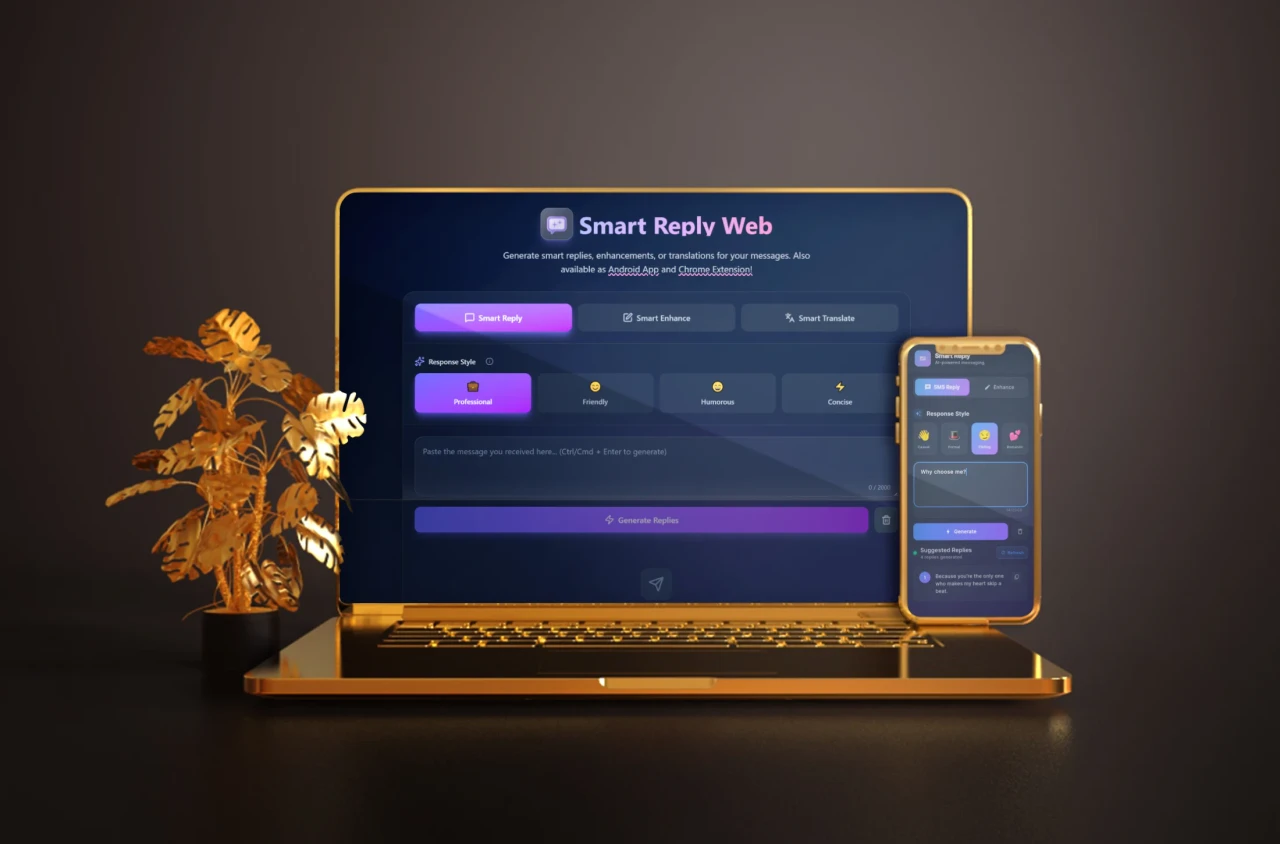
AI-powered assistant to generate context-aware replies, enhance your writing, and translate text — directly from your browser, web app, or mobile device.


- Overview
- Features
- Architecture
- Tech Stack
- Getting Started
- API Reference
- Caching System
- Deployment
- Contributing
- License
Smart Reply, Enhance & Translate is a full-stack AI tool suite built to boost productivity for anyone who works with text. Whether you're a support agent handling repetitive messages, a freelancer drafting professional emails, or someone who needs quick translations, this project provides a seamless experience across multiple platforms.
The suite consists of three client interfaces — a browser extension (Chrome/Firefox), a React web application, and a Flutter mobile app — all powered by a shared Node.js backend that communicates with state-of-the-art LLMs via OpenRouter.
Three core modes:
| Mode | What it does |
|---|---|
| Smart Reply | Generates up to 4 context-aware reply suggestions for any message |
| Smart Enhance | Improves your text across grammar, clarity, conciseness, and structure |
| Smart Translate | Translates text into your target language with 4 style variations |
- 4 AI suggestions per request across all three modes (Reply, Enhance, Translate)
- 6 response formats — Professional, Friendly, Casual, Formal, Flirty, Romantic — with tooltip descriptions
- Multi-language translation — English, Spanish, French, German, Chinese, Arabic, Bengali, and more
- Multiple free LLM models — automatically selects the best model per operation type
- LLM-agnostic — compatible with any OpenRouter-supported model (free or paid)
- Custom API key support — bring your own key for full privacy and control
- SHA256-based intelligent caching — prevents duplicate API calls, 5-minute TTL
- Docker support — spin up the backend with a single command
- Browser Extension (Chrome/Firefox) — insert text directly into any field, keyboard shortcut
Ctrl+Shift+T, context menu integration, auto-detect selected text - Web App — animated UI with Framer Motion, auto-resizing textarea, keyboard shortcuts (
Ctrl/Cmd + Enter), responsive and accessible - Mobile App (Flutter) — native Android support, optimized for on-the-go usage
smart-reply/
├── backend/              # Node.js + Express API server
├── extension/            # Browser extension (Chrome/Firefox, Manifest V3)
├── frontend/             # React web application
└── smart_reply_app/      # Flutter mobile application
All clients communicate with the same backend via three REST endpoints. The backend handles LLM selection, prompt construction, caching, and response formatting.
| Layer | Technology |
|---|---|
| Backend | Node.js, Express |
| Web Frontend | React, Zustand, Tailwind CSS, Framer Motion, Lucide React |
| Browser Extension | Manifest V3, Vanilla JS, HTML, CSS |
| Mobile App | Flutter, Provider, Google Fonts |
| AI Integration | OpenRouter API |
| Containerization | Docker |
| Deployment | Vercel (frontend), Render / Railway / Fly.io (backend) |
Before you begin, make sure you have the following installed:
- Node.js v18 or higher
- npm v9 or higher
- Flutter SDK (only for mobile)
- Docker (optional, for containerized backend)
- An OpenRouter API key
git clone https://github.com/mahmud-r-farhan/smart-reply.git
cd smart-replyThe backend is a single Express server that serves all three clients. You only need to set it up once.
Option A — Local Setup
- Navigate to the backend directory:
cd backend- Create a
.envfile:
OPENROUTER_API_KEY=your_openrouter_api_key
PORT=5006- Install dependencies and start the server:
npm install
npm start
The backend will be running at http://localhost:5006.
Option B — Docker Setup
docker build -t smart-reply-backend ./backend
docker run -d -p 5006:5006 --env OPENROUTER_API_KEY=your_openrouter_api_key smart-reply-backend
Verify it's running by visiting http://localhost:5006/health.
Chrome
- Open Chrome and navigate to
chrome://extensions - Enable Developer Mode (toggle in the top-right corner)
- Click Load unpacked and select the
extension/folder - The Smart Reply icon will appear in your toolbar
Firefox
- Open Firefox and navigate to
about:debugging#/runtime/this-firefox - Click Load Temporary Add-on...
- Select the
manifest.jsonfile inside theextension/folder - The extension will be loaded for the current browser session
Connect the extension to your backend:
- Click the extension icon in the toolbar
- Open Settings
- Paste your backend base URL (e.g.,
http://localhost:5006/api) - Optionally set default source and target languages for quick translation
- Click Save
- Navigate to the frontend directory:
cd frontend- Create a
.envfile:
VITE_API_ENDPOINT=http://localhost:5006/api- Install dependencies and start the development server:
npm install
npm run dev
The app will be available at http://localhost:5173.
- Navigate to the mobile app directory:
cd smart_reply_app- Configure the API endpoint in
lib/utils/constants.dart:
// For Android Emulator (default):
const String baseUrl = 'http://10.0.2.2:5006/api';

// For a physical device, replace with your local machine's IP:
const String baseUrl = 'http://192.168.1.X:5006/api';- Get dependencies and run the app:
flutter pub get
flutter runAll endpoints accept and return JSON. The base URL is configurable (default: http://localhost:5006).
Generates up to 4 context-aware reply suggestions for a given message.
Request body:
{
  "message": "Can we reschedule the meeting?",
  "format": "professional"
}
Response:
{
  "suggestions": [
    "Absolutely, let's find a new time that works for both of us.",
    "Sure, please let me know your availability.",
    "No problem, I can adjust my schedule accordingly.",
    "Of course, happy to reschedule. When would you like to meet?"
  ]
}Generates up to 4 improved variations of your input text.
Request body:
{
  "text": "We need to reschedul the meeting because of conflict.",
  "format": "professional"
}
Response:
{
  "enhancements": [
    "We need to reschedule the meeting due to a scheduling conflict.",
    "Due to a conflict, let's reschedule the meeting at your earliest convenience.",
    "I apologize, but a conflict has arisen — could we reschedule the meeting?",
    "There's a scheduling conflict; please suggest alternative times for the meeting."
  ]
}Translates the given text into the target language with style variations.
Request body:
{
  "text": "Hello, how are you?",
  "format": "friendly",
  "language": "bengali"
}
Response:
{
  "translations": [
    "হ্যালো, আপনি কেমন আছেন?",
    "হাই, তুমি কেমন আছো?",
    "হেলো, তোমার খবর কী?",
    "হ্যালো, আপনার অবস্থা কেমন?"
  ]
}Returns a simple health check response.
Response:
{ "status": "ok" }Supported format values for all endpoints:
| Value | Description |
|---|---|
professional |
Clear, formal, business-appropriate |
friendly |
Warm and approachable |
casual |
Relaxed, everyday language |
formal |
Strict and official tone |
flating |
Flirty compliments with light romantic interest |
romantic |
Affectionate and emotionally warm |
As of v0.4, the backend uses an intelligent SHA256-based caching layer to avoid redundant API calls and reduce latency.
How it works:
- A unique cache key is generated from the full prompt and model identifier using SHA256 hashing
- Cache entries expire automatically after 5 minutes (TTL)
- Different prompts always produce different cache keys, eliminating false cache hits
Example behavior:
Request 1: "Hello"    → Cache MISS  → Calls OpenRouter → Stores in cache
Request 2: "Hi"       → Cache MISS  → Calls OpenRouter → Stores in cache
Request 1 (repeat)    → Cache HIT   → Returns instantly (no API call)
Performance improvements in v0.4:
| Metric | Before | After |
|---|---|---|
| Response Size | 100% | ~32% (65–70% reduction) |
| API Cache Hits | 0% | ~60% |
| Cache Key Collisions | High | 0% (SHA256 hashing) |
| React Re-renders | High | Low (40–50% reduction) |
| Bundle Size | 100% | ~87% (12–15% reduction) |
| Request Cancellation | ❌ | ✅ Prevents zombie requests |
| Security Headers | ❌ | ✅ XSS/Clickjacking protection |
The backend can be deployed to any Node.js-compatible cloud platform. Set the OPENROUTER_API_KEY environment variable, then update your clients' API endpoint accordingly.
Recommended platforms:
- Render — free tier available, easy GitHub integration
- Railway — fast deploys, simple environment management
- Fly.io — global edge deployment with Docker support
- Any VPS (Ubuntu + PM2 or Docker)
Frontend deployment:
The React web app deploys seamlessly to Vercel. Set VITE_API_ENDPOINT as an environment variable in your Vercel project settings.
Contributions of all kinds are welcome — bug fixes, new features, documentation improvements, translations, and more.
How to contribute:
- Fork the repository
- Create a new branch for your changes:
git checkout -b feature/your-feature-name
- Make your changes with clear, descriptive commits
- Test your changes thoroughly
- Open a pull request with a summary of what you've changed and why
Guidelines:
- Keep pull requests focused on a single change
- Write clear commit messages (e.g.,
fix: correct cache key collision on empty input) - If you're adding a new feature, consider updating this README accordingly
- Report bugs or suggest improvements via GitHub Issues
This project is open source. See the repository for license details.
Built by Mahmud Rahman · Powered by OpenRouter
"Automate your responses. Amplify your productivity."