
MCP Audit is a real-time token profiler for MCP servers and MCP tools.
It helps you diagnose context bloat, auto-compaction, and unexpected token spikes across Claude Code, Codex CLI, and Gemini CLI—so you always know which MCP tool or MCP server is consuming your tokens and why.
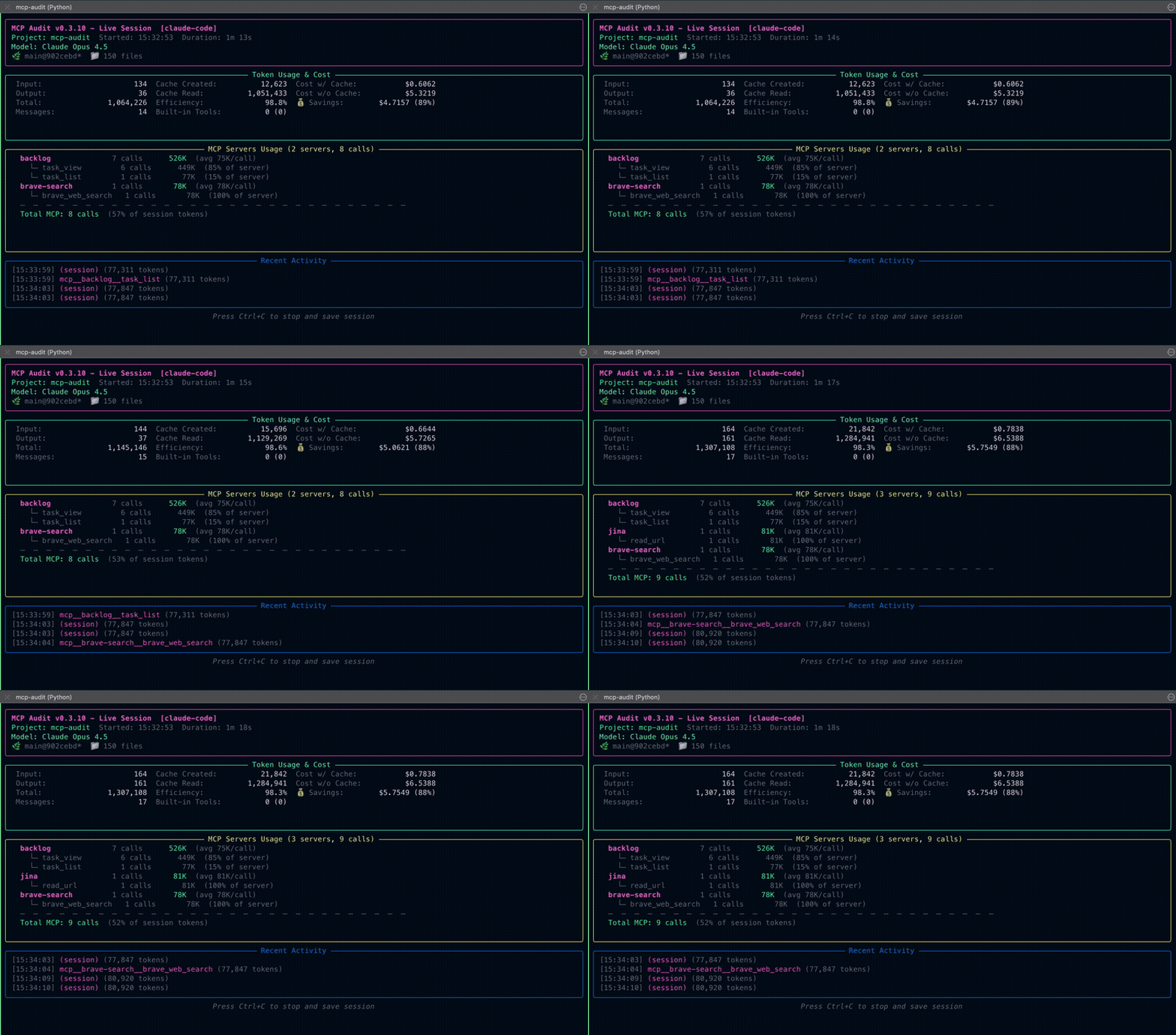
Real-time token tracking & MCP tool profiling — understand exactly where your tokens go.




pipx install mcp-auditAlternative: pip or uv
pip install mcp-audituv pip install mcp-auditUpgrade to latest version
# pipx
pipx upgrade mcp-audit

# pip
pip install --upgrade mcp-audit

# uv
uv pip install --upgrade mcp-audit
💡 Gemini CLI Users: For 100% accurate token counts (instead of ~95%), run mcp-audit tokenizer download after installing.
mcp-audit tokenizer downloadPython: 3.8, 3.9, 3.10, 3.11, 3.12, 3.13
Operating Systems:
- macOS – fully supported
- Linux – works, CI coverage coming soon
- Windows – recommended via WSL (native PowerShell support not yet guaranteed)
| 🛠️ The Builder | 💻 The Vibecoder |
|---|---|
| "Is my MCP server (or the one I downloaded) too heavy?" | "Why did my CLI Agent auto-compact so quickly?" |
| You build MCP servers and want visibility into token consumption patterns. | You use Cursor/Claude daily and hit context limits without knowing why. |
| You need: Per-tool token breakdown, usage trends. | You need: Real-time cost tracking, session telemetry. |
A real-time MCP token profiler designed to help you understand exactly where your tokens are going — and why.
- Tracks real-time token usage across Claude Code, Codex CLI, and Gemini CLI
- Breaks down usage by server, tool, and individual call
- Flags context bloat and schema overhead ("context tax")
- Detects early auto-compaction triggers
- Highlights payload spikes and chatty tools
- Smell Detection: 5 efficiency anti-patterns (HIGH_VARIANCE, CHATTY, etc.)
- Zombie Tools: Finds unused MCP tools wasting schema tokens
- Generates post-session summaries for deeper optimisation
- Supports multi-session comparisons (aggregation mode)
- AI Export: Export sessions for AI assistant analysis
- Data Quality: Clear accuracy labels (exact/estimated/calls-only)
- Multi-Model Tracking: Per-model token/cost breakdown when switching models mid-session
- Dynamic Pricing: Auto-fetch current pricing for 2,000+ models via LiteLLM API
- Context Tax: Track MCP schema overhead per server
- No proxies, no interception, no cloud uploads — all data stays local
- Works alongside existing agent workflows with zero setup overhead
"Why is my MCP server using so many tokens?"
Large list_tools schemas and verbose tool outputs add a hidden context tax.
MCP Audit reveals exactly where that cost comes from.
"Why does Claude Code keep auto-compacting?"
Auto-compaction usually triggers when tool schemas or outputs are too large. MCP Audit shows the exact schema + tool calls contributing to early compaction.
"Which MCP tools are the most expensive?"
The TUI highlights per-tool token usage, spikes, and trends in real time.
"How do I reduce token costs in multi-step agent workflows?"
Use the post-session reports to identify inefficient tool patterns, chatty tools, and large payloads.
mcp-audit is a passive observer. It watches your local session logs and artifacts in real-time.
- No Proxies: It does not intercept your network traffic or API calls.
- No Latency: It runs as a sidecar process, adding zero overhead to your agent.
- Local Only & Private: All data remains on your machine.
- Telemetry Only: Provides signals and metrics — you (or your AI) decide what to do with them.
Note: MCP Audit is telemetry-only — no recommendations or optimizations are performed automatically.
Use the AI export command (mcp-audit export ai-prompt) to analyze your results with your preferred AI CLI.
MCP Audit helps you understand why your MCP tools behave the way they do—whether it's high token usage, slow agent performance, or unexpected context growth. It turns raw MCP telemetry into actionable insights you can use to optimise your agent workflows.
Polish + Stability — Performance optimization and API stability for production readiness:
Performance Optimization:
- Sub-millisecond TUI refresh with dirty-flag caching
- Storage performance: mtime caching, header peeking for fast metadata reads
- 14 benchmark tests in CI (TUI <100ms, session load <500ms, memory <100MB)
API Stability:
- 30 public exports with explicit stability tiers (stable/evolving/deprecated)
API_STABILITYdictionary for programmatic stability checking- Comprehensive
API-STABILITY.mddocumentation - Deprecation warnings for APIs scheduled for removal
Profiling Guide:
docs/profiling.mdwith cProfile and tracemalloc examples
See the Changelog for full version history.
Once you're running mcp-audit, watch for these common patterns in your telemetry:
-
The "Context Tax" (High Initial Load):
- Signal: Your session starts with 10k+ tokens before you type a word.
- What this might indicate: Large
list_toolsschemas can increase context usage on each turn. - v0.6.0 Feature: A dedicated TUI panel shows per-server static token overhead with confidence scores.
-
The "Payload Spike" (Unexpected Cost):
- Signal: A single tool call consumes far more tokens than expected.
- What this might indicate: Large file reads or verbose API responses.
-
The "Zombie Tool":
- Signal: A tool appears in your schema but is never called.
- What this might indicate: Unused tools consuming schema tokens on every turn.
- Detection: Configure known tools in
mcp-audit.tomland MCP Audit will flag unused ones.
-
The "Auto-Compaction Trigger" (Early Context Collapse):
- Signal: Claude Code or Codex CLI compacts the conversation unexpectedly early.
- What this might indicate: High schema weight or repeated inclusion of large payloads.
- How MCP Audit helps: Identifies which MCP server or MCP tool is pushing the session over the threshold.
Open a separate terminal window and run (see Platform Guides for detailed setup):
# Auto-detects your platform (or specify with --platform)
mcp-audit collect --platform claude-code
mcp-audit collect --platform codex-cli
mcp-audit collect --platform gemini-cliGo back to your agent (Claude Code, Codex CLI, or Gemini CLI) and start working. The MCP Audit TUI updates in real-time as you use tools.
TUI runs automatically. Other display options:
--quiet(logs only),--plain(CI/pipelines),--no-logs(display only).
Generate a post-mortem report to see where the money went:
# See the top 10 most expensive tools
mcp-audit report ~/.mcp-audit/sessions/ --top-n 10

# Session logs are stored by default in ~/.mcp-audit/sessions/
Now that you're collecting telemetry, read What to Look For to understand the signals that indicate context bloat, expensive tools, and auto-compaction risks.



| Platform | Token Accuracy | Tracking Depth | Notes |
|---|---|---|---|
| Claude Code | Native (100%) | Full (Per-Tool) | Shows exact server-side usage. |
| Codex CLI | Estimated (99%+) | Session + Tool | Uses o200k_base tokenizer for near-perfect precision. |
| Gemini CLI | Estimated (100%) | Session + Tool | Uses Gemma tokenizer (requires download) or fallback (~95%). |
| Ollama CLI | — | — | Planned for v1.1.0 |
- Session-level token accuracy is 99–100% for Codex CLI and Gemini CLI.
(Per-tool token counts are estimated and highly accurate in most cases.)
Want support for another CLI platform? Start a discussion and let us know what you need!
MCP tools and servers often generate hidden token overhead—from schema size, payload spikes, and inefficient tool patterns. These issues cause:
- Early auto-compaction — sessions end prematurely
- Slow agent performance — large contexts increase latency
- Unexpected cost increases — tokens add up faster than expected
- Misleading debug logs — hard to trace the real source of bloat
- Context window exhaustion — hitting limits before finishing work
MCP Audit exposes these hidden costs and helps you build faster, cheaper, more predictable MCP workflows.
Detailed Platform Capabilities
| Capability | Claude Code | Codex CLI | Gemini CLI |
|---|---|---|---|
| Session tokens | ✅ Full | ✅ Full | ✅ Full |
| Per-tool tokens | ✅ Native | ✅ Estimated | ✅ Estimated |
| Reasoning tokens | ❌ Not exposed | ✅ o-series | ✅ Gemini 2.0+ |
| Cache tracking | ✅ Create + Read | ✅ Read only | ✅ Read only |
| Cost estimates | ✅ Accurate | ✅ Accurate | ✅ Accurate |
mcp-audit focuses on real-time MCP inspection. It fits perfectly alongside other tools in your stack:
| Tool | Best For... | The Question it Answers |
|---|---|---|
| MCP Audit (Us) | ⚡ Deep Profiling | "Which specific tool is eating my tokens right now?" |
| ccusage | 📅 Billing & History | "How much did I spend last month?" |
| Claude Code Usage Monitor | 🛑 Session Limits | "Will I hit my limit in the next hour?" |
Customize your dashboard look!
# Use the Catppuccin Mocha theme
mcp-audit collect --theme mocha

# Use Catppuccin Latte (light)
mcp-audit collect --theme latte

# Use High Contrast (Accessibility - WCAG AAA)
mcp-audit collect --theme hc-dark
Supported Themes: auto, dark, light, mocha, latte, hc-dark, hc-light
Configure known tools to detect unused ("zombie") tools:
# mcp-audit.toml
[zombie_tools.zen]
tools = [
    "mcp__zen__thinkdeep",
    "mcp__zen__debug",
    "mcp__zen__refactor"
]
Zombie tools are detected when a configured tool is never called during a session.
New in v0.6.0: MCP Audit fetches current model pricing from the LiteLLM API with 24-hour caching for accurate cost tracking across 2,000+ models.
To use static TOML pricing only:
# mcp-audit.toml
[pricing.api]
enabled = false      # Disable dynamic pricing
cache_ttl_hours = 24 # Cache duration (default: 24)
offline_mode = false # Never fetch, use cache/TOML only
Add custom models or override pricing:
[pricing.claude]
"claude-opus-4-5-20251101" = { input = 5.00, output = 25.00 }

[pricing.openai]
"gpt-5.1" = { input = 1.25, output = 10.00 }
Prices in USD per million tokens. Run mcp-audit init to see current pricing source status.
# Most common usage - just run this and start working
mcp-audit collect

# Specify your platform explicitly
mcp-audit collect --platform claude-code
mcp-audit collect --platform codex-cli
mcp-audit collect --platform gemini-cli

# Use a dark theme (try: mocha, latte, hc-dark, hc-light)
mcp-audit collect --theme mocha

# See where your tokens went after a session
mcp-audit report ~/.mcp-audit/sessions/

# Browse past sessions interactively
mcp-audit ui

# Gemini CLI users: download tokenizer for 100% accuracy
mcp-audit tokenizer downloadTrack a live session.
Options:
  --platform          Platform: claude-code, codex-cli, gemini-cli, auto
  --project TEXT      Project name (auto-detected from directory)
  --theme NAME        Color theme (default: auto)
  --pin-server NAME   Pin server(s) at top of MCP section
  --from-start        Include existing session data (Codex/Gemini only)
  --quiet             Suppress display output (logs only)
  --plain             Plain text output (for CI/logs)
  --no-logs           Skip writing logs to disk (real-time display only)
Generate usage report.
Options:
  --format           Output: json, csv, markdown (default: markdown)
  --output PATH      Output file (default: stdout)
  --aggregate        Aggregate across multiple sessions
  --top-n INT        Number of top tools to show (default: 10)
Export session data for external analysis.
# Export for AI analysis (markdown format)
mcp-audit export ai-prompt

# Export specific session as JSON
mcp-audit export ai-prompt path/to/session.json --format json
Formats:
ai-prompt Export session for AI assistant analysis
(includes suggested analysis questions)
Options:
--format Output: markdown (default), json
--output PATH Output file (default: stdout)
Manage optional tokenizers.
mcp-audit tokenizer download   # Download Gemma tokenizer (~4MB)
mcp-audit tokenizer status # Check tokenizer availabilityShow configuration status and pricing source information.
mcp-audit init # Display config status, pricing source, and cache infoOutput includes:
- Configuration file location (if found)
- Pricing source: api, cache, toml, or built-in
- LiteLLM cache status and expiry
- Tokenizer availability
Browse past sessions interactively.
mcp-audit ui                   # Launch session browser
mcp-audit ui --theme mocha     # Use specific theme
Keybindings:
j/k, ↑/↓ Navigate sessions
Enter View session details
f Cycle platform filter
s Cycle sort order (date/cost/duration/tools)
p Pin/unpin session
r Refresh session list
? Show help overlay
q Quit
Options:
--theme NAME Color theme (default: auto)
# pipx (recommended)
pipx upgrade mcp-audit

# pip
pip install --upgrade mcp-audit

# uv
uv pip install --upgrade mcp-audit# If installed with pipx
pipx uninstall mcp-audit
# If installed with pip
pip uninstall mcp-auditHow accurate is token estimation for Codex CLI and Gemini CLI?
Very accurate. In v0.4.0, we use the same tokenizers as the underlying models:
- Codex CLI (OpenAI): Uses
tiktokenwith theo200k_baseencoding — the same tokenizer OpenAI uses. Session-level accuracy is 99%+. - Gemini CLI (Google): Uses the official
Gemmatokenizer (viamcp-audit tokenizer download). Session-level accuracy is 100%. Without it, we fall back totiktokenat ~95% accuracy.
Per-tool token estimates are also highly accurate in most cases, though platforms don't provide native per-tool attribution (only Claude Code does).
Claude Code provides native token counts directly from Anthropic's servers, so no estimation is needed there.
Why am I seeing 0 tokens or no activity?
- Started MCP Audit after the agent — Only new activity is tracked. Start
mcp-auditfirst, then your agent. - Wrong directory — MCP Audit looks for session files based on your current working directory.
- No MCP tools used yet — Built-in tools (Read, Write, Bash) are tracked separately. Try using an MCP tool.
Where is my data stored?
All your usage data stays on your machine:
- Session data:
~/.mcp-audit/sessions/ - Configuration:
./mcp-audit.tomlor~/.mcp-audit/mcp-audit.toml - Pricing cache:
~/.mcp-audit/pricing-cache.json
Network access: By default, mcp-audit fetches model pricing from the LiteLLM pricing API (cached 24h). No usage data is sent. To disable: set [pricing.api] enabled = false in config.
Only token counts and tool names are logged—prompts and responses are never stored.
Can MCP Audit help diagnose context bloat in MCP servers?
Yes. MCP Audit tracks schema weight, per-tool usage, and payload spikes that contribute to context bloat in Claude Code, Codex CLI, and Gemini CLI. It helps you understand why your agent is using so many tokens and where optimisation will have the biggest impact.
- Getting Started Guide — Install and run your first session
| Platform | Guide |
|---|---|
| Claude Code | Setup & Troubleshooting |
| Codex CLI | Setup & Troubleshooting |
| Gemini CLI | Setup & Troubleshooting |
- Feature Reference — TUI, smells, exports, recommendations
- Configuration Reference — CLI options, themes, pricing
- API Reference — Programmatic usage
- Troubleshooting — Common issues and solutions
- FAQ — 25+ answered questions
| Document | Description |
|---|---|
| Architecture | System design |
| Data Contract | Schema v1.7.0 |
| Privacy & Security | Data policies |
| Changelog | Version history |
| Roadmap | Planned features |
Current: v0.9.x — Polish + Stability (Performance Optimization, API Stability, Profiling Guide)
Coming in v1.0.0:
- Product Hunt Launch — Landing page, press kit, video demos
- Documentation completion — Comprehensive guides for all features
- Usage examples — Real-world scenario walkthroughs
See the full Roadmap for details.
Have an idea or feature request? Start a discussion
We welcome contributions! See CONTRIBUTING.md for guidelines.
- Bug reports: Open an Issue
- Feature ideas: Start a Discussion
- Questions: Ask in Discussions
git clone https://github.com/littlebearapps/mcp-audit.git
cd mcp-audit
pip install -e ".[dev]"
pytestMIT License — see LICENSE for details.
Third-Party:
- tiktoken (MIT) — Bundled for Codex CLI token estimation
- Gemma tokenizer (Apache 2.0) — Optional download for Gemini CLI. See Gemma Tokenizer License for terms.
Made with 🐻 by Little Bear Apps
Issues · Discussions · Roadmap