
This utility consists of BASH scripts that create bootable flash drives for use on UEFI and BIOS systems. It provides functionality under macOS and Linux similar to the Rufus USB Tool for Windows. Graphical menus using Zenity are now supported on Linux.
| Zenity Menu | Text Menu |
|---|---|
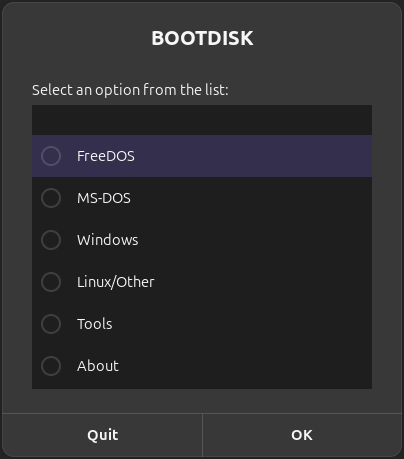 |
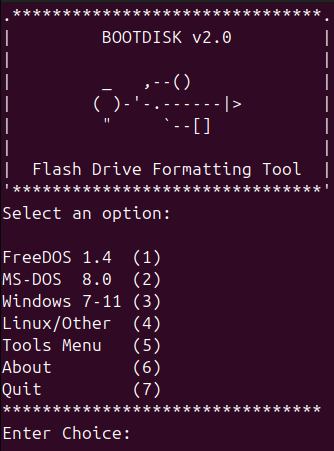 |
-
Create a FreeDOS 1.4 boot disk with the basic utilities such as FDISK,FORMAT,SYS,EDIT etc.
-
Create a MS-DOS boot disk using the version included with Windows from XP to 8.1.
-
Create bootable Windows install media and Windows To Go media from an ISO image.1
-
Create bootable Linux media that includes persistence on supported distributions. 2
-
Create UEFI bootable exFAT or NTFS disks using the UEFI:NTFS bootloader.
-
Create a boot disk using the pre-built UEFI Shell image provided by Pete Batard.
-
Download official retail Windows ISOs and UEFI Shell ISOs using the Fido script.
-
Calculate the SHA-1 checksum for Windows ISO files and search the sha1.rg-adguard.net databases.
-
Customize the Windows installation process to automatically create a local account, configure privacy settings, select language and timezone settings, skip wireless network setup and disable automatic BitLocker encryption.
-
Customize Windows 11 installation media to disable TPM, Secure Boot and RAM requirements.
-
Additional information on the features above is available by selecting the About option.
Download from Releases or clone the repository.
git clone https://github.com/jpz4085/BOOTDISK.git
Install, uninstall or upgrade from the previous release.
sudo ./setup.sh install | uninstall | upgrade
Click the shortcut on the app menu or run from terminal.
bootdisk #Graphical dialogues.
bootdisk --text-mode
Install any missing software packages as needed.
| Required: UEFI Bootable Media |
|---|
| 7zip, curl, jq (JSON processor), bash (above 3.2 on macOS) |
| Recommended | Packages |
|---|---|
| Windows/UEFI Shell ISO downloads: | powershell |
| Linux NTFS and exFAT Support: | ntfs-3g, exfatprogs |
| Graphical Dialogue Support: | zenity (Linux) |
| Imaging Progress Support: | pv/pipeviewer |
| Optional | Packages |
|---|---|
| Legacy BIOS and DOS media: | ms-sys, mtools |
| Support for Windows To Go media: | wimtools, bcd-sys |
| macOS NTFS Write/Format Support: | Tuxera/Paragon |
| macOS Linux Persistence Support: | e2fsprogs |
Note: For macOS see MacPorts or Homebrew.