Meaningfully is a semantic search tool for text data in spreadsheets.
Keyword searching in Excel or Google Sheets is painful because text data is displayed awkwardly and because keywords miss circumlocutions, typos, unexpected wording and foreign-language data. Semantic search solves all of that. Meaningfully works best for semi-structured data, where you have thousands of instances of a type and want to find certain instances.
For example:
- consumer complaints about a product or business
- credit card transactions
- descriptions of government contracts
- responses to a survey
Journalists, researchers, academics, people who do surveys or solicit submissions, anybody.
It's a middle-ground between AI chatbot search and keyword search. It uses the smarts of AI to 'understand' human language, but doesn't risk making stuff up like AI.
Yeah! It is kind of the minimum viable semantic search app. If people like it, I hope to sand down the rough edges and build extra features. Right now, it's only been used by a few people, so you may discover errors or bugs. Please email me or open a ticket to tell me about how Meaningfully worked (or didn't work) for you.
In particular, Meaningfully is slow and can't handle huge spreadsheets (>100,000 rows, let's say) yet.
Once you've uploaded a CSV with a text column, search is simple.
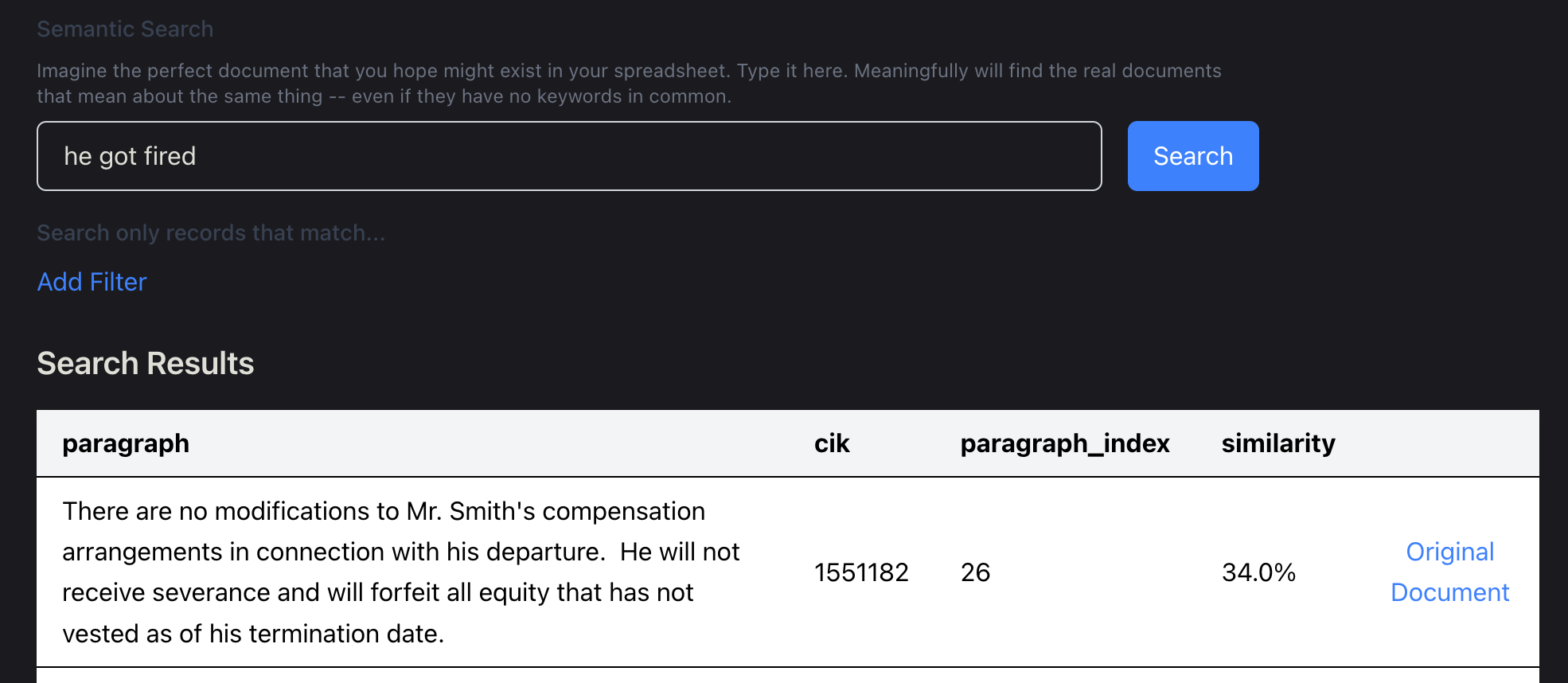
- 🤔 Just imagine what you're looking for, then imagine a phrase or sentence from that perfect result. Like, "he got fired."
- Type the imagined phrase or sentence in the search box, and then click search.
- Hopefully the closest results from the CSV will appear at the top of the search results.
You can also filter by metadata attributes.
Mostly. Semantic search requires "embedding" snippets of your document into numbers. You can do this on your computer, but it's very slow, but free (but for your electric bill). I recommend you get an OpenAI API key, put it into meaningfully, and use that; you'll be responsible for the OpenAI charges, but meaningfully doesn't cost any extra on top of that. (And it's generally very cheap. Most spreadsheets, even with tens of thousands of rows, will cost a few pennies.)
Eventually, meaningfully may include some paid options.
Visit meaningfully's release page, download the appropriate installer for your platform, and install it.
For Macs, use the x64 binary if you have an Intel chip and arm64 if you have Apple Silicon. See "About This Mac" in the Apple menu on the top left of your screen to determine which kind of processor you have; computers manufactured before late 2020 generally have Intel chips.
I don't have a Windows computer, so I can't test the Windows builds.
If you use Windows and want to try meaningfully, please try development mode below. It works fine, at least for smaller CSVs, although it will be slower and the file-sizes larger than on Mac and Linux, because the Weaviate database binary isn't available for Windows.
Alternatively, you can set up Windows Subsystem for Linux, run export DISPLAY=:0, then install and run Meaningfully as described below, in the Linux instructions.
snap install meaningfully or install the .deb file listed in meaningfully's release page.
You'll need Node v23 or higher. You might try installing nvm and then running nvm install 23 and nvm use 23 but troubleshooting and other methods are outside the scope of this document.
npm install
npm run dev
Most of the application logic for Meaningfully is in two child packages:
- @meaningfully/ui for the UI
- @meaningfully/core for the main application logic (embedding, document splitting, etc.)
To modify this app locally in development, you'll want to clone down those repos, modify this repo's package.json to point to your local copies
-    "@meaningfully/core": "^0.1.3",
-    "@meaningfully/ui": "^0.0.4",
+    "@meaningfully/core": "../meaningfully-core/",
+    "@meaningfully/ui": "../meaningfully-ui",
Then, after you've made your modifications, you'll want to build the child library with npm run build (or npm run watch to build on file modification), then run npm run dev in this repo.
meaningfully has both unit tests and end-to-end integration tests.
Run the unit tests for the backend with npm test. Run the integration tests for the frontend by building (npm run build:<platform>) and then running npm run wdio.
Test a specific feature file with npm run wdio run ./wdio.conf.ts -- --spec ./e2e/features/upload-process.feature -- again, testing the already-built version.
You can also run just a single test in a specific file with npm run wdio run ./wdio.conf.ts -- --spec ./e2e/features/upload-process.feature --cucumberOpts.tags=@largefile.
If you want to run against the development code (rather than building a whole artifact, which can be time-consuming), build (npm run build) and use the WDIO_DEV=true env var.
E.g.
- test everything
npm run build && WDIO_DEV=true npm run wdio - test one file
npm run build && WDIO_DEV=true npm run wdio run ./wdio.conf.ts -- --spec ./e2e/features/upload-process.feature. - run one test
npm run build && WDIO_DEV=true npm run wdio run ./wdio.conf.ts -- --spec ./e2e/features/upload-process.feature --cucumberOpts.tags=@largefile.
Try Semantra.