Custom Home Assistant Component for Heatmiser PRT-N Stats (version 1.3.1)
This component accesses the stats via an IP to RS485 adaptor (I use an ATC_1000)
To use this custom component:
-
Add the repository to HACS with the following link:
-
Add the configuration to your
configuration.yamlfile, specifying either the hostname and port, or the serialid depending on how you have connected the RS485 converter.

Example configuration.yaml
 climate:
  - platform: heatmiser_ndc
    host: 192.168.0.19 # If you're using the host do not specify the serialid
    port: 23
    serialid: "/dev/to/device" # If you're using the serial id do not specify the host and port
    scan_interval: 20
    tstats:
      - id: 1
        name: Kitchen
      - id: 2
        name: Guest Bath
      - id: 3
        name: Guest Bed
      - id: 4
If using the serialid you can find the link under Settings -> System -> Hardware -> All Hardware -> ttyUSBx.
This version has been derived from the original Heatmiser component and the HeatmiserV3 library. The library has been incorporated into this custom component (heatmiser.py) to add logging and fix a few issues.
My own heatmiser system has 15 stats connected via a single ATC_1000 RS485 adaptor.
There is a COM_TIMEOUT in heatmiser.py (currently 0.8 secs), so it takes c12 seconds to update all stats. This works fine on my own system, but if you have lots of CRC errors reported in the log, then it may be worth increasing this a little to say 1 second or more.
The first update is no longer done as part of initialisation, so the warning message "Setup of climate platform heatmiser_ndc is taking over 10 seconds" is no longer generated. The climate entities are made available quickly but will have 0 values. These will be updated shortly after initialisation completes.
The configuration parameter scan_interval determines how frequently Hass reads the stat values after scan_interval seconds. The shorter this interval, the more quickly Hass will detect changes in temperature or heating mode. The fewer stats you have, the smaller this interval can be.
The component now supports 3 HVAC MODES - "Auto", "Heat" and "Off" and implements the climate services Turn on, Turn off & Set Hvac Mode. Turn off sets the stat into frost protect mode, Turn on sets it to normal (ie heating if actual temp < target temp)). Set Hvac mode on or off is the same as turn on / turn off. The modes can be controlled from the UI, or by calling the relevant services from developer tools or automations. Setting mode to "Auto" or "Heat" has the same effect - the resulting mode in the stat will depend on the current temp.
The standard climate component supports a humidity level (while the heatmiser stat does not). So the code now allows the frost protect temp to be read and modified via the humidity level. It accepts values in the range 7 to 17 as per the PRT stat. Thermostat cards will display this "humidity" and allow it to be changed.
The component logs lots of events at debug, info, warning, error levels. Debug - logging the path through the code and data Info - startup info, rs485 line stats, soft line errors Warning - Unused at present Error - unrecoverable line error (too many retries), broken serial line
Logging levels can be controlled by including something like the following in the configuration.yaml file
logger:
  default: warning
  logs:
    custom_components.heatmiser_ndc: debug
Logging can also be controlled at the module level within the component
logger:
  default: warning
  logs:
    custom_components.heatmiser_ndc.climate: debug
    custom_components.heatmiser_ndc.rs485: info
Logging can also be controlled on the fly using the logger.set_level service in Developer Tools in the UI in Yaml mode with
service: logger.set_level
data:
  custom_components.heatmiser_ndc: warning
The code now reads all the thermostat variables/parameters and writes these as additional state attributes (about 45 of them). These may be viewed in the Developer Tools section of the UI (see state variables). I use the Lovelace flex_table_card to display the attributes I want to see in the UI (see below). At some point in the future, I will provide services to change the r/w variables.
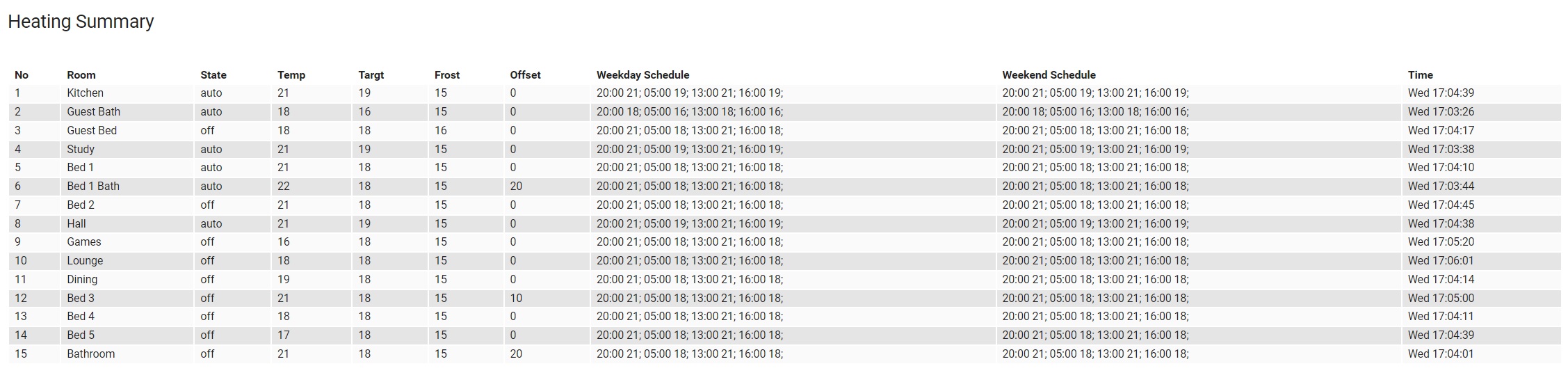
This version updates the various constants that have been deprecated, and were generating warning messages. ie HVAC_MODE_HEAT, HVAC_MODE_OFF, HVAC_MODE_AUTO, SUPPORT_TARGET_TEMPERATURE, SUPPORT_TARGET_HUMIDITY Also TURN_ON, TURN_OFF,
The code now recognises line errors and attempts to recover from these. If a line error occurs, the read or write is retried (upto 5 times). If a retry is successful, no error is reported to the logs. If the retry maximum is reached a hard error is counted and an error reported to the log. Any error that is recovered counts as a soft error. The most common errors (on my installation) are CRC and NDR (No Data Read). The code looks for other errors but these are rarely if ever seen, so these will be grouped together as Oth(er). 2 more Additional attributes have been added for each thermostat Read Stats is a string in the form "soft error%" "hard error count" "soft error %" is total read soft error count divided by the total no of reads Write Stats is a string in the form "write count" "soft errors" "hard errors" far fewer writes are likely so the total count is included.
In addition, the RS485 module counts the total reads & writes to the line and outputs log data (INFO level) evry 10,000 calls It logs total count, crc errors, ndr errors, oth errors, hard errors
Use Developer Tools or Flex Table card to see the per thermostat errors
The code now detects a serial line exception, and attempts to recover
I have tried to implemented code to reset the thermostat clock. This uses Preset Modes, and can be accessed form the UI. At present, the code appears to send the correct data to the line, but the clock does not change. More work needed here