Releases: heyman/heynote
2.8.0

What's Changed
Images
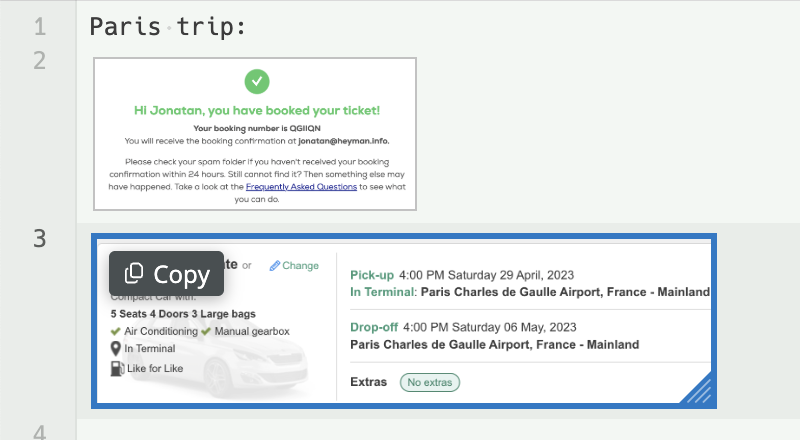
Heynote now supports inline images. You can paste images from the clipboard or drag and drop image files.
Images can be selected and resized directly in the editor, and it's quick and easy to put an image back
on the system clipboard.
Drawing on images
Heynote now includes a lightweight drawing tool for adding quick, freehand annotations on top of images.
Other changes
- Add syntax highlighting for Math blocks
- New lines in a Plaintext, Math and SQL blocks now inherits the indentation from the previous line
(other languages should already have this behaviour for new lines) - Add support for Mermaid blocks
- Fix issue not being able to record the Enter key when creating custom key bindings
Merged PRs
- Make new lines in Plaintext and Math blocks and inherit the indentation from the previous line by @heyman in #426
- Add Mermaid language support by @LSauce in #407
- Add syntax highlighting for Math blocks by @heyman in #427
- Use official version of @codemirror/search by @heyman in #428
- Add support for images by @heyman in #429
- Downgrade Electron to 39.3.0 by @heyman in #432
- Sanitize system locale by @heyman in #435
- Add feature for drawing on images by @heyman in #433
- Use jetpack to serve heynote-file protocol responses by @heyman in #437
- Fix so that Enter can be recorded for custom key bindings by @heyman in #441
New Contributors
Full Changelog: v2.7.1...v2.8.0
Contributors


Assets 21
- 98.6 MB
2026-02-04T13:37:56Z - 106 KB
2026-02-04T13:37:56Z - 101 MB
2026-02-04T13:37:15Z - 116 MB
2026-02-04T13:42:51Z - 125 KB
2026-02-04T13:42:51Z - 112 MB
2026-02-04T13:43:00Z - 119 KB
2026-02-04T13:43:00Z - 206 MB
2026-02-04T13:46:44Z - 219 KB
2026-02-04T13:46:44Z - 199 MB
2026-02-04T13:47:39Z -
2026-02-04T13:35:21Z -
2026-02-04T13:35:21Z - Loading
2.8.0-beta.4
What's Changed
Drawing on images
Heynote now includes a lightweight drawing tool for adding quick, freehand annotations on top of images.
Merged PRs
Full Changelog: v2.8.0-beta.3...v2.8.0-beta.4
Contributors
Assets 21
2.7.2
Bug fixes
- Fixed bug breaking the status bar in some system locales (#434)
Full Changelog: v2.7.1...v2.7.2
2.8.0-beta.3
What's Changed
Full Changelog: v2.8.0-beta.2...v2.8.0-beta.3
Contributors
Assets 21
2.8.0-beta.2
What's Changed
Images
Heynote now supports inline images. You can paste images from the clipboard or drag and drop image files.
Images can be selected and resized directly in the editor, and it's quick and easy to put an image back
on the system clipboard.
Other changes
- Add syntax highlighting for Math blocks
- New lines in a Plaintext, Math and SQL blocks now inherits the indentation from the previous line
(other languages should already have this behaviour for new lines) - Add support for Mermaid blocks
- Update to latest version of Electron
Merged PRs
- Make new lines in Plaintext and Math blocks and inherit the indentation from the previous line by @heyman in #426
- Add Mermaid language support by @LSauce in #407
- Add syntax highlighting for Math blocks by @heyman in #427
- Use official version of @codemirror/search by @heyman in #428
- Add support for images by @heyman in #429
New Contributors
Full Changelog: v2.8.0-beta...v2.8.0-beta.2
Contributors
Assets 21
2.8.0-beta
What's Changed
- Add syntax highlighting for Math blocks
- New lines in a Plaintext, Math and SQL blocks now inherits the indentation from the previous line
(other languages should already have this behaviour for new lines) - Add support for Mermaid blocks
Merged PRs
- Make new lines in Plaintext and Math blocks and inherit the indentation from the previous line by @heyman in #426
- Add Mermaid language support by @LSauce in #407
- Add syntax highlighting for Math blocks by @heyman in #427
New Contributors
Full Changelog: v2.7.1...v2.8.0-beta
Contributors
Assets 21
2.7.1
What's Changed
- Fix issue where a folded block gets unfolded when editing an empty block directly below it by @heyman in #423
Full Changelog: v2.7.0...v2.7.1
Contributors
Assets 21
2.7.0
What's Changed
Non backwards-compatible change
Buffers created/saved with this new version of Heynote is not compatible with older versions of Heynote,
so if you're using Heynote on multiple machines, make sure to update to >=2.7 on all machines.
Creation time for blocks
The time of creation is now recorded for blocks, and it's displayed in the status bar. For folded blocks,
it's also displayed in the summary line.
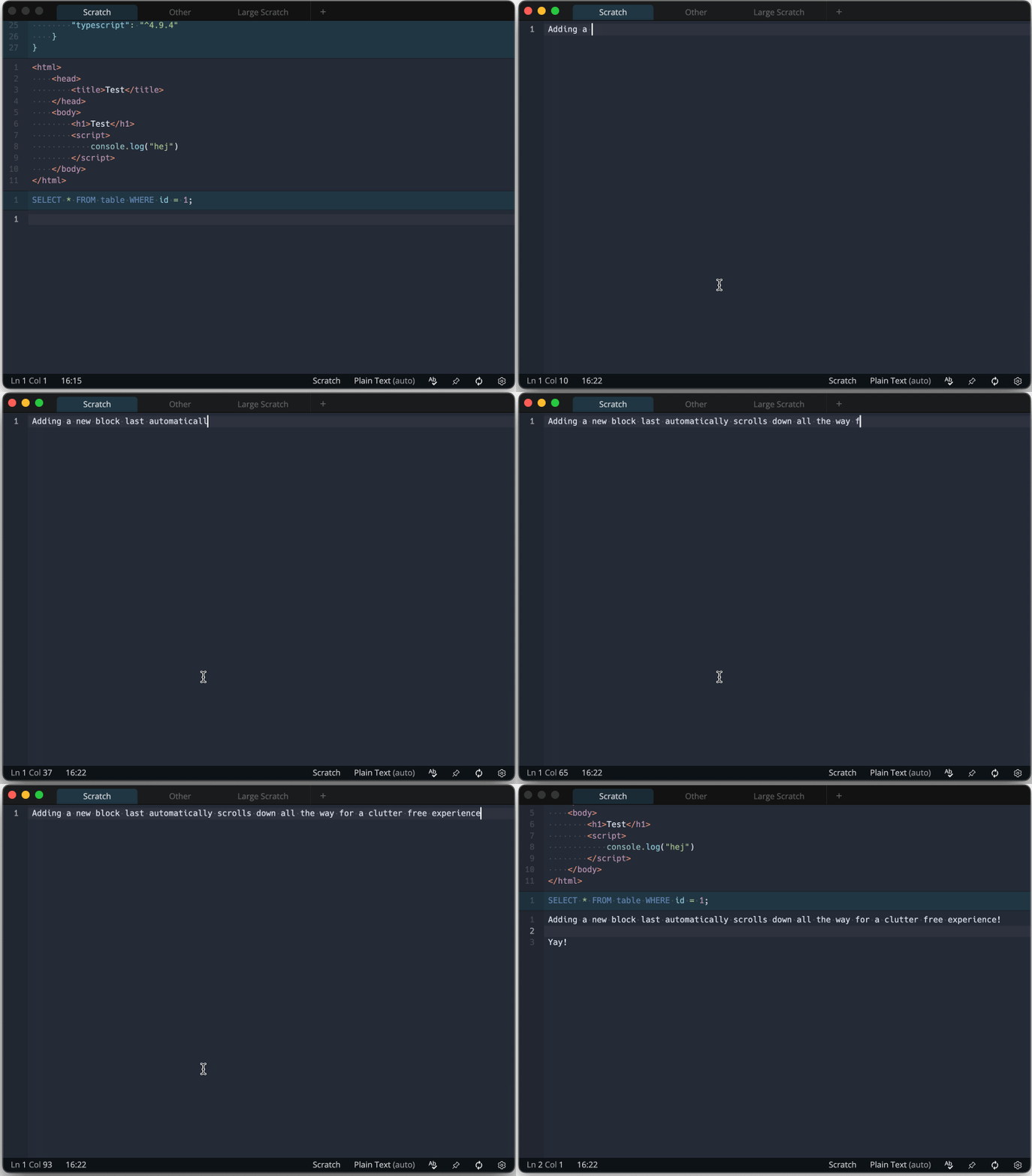
Add new block and scroll down
A new command for adding a new block at the end of the buffer and then scrolling down so that only the new
block is visible has been added. This can be used to create a new block and avoid any distraction from seeing
the other blocks above while writing.
The default key binding for Cmd/Ctrl+Shift+Enter has been changed to this new command, but anyone who would
prefer the old behaviour, can add a key binding for the Add new block after last block command.
Other fixes and improvements
- The default key binding for the
TABkey is now a newinsertIndentationcommand. This command will insert
indentation character(s) (spaces or tabs depending on the setting) so that the cursor aligns with the indentation
columns. Unless there is an active selection, in which case theindentMorecommand will be executed instead.
If you want the old behaviour, you can bind theTABkey toindentMore. - Chinese characters in buffer file names are now converted to ascii using pinyin. This fixes an issue where it
wasn't possible to create a buffer with only chinese characters it the name. - Fix issue where the wrong locale was used for formatting dates on MacOS on systems using a locale such as "en-SE"
- Fix issue with folded Math blocks where the results from the first and last line would still be visible
- Always use 2-digit notation for hours when displaying time
- Add setting for configuring the cursor blink rate (or turning off the blinking)
- Add support for Lua blocks
- Add
toggleCheckboxcommand for Markdown todo items (default key binding:Cmd/Ctrl+Shift+Space) - Fix issue when selecting all content of a math block and typing a character
- Fix so that checkboxes in todo lists takes up 4 spaces so that the margin align for multi line list items
Merged PRs
- Convert chinese characters in buffer file names to ascii using pinyin-pro library by @heyman in #409
- Add creation time metadata to blocks by @heyman in #410
- Add new insertIndentation command used for the Tab key by default by @heyman in #411
- Create new block at the end and scroll down to only show the new block by @heyman in #412
- Make tests less flaky when run in Github actions by @heyman in #413
- Don't display Math result widgets for blocks that are folded by @heyman in #414
- Add cursor blink rate setting by @heyman in #415
- Add support for Lua blocks by @heyman in #416
- Add toggleCheckbox command for Markdown todo items by @heyman in #417
- Upgrade to latest version of Electron (39.2.7) by @heyman in #418
- Update block created time when adding content to blocks that are completely empty by @heyman in #419
- Fix for selecting all text of a Math block and typing doesn't overwrite all text by @heyman in #420
Full Changelog: v2.6.2...v2.7.0
Contributors
Assets 21
2.7.0-beta.5
What's Changed
Full Changelog: v2.7.0-beta.4...v2.7.0-beta.5
Contributors
Assets 21
2.7.0-beta.4
What's Changed
- Update block created time when adding content to blocks that are completely empty by @heyman in #419
Full Changelog: v2.7.0-beta.3...v2.7.0-beta.4