Jira Metrics extracts the most common team metrics from your project.


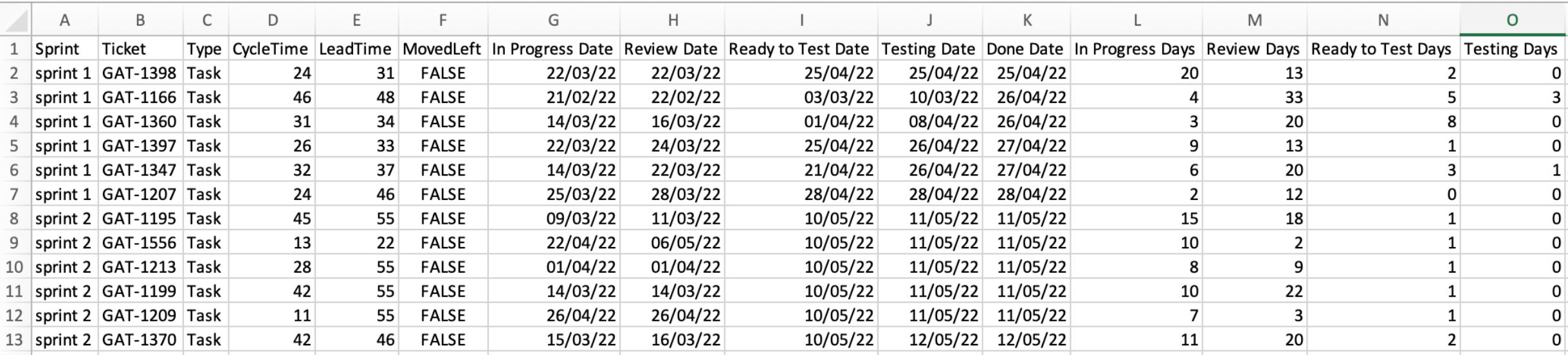
The script will generate two csv files with your sprint data.
Contains information on each ticket Done and includes:
- Ticket number: the unique id of the ticket
- Ticket type: story, bug, task
- Cycle time: number of days "in progress"
- Lead time: number of days between creation and Done
- Moved left: whether the ticket moved left on the board
- "State entrance:" shows the date of entrance on each board column
- "Days per state:" shows the number of days the ticket was on each board column
Gives you a "birds-eye-view" of each sprint (for tickets Done). It includes:
- Throughput: number of tickets
- Bugs: number of bugs
- Spikes: number of spikes
- Tasks: number of tasks
- Average cycle time: average number of days "in progress"
- Average lead time: average number of days between creation to Done
- 85th percentile cycle time: 85% of all cycle times fall below this
- 85th percentile lead time: 85% of all lead times fall below this

First you install Python 3 (obviously). Then install two project dependencies.
On MacOS:
% pip3 install jira
% pip3 install numpy
Now all you need to do is to download jira_metrics.py and jira_metrics.cfg.
Before your first run you will need to generate an API Token from your Jira instance.
- Click on your profile picture (top right)
- Account Settings
- Security
- API Token > Create
Now you need to add your project information to your jira_metrics.cfg file. It's actually more simple than it looks.
{
	"start_date": "YYYY-MM-DD",
	"end_date": "YYYY-MM-DD",
	"sprint_names": {
	    "sprint 1": ["YYYY-MM-DD", "YYYY-MM-DD"],
	    "sprint 2": ["YYYY-MM-DD", "YYYY-MM-DD"],
	    "sprint 3": ["YYYY-MM-DD", "YYYY-MM-DD"],
	    "sprint 4": ["YYYY-MM-DD", "YYYY-MM-DD"]
	},
	"jira":{
		"user": "<your jira user name>",
		"apitoken": "<API from jira>",
		"server": "<URL to your instance>"
	},
	"teams": [
		{
	        "name": "<team name>",
	        "jira_name": "<jira project name>",
	        "jira_columns": ["Column name", "Another column", "Yet another column"],
	        "details_filename": "details.csv",
		"summary_filename": "summary.csv",
		"sprint_names": {  }
		}
	],
	"holidays": ["YYYY-MM-DD", "YYYY-MM-DD"],
	"jql_done": "project = %s AND status = Done AND resolutionDate >= '%s' AND resolutionDate <= '%s'"
}- start_date: report start date
- end-date: report end date
- sprint_names: are just nicknames to your sprints for reporting (add new ones at your heart's content)
- jira: your jira credentials
- user: is your username (likely an e-mail address)
- apitoken: the string you generated in the first step
- server: is the link to your Jira installation
- teams:
- name: the name of your team
- jira_name: the name of the project in Jira
- jira_columns: are the column names on your board (warning: do NOT add the "To Do" and "Done" columns here)
- details_filename: it's the output filename
- summary_filename: it's the other output filename
- holidays: dates to exclude
- jql_done: is the Jira query that will retrieve your tickets
Bonus: this file can be used to generate metrics for multiple teams. In the "teams" element, you can copy and paste the {...} snippet having one per team. And separate each block of {} with a comma.
Now you have to execute the script.
On MacOS:
% python3 jira_metrics.py
Jira Metrics will then read the configuration file and do its magic.