Releases: drdnar/progcalc
Release 12 August 2021 v1.21

tr1p1ea requested that graying out leading zeros be optional, so I implemented that feature.
Release 12 August 2021
- Signed mode lets you display negative numbers with (-) sign instead of in two's complement.
- Always show options give quick access to base conversion.
- 2nd + enter can recall a stack entry back into the editor.
- You can now use Y= to interact with widgets.
- Vars now brings up the help/about dialog instead of Y=.
- Show a simple help message if the stack is empty.
- Use a lighter-weight font in some places.
- A bunch of code has been restructured.
- Minor bugfixes.
Release 22 July 2021
This version can automatically save and restore your stack when you quit and resume the program. Additionally, leading zeros are now grayed out to improve readability.


Release 21 July 2021
This minor update fixes an issue with the battery icon displaying when it shouldn't and slightly improves cursor feedback from widgets.
Release 20 July 2021
This is the first full release. The code still has some messiness in it, including holdovers from the pre-C++ versions. Nevertheless, the UI for changing settings should be reasonably intuitive.
Before compression, this is about 2 K of actual math routines and 40 K of user interface code. 20-30 K of that is the widgets subsystem that implements the settings dialog.
Have some screen shots:


Beta 18 September 2020


This version is fully functional, but the UI is not intuitive. You'll need both the DrSans and DrMono fonts, included below.
Changes from last update:
- The stack now prints in the other direction, which makes the UI slightly more intuitive.
- There is now a status bar.
- Scrolling the stack is implemented; you can use the arrows keys to view entries not visible on-screen.
So here's the manual:
Input is RPN-style: Type a number, then press enter. Type a second number, then enter the operation you want to perform.
Keys:
- No need to press alpha to type A-F. It just assumes that if you're pressing those keys, you're trying to enter those hexadecimal digits.
- Window/Zoom/Trace/Graph select base binary/octal/decimal/hexadecimal
- Alpha/Graph var/Stat select how many bits to display. Useful because 128-bit display isn't usually too useful and takes a lot of screen space.
- +, -, *, / do as you would think
- 2nd + / performs modulus
- 2nd + * performs division, and pushes both the remainder and quotient to the stack.
- ^ performs bitwise AND
- 2nd + ^ performs bitwise NAND
- tan/fraction template (83 Premium) performs bitwise OR
- 2nd + tan performs bitwise NOR
- . performs bitwise NOT
- (-) performs negation
- x^2 performs a left shift
- log performs a right shift
- ln performs a signed right shift (preserves top bit)
- Alpha, graphvar, and stat set the number of bits to display to 32, 64, or 128, respectively
- Window, zoom, trace, and graph set the current base to binary, octal, decimal, or hexadecimal
- , swaps the top two stack entries
- ( rotates the stack down
- ) rotates the stack up
- Clear erases the current entry
- Del deletes a character if you're entering a number. If not, it deletes the top stack entry
- 2nd + Del (insert) duplicates the top stack entry
- Enter pushes the current number being entered onto the stack
- Up and down scroll the stack display
- 2nd + Down will scroll to the end of the stack
- 2nd + Mode quits
Beta 25 August 2020
This version is fully functional, but the UI is not intuitive. You'll need the DrMono font from my CE fonts repo.
So here's the manual:
Input is RPN-style: Type a number, then press enter. Type a second number, then enter the operation you want to perform.
Keys:
- +, -, *, / do as you would think
- 2nd + / performs modulus
- 2nd + * performs division, and pushes both the remainder and quotient to the stack.
- ^ performs bitwise AND
- 2nd + ^ performs bitwise NAND
- tan/fraction template (83 Premium) performs bitwise OR
- 2nd + tan performs bitwise NOR
- . performs bitwise NOT
- (-) performs negation
- x^2 performs a left shift
- log performs a right shift
- ln performs a signed right shift (preserves top bit)
- Alpha, graphvar, and stat set the number of bits to display to 32, 64, or 128, respectively
- Window, zoom, trace, and graph set the current base to binary, octal, decimal, or hexadecimal
- , swaps the top two stack entries
- ( rotates the stack down
- ) rotates the stack up
- Clear erases the current entry
- Del deletes a character if you're entering a number. If not, it deletes the top stack entry
- 2nd + Del (insert) duplicates the top stack entry
- Enter pushes the current number being entered onto the stack
- 2nd + Mode quits
Beta 15 August 2020
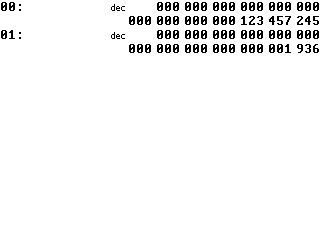
This is a basic UI demo. The UI is RPN-style, so to add two numbers, for example, type in the first number, press Enter, enter the second number, and then hit + to add them. You can enter numbers and perform addition, subtraction, and multiplication. 2nd, Mode, and Alpha changes how many bits are shown. Y=, Zoom, and Trace change the base between binary, decimal, and hexadecimal. Pressing Clear once will erase the current entry, pressing Clear a second time will quit.