


This is part of a larger project called Pebl. Pebl is an open source project to help teams stop iterating on vibes and start iterating on evidence. To learn more check out the website.
The Goal of Pebl Maps
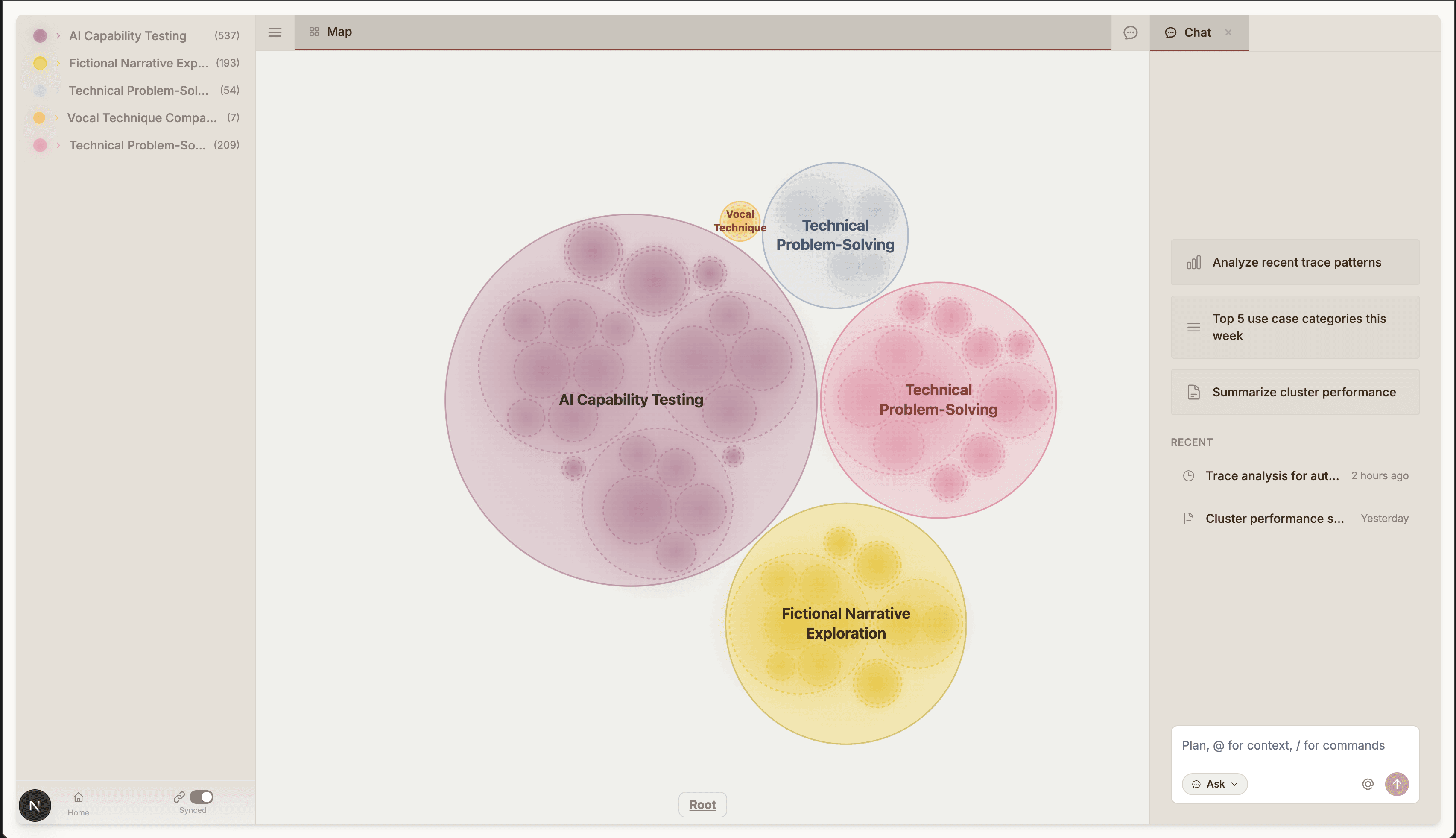
Pebl maps helps you understand how your users interact with your agents. This is done by automatically clustering and visualizing conversation traces and allowing you to investigate issues by drilling down infinitely into individual conversations. To pinpoint more specific issues and get more detailed answers, you can chat with an agent that is deeply understands your data.
To get started, upload your traces, and Pebl maps will generate topics, organize them into a hierarchical structure, and provide an interactive visualization to explore patterns in your data.
| Feature | Description |
|---|---|
| 🏷️ Automatic Topic Generation | Uses LLMs to summarize each conversation trace |
| 🌳 Hierarchical Clustering | Organizes traces into hierarchical clusters (broad categories) |
| 🫧 Interactive Bubble Visualization | Explore clusters with a zoomable, color-coded canvas |
| 🔍 Trace Viewer | Drill down infinitely into individual conversations |
| 🤖 AI-Powered Analysis | Chat with an AI agent to ask questions about your traces and get answers from your traces |
Note: Agent mode is currently unavailable, but will be coming soon!
- Python 3.10+
- Node.js 18+
- API Keys:
git clone https://github.com/yourusername/OpenClio.git
cd pebl-maps

# Install Python dependencies
pip install -r requirements.txt

# Install frontend dependencies
cd client
npm install
cd ..# Copy the example env files
cp .env.example .env
cp client/.env.example client/.env.local
# Edit .env and add your API keysYour input CSV should have a column containing conversation text. The expected format is a dictionary of turns:
# Example conversation format
{
  1: {"user": "Hello, how are you?", "assistant": "I'm doing well, thanks!"},
  2: {"user": "What's the weather?", "assistant": "I don't have access to weather data."}
}python -m pipeline.run --input your_traces.csv --conversation_col "Conversation"This will:
- Generate topic summaries for each conversation
- Create embeddings using OpenAI
- Cluster topics hierarchically (L2 → L1 → L0)
- Index everything into Pinecone
cd client
npm run dev
Open http://localhost:3000 to explore your traces!
┌─────────────────────────────────────────────────────────────────┐
│                         OpenClio                                 │
├─────────────────────────────────────────────────────────────────┤
│                                                                  │
│  ┌──────────────┐    ┌──────────────┐    ┌──────────────┐       │
│  │   Pipeline   │───▶│   Pinecone   │◀───│   Frontend   │       │
│  │              │    │   (Vectors)  │    │   (Next.js)  │       │
│  └──────────────┘    └──────────────┘    └──────────────┘       │
│         │                                       │                │
│         ▼                                       ▼                │
│  ┌──────────────┐                       ┌──────────────┐        │
│  │  OpenAI /    │                       │  Bubble      │        │
│  │  DeepSeek    │                       │  Canvas      │        │
│  │  (LLM APIs)  │                       │  + TreeView  │        │
│  └──────────────┘                       └──────────────┘        │
│                                                                  │
└─────────────────────────────────────────────────────────────────┘
| Step | Script | Description |
|---|---|---|
| 1 | generate_topics.py |
Summarizes each conversation using an LLM |
| 2 | embed_topics.py |
Creates vector embeddings for topics |
| 3 | cluster.py |
Performs hierarchical K-means clustering |
| 4 | upsert.py |
Indexes clusters and topics into Pinecone |
- Next.js 14 with App Router
- D3.js for bubble/circle packing visualization
- Tailwind CSS for styling
- Interactive cluster tree navigation
- Trace viewer with conversation replay
python -m pipeline.run --help

Options:
  --input              Input CSV file path (required)
  --output_dir         Directory for intermediate files (default: ./output)
  --conversation_col   Column name for conversation text (default: Conversation)
  --skip_generation    Skip topic generation step
  --skip_embedding     Skip embedding step
--skip_clustering Skip clustering stepEdit pipeline/cluster.py to customize:
@dataclass
class ClusterConfig:
    l2_clusters: int = 5   # Number of top-level categories
    l1_clusters: int = 5   # Sub-categories per L2
    l0_clusters: int = 5   # Topics per L1
model: str = "gpt-4o" # Model for labelingPebl-Maps/
├── client/ # Next.js frontend
│ ├── src/
│ │ ├── app/ # App router pages & API routes
│ │ ├── components/ # React components
│ │ ├── contexts/ # React contexts
│ │ └── lib/ # Utilities & types
│ └── ...
├── pipeline/ # Data ingestion pipeline
│ ├── run.py # Main entry point
│ ├── generate_topics.py # Topic generation
│ ├── embed_topics.py # Embedding creation
│ ├── cluster.py # Hierarchical clustering
│ └── upsert.py # Pinecone indexing
├── .env.example # Environment template
├── requirements.txt # Python dependencies
└── README.md
We welcome contributions! Please see CONTRIBUTING.md for guidelines.
This project is licensed under the MIT License - see the LICENSE file for details.
- Built with Next.js, D3.js, and Pinecone
- Inspired by the Clio project from Anthropic and our own experiences working in industry building agents at scale.