An AI-powered conversation and sales intelligence system that analyzes customer conversations in real-time, assists agents with AI-generated insights, and predicts sales outcomes.
.
├── server/          # Go backend (API, services, AI integration)
├── web/             # Next.js frontend (Admin dashboard & customer interface)
├── docker-compose.yml   # Docker orchestration for all services
└── README.md        # This file
The platform follows Clean Architecture principles with strict layer boundaries, ensuring separation of concerns and maintainability.
┌─────────────────────────────────────────────────────────────┐
│                        Frontend (Web)                        │
│  ┌──────────────┐  ┌──────────────┐  ┌──────────────┐     │
│  │ Admin        │  │ Agent        │  │ Customer     │     │
│  │ Dashboard    │  │ Interface    │  │ Interface    │     │
│  └──────────────┘  └──────────────┘  └──────────────┘     │
│         │                  │                  │             │
└─────────┼──────────────────┼──────────────────┼─────────────┘
          │                  │                  │
          └──────────────────┼──────────────────┘
                             │
                    HTTP/REST API (Port 8080)
                             │
┌────────────────────────────┼──────────────────────────────┐
│                    Backend (Server)                        │
│  ┌────────────────────────────────────────────────────┐   │
│  │              API Layer (Handlers)                  │   │
│  │  - HTTP request/response translation only          │   │
│  │  - No business logic, no DB queries, no AI calls   │   │
│  └────────────────────────────────────────────────────┘   │
│                            │                               │
│  ┌─────────────────────────┼───────────────────────────┐  │
│  │          Service Layer (Business Logic)             │  │
│  │  - Conversation Ingestion & Analysis                │  │
│  │  - Agent Assist (Suggestions, Pricing, Timing)      │  │
│  │  - Analytics & Trends Generation                    │  │
│  │  - Auto-reply Management                            │  │
│  └─────────────────────────┼───────────────────────────┘  │
│                            │                               │
│  ┌─────────────────────────┼───────────────────────────┐  │
│  │  ┌──────────┐  ┌──────────┐  ┌──────────┐          │  │
│  │  │  AI      │  │  Rules   │  │ Storage  │          │  │
│  │  │  Layer   │  │  Engine  │  │  Layer   │          │  │
│  │  └──────────┘  └──────────┘  └──────────┘          │  │
│  └─────────────────────────────────────────────────────┘  │
└────────────────────────────┼──────────────────────────────┘
                             │
        ┌────────────────────┼────────────────────┐
        │                    │                    │
┌───────▼──────┐  ┌──────────▼──────────┐  ┌────▼────────┐
│  PostgreSQL  │  │     ChromaDB        │  │  Gemini API │
│   (Port      │  │   (Port 8000)       │  │  (External) │
│    5432)     │  │                     │  │             │
│              │  │  - Semantic Search  │  │  - LLM      │
│  - Users     │  │  - Embeddings       │  │  - Analysis │
│  - Conversations │  - Product KB     │  │  - Embeddings│
│  - Rules     │  │                     │  │             │
│  - Analytics │  │                     │  │             │
└──────────────┘  └─────────────────────┘  └─────────────┘
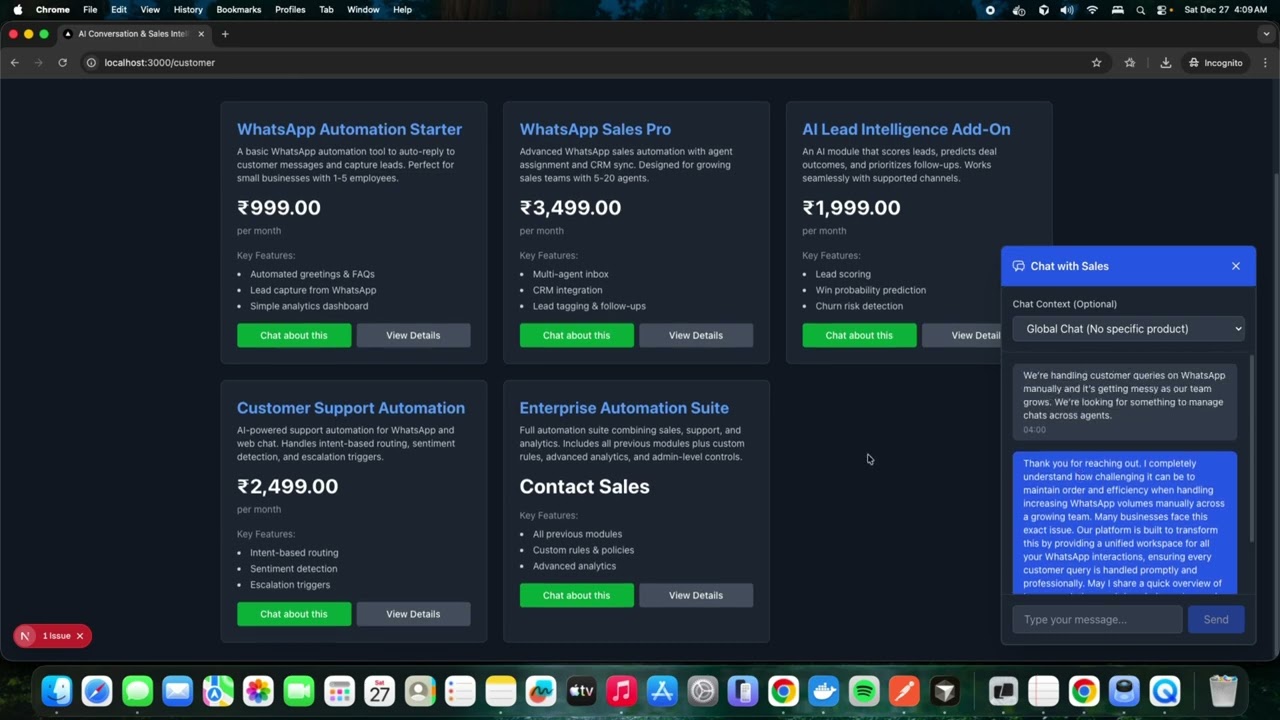
🔗 Direct Link: https://youtu.be/MiJjFnMWRK8?si=aeVqrEPlruqtTuJF
- Purpose: HTTP request/response translation only
- Responsibilities:
- Parse HTTP requests (JSON, form data)
- Validate input format
- Call appropriate service methods
- Format responses (JSON)
- Handle HTTP status codes
- Constraints: No business logic, no database queries, no AI calls
- Purpose: Business use-case orchestration
- Key Services:
- Conversation Service: Ingests and processes conversations
- Agent Assist Service: Generates AI suggestions, pricing recommendations, timing advice
- Analytics Service: Generates analytics, trends, and insights
- Auto-reply Service: Manages automated reply rules
- Responsibilities:
- Orchestrate business workflows
- Coordinate between storage, AI, and rules layers
- Apply business rules and validation
- Constraints: No HTTP handling, no SQL strings, no direct AI API calls
- Purpose: Data persistence and retrieval (CRUD only)
- Components:
- PostgreSQL Storage: Users, conversations, rules, analytics, products
- ChromaDB Storage: Semantic search, embeddings, product knowledge base
- Responsibilities:
- Database operations (create, read, update, delete)
- Connection management
- Transaction handling
- Constraints: No business logic, no AI calls, pure data operations
- Purpose: AI orchestration and integration
- Components:
- Gemini Client: Google Gemini API integration
- Analyzer: Conversation analysis (sentiment, intent, emotions)
- Embedding Service: Text embedding generation
- Confidence Scoring: AI output reliability assessment
- Fallback Mechanisms: Graceful degradation when AI fails
- Responsibilities:
- External AI API communication
- Embedding generation and storage
- Semantic search coordination
- Constraints: No business logic, no storage decisions, pure AI operations
- Purpose: Policy validation and business rule enforcement
- Responsibilities:
- Validate AI outputs against business rules
- Apply safety controls
- Enforce compliance policies
- Critical: All AI outputs must pass rule engine validation
- Philosophy: "AI is NOT trusted" - all outputs are validated
- Single Responsibility Principle: Each package has one reason to change
- Layer Boundaries: Strict separation between layers
- AI is NOT Trusted: All AI outputs must pass rule engine validation
- Dependency Direction: Outer layers depend on inner layers, never reverse
- Explicit Over Implicit: Clear interfaces, no hidden dependencies
- Docker & Docker Compose (recommended) OR
- Go 1.21+ and Node.js 18+ (for local development)
- PostgreSQL 15+ (if not using Docker)
- ChromaDB (if not using Docker)
- Google Gemini API Key (required for AI features)
This is the easiest way to get started as it handles all dependencies automatically.
Create a .env file in the root directory:
# Google Gemini API Key (Required for AI features)
GEMINI_API_KEY=your_gemini_api_key_here

# Tenant Configuration
TENANT_ID=OMX26

# Database Configuration
POSTGRES_USER=omx_user
POSTGRES_PASSWORD=omx_password
POSTGRES_DB=omx_db

# JWT Secret (Change in production!)
JWT_SECRET=your-secret-key-change-in-production

# Default Admin User (Created automatically on first startup)
DEFAULT_ADMIN_TENANT_ID=OMX26
[email protected]
DEFAULT_ADMIN_PASSWORD=OMX@2026

# Service URLs (Used by API service)
CHROMA_URL=http://chromadb:8000# From the root directory
docker-compose up -dThis will start:
- PostgreSQL on port
5432 - ChromaDB on port
8000 - API Server on port
8080
Check service status:
docker-compose psView API logs to ensure everything started correctly:
docker-compose logs -f apiYou should see:
- Database connection successful
- ChromaDB connection successful
- Gemini API initialized (if API key is valid)
- Default admin user created
- Server running on port 8080
In a new terminal, navigate to the web directory and start the frontend:
cd web
npm install
npm run dev
The frontend will be available at http://localhost:3000
- Open
http://localhost:3000in your browser - Use the default admin credentials:
- Tenant ID:
OMX26 - Email:
[email protected] - Password:
OMX@2026
- Tenant ID:
# View logs
docker-compose logs -f api          # API logs
docker-compose logs -f postgres     # Database logs
docker-compose logs -f chromadb     # ChromaDB logs

# Stop all services
docker-compose down

# Stop services (keep data)
docker-compose stop

# Restart services
docker-compose restart

# Rebuild and restart
docker-compose up -d --build

# Remove all data (fresh start)
docker-compose down -vFor development without Docker, you can run services locally.
Install and start PostgreSQL, then create the database:
createdb omx_db
# Or using psql:
psql -c "CREATE DATABASE omx_db;"You can run ChromaDB using Docker (just for ChromaDB):
docker run -d \
  --name chromadb \
  -p 8000:8000 \
  -v chromadb_data:/chroma/chroma \
  chromadb/chroma:latest
Or install ChromaDB locally (see ChromaDB documentation).
cd server

# Install Go dependencies
go mod download

# Create .env file
cat > .env << EOF
GEMINI_API_KEY=your_gemini_api_key_here
TENANT_ID=OMX26
DB_TYPE=postgres
DATABASE_URL=postgres://omx_user:omx_password@localhost:5432/omx_db?sslmode=disable
CHROMA_URL=http://localhost:8000
PORT=8080
JWT_SECRET=your-secret-key
POSTGRES_HOST=localhost
POSTGRES_PORT=5432
POSTGRES_USER=omx_user
POSTGRES_PASSWORD=omx_password
DEFAULT_ADMIN_TENANT_ID=OMX26
[email protected]
DEFAULT_ADMIN_PASSWORD=OMX@2026
EOF

# Run database migrations
make migrate
# or
go run cmd/migrate/main.go -direction=up

# Start the server
make run
# or
go run cmd/api/main.go
The API server will be available at http://localhost:8080
cd web

# Install dependencies
npm install

# Create environment file
echo "NEXT_PUBLIC_API_URL=http://localhost:8080" > .env.local

# Start development server
npm run dev
The frontend will be available at http://localhost:3000
Verify that all services are running correctly:
# API Health
curl http://localhost:8080/health

# ChromaDB Health
curl http://localhost:8000/api/v2/heartbeat

# Test Login
curl -X POST http://localhost:8080/api/auth/login \
  -H "Content-Type: application/json" \
  -d '{
    "email": "[email protected]",
    "password": "OMX@2026",
    "tenant_id": "OMX26"
}'- ✅ Real-time Conversation Analysis: Analyze conversations for sentiment, intent, and emotions
- ✅ AI-Powered Agent Assistance: Get AI-generated reply suggestions with confidence scores
- ✅ Lead Scoring & Prioritization: Automatically score and prioritize leads
- ✅ Sentiment & Intent Detection: Understand customer emotions and intentions
- ✅ Rule-Based Safety Controls: Ensure AI outputs comply with business rules
- ✅ Multi-Tenant Support: Isolated data and configurations per tenant
- ✅ Semantic Search: ChromaDB-powered semantic search for product knowledge
- ✅ Analytics Dashboard: Comprehensive analytics with charts and visualizations
- ✅ Auto-reply Management: Configure automated responses
- ✅ Customer Memory: Track and manage customer preferences
POST /api/auth/login- Login with email, password, and tenant ID
GET /api/conversations- List all conversationsGET /api/conversations/:id- Get conversation detailsPOST /api/conversations- Create new conversationPOST /api/conversations/:id/messages- Send message
GET /api/agentassist/suggestions/:conversation_id- Get AI suggestionsGET /api/agentassist/pricing/:conversation_id- Get pricing recommendationsGET /api/agentassist/timing/:conversation_id- Get timing advice
GET /api/analytics/dashboard- Get dashboard analyticsGET /api/analytics/trends- Get trend data
GET /api/rules- List all rulesPOST /api/rules- Create rulePUT /api/rules/:id- Update ruleDELETE /api/rules/:id- Delete rule
GET /api/products- List productsPOST /api/products- Add productPUT /api/products/:id- Update productDELETE /api/products/:id- Delete product
cd server

# Run tests
make test

# Build binaries
make build

# Run migrations
make migrate

# View available commands
make helpcd web
# Run development server
npm run dev
# Build for production
npm run build
# Start production server
npm start
# Lint code
npm run lintGEMINI_API_KEY: Google Gemini API key (required for AI features)DATABASE_URLorPOSTGRES_*: PostgreSQL connection detailsCHROMA_URL: ChromaDB connection URLJWT_SECRET: Secret key for JWT token signing
TENANT_ID: Default tenant IDPORT: API server port (default: 8080)DEFAULT_ADMIN_*: Default admin user credentials
-
Check if ports are already in use:
lsof -i :8080  # API
lsof -i :3000  # Frontend
lsof -i :5432  # PostgreSQL
lsof -i :8000  # ChromaDB
-
Check Docker logs:
docker-compose logs
-
Verify environment variables are set correctly
- Ensure PostgreSQL is running
- Check database credentials in
.env - Verify network connectivity (if using Docker, services use service names, not localhost)
- Verify
GEMINI_API_KEYis set and valid - Check API logs for Gemini API errors
- Ensure ChromaDB is accessible
- Verify
NEXT_PUBLIC_API_URLis set correctly inweb/.env.local - Check CORS settings (if needed)
- Ensure backend is running on the correct port
Proprietary