

The Knowing Less theme is a HUGO theme for podcasts.
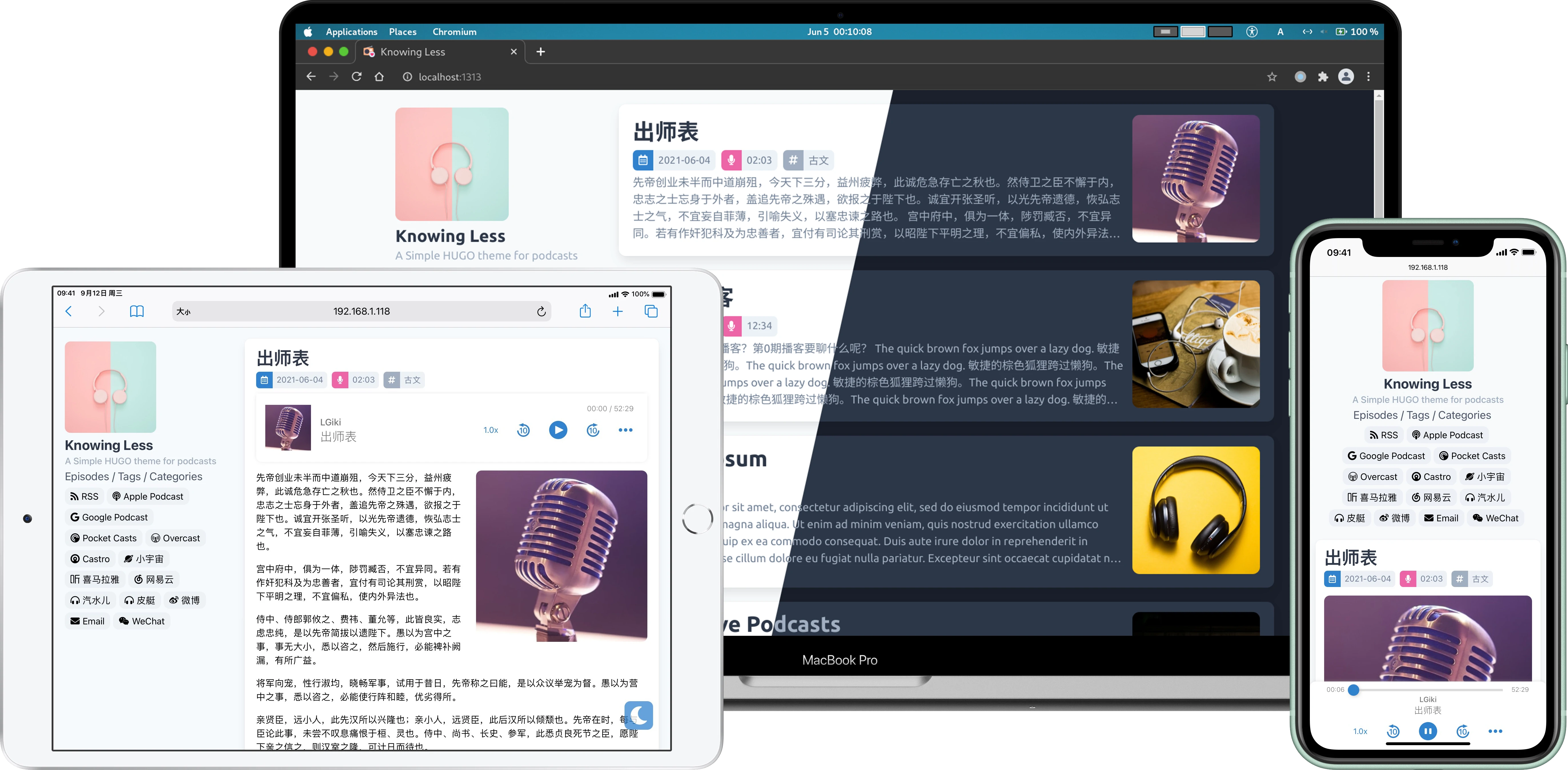
- Responsive: Elegant responsive double column layout.
- Design for podcast: Support generate podcast RSS feed from published episodes automatically and has many podcast related options.
- Multi-languages support: currently
zh-CN,zh-TW,enandde, PR welcome. - Dark mode support
Clone it to themes/knowing-less:
git clone https://github.com/LGiki/hugo-theme-knowing-less themes/knowing-lessOr if you already have a git repo in your site folder and don't want to make any changes to this theme, you can add it as a submodule:
git submodule add https://github.com/LGiki/hugo-theme-knowing-less themes/knowing-lessCopy the config.toml file from exampleSite folder to the root folder of your Hugo site:
cp themes/knowing-less/exampleSite/config.toml hugo.tomlFeel free to change it.
Following needs to be changed in config.toml, not all config needs customization, you just change what you need.
If you want to display some links in the sidebar, set it like following:
[[menu.main]]
  name = "Episodes"
  weight = 20
  identifier = "episodes"
  url = "/episode/"
[[menu.main]]
  name = "Tags"
  weight = 30
  identifier = "tags"
  url = "/tags/"
[[menu.main]]
  name = "Categories"
  weight = 40
  identifier = "categories"
url = "/categories/"You can configure the social links in the sidebar like following:
[[params.links]]
  title = "Apple Podcast"
  fontAwesomeIcon = "fas fa-podcast"
  link = "https://example.org"
  svg = ""
If you leave the link field blank, this link will not displayed in the sidebar.
You can specify icon by fontAwesome or svg field:
-
If using
fontAwesome, simply fill thefontAwesomefield with class name of icon. For example:fontAwesomeIcon = "fas fa-podcast"
-
If using
svg, you need put your SVG icon tostatic/icons/, then specify thesvgfield. For example:svg = "/icons/cosmos.svg"
This theme also support show WeChat Official Account QR code in sidebar, you can set weChatQRCode as your WeChat Official Account QR code image URL, when you mouse over the WeChat link in the sidebar, will display this QR code automatically.
-
Podcast Title
Specify the
titlefield to set the podcast title. -
Podcast Author
Set podcast author like following:
[author]
  name = "LGiki"
  email = "lgiki@example.org"
-
Podcast Cover Image
Specify the
podcastImagefield with image URL to set the podcast cover image. -
Podcast Category
Set podcast category like following:
[[params.podcastCategory]]
  title = "Society & Culture"
  subTitle = "Personal Journals"
[[params.podcastCategory]]
  title = "Society & Culture"
  subTitle = "Relationships"
[[params.podcastCategory]]
  title = "Society & Culture"
  subTitle = "Documentary"
This theme will automatically generate podcast RSS feed from published episodes. The generated RSS feed link will be displayed in the sidebar.
If your podcast already has an RSS feed link and you don't want to use the RSS feed generated by this theme, you can specify podcastRSS field with your own RSS feed link, then the link you set will displayed in the sidebar.
For this theme, you should use episode instead of posts:
hugo new episode/your-title-here.mdIf you make any changes to this theme, please commit them first. You can only pull when your workspace is clean.
Then use git pull to get the newest commits, if there is a conflict, merge it manually:
cd ./themes/knowing-less
git pullThe archetypes/default.md shows all available parameters. Copy this file to the archetypes folder in the root of your Hugo site, then new episode will use this template automatically.
Podcast related front matter as following:
coverImage: ""
enclosureURL: ""
enclosureType: ""
enclosureLength: ""
author: ""
# The duration can be either string or integer (in seconds), for example:
# If set duration to 12345 will displayed 03:25:45
# If set duration to "12:34" will displayed 12:34
duration: 0
hiddenFromRSS: false-
coverImageEpisode cover image URL.
-
enclosure
There are three enclosure related parameters:
-
enclosureURL: episode audio file URL. -
enclosureType: episode audio file MIME type, e.g.,audio/x-m4a,audio/mpeg. -
enclosureLength: episode audio file length (in bytes).
These parameters are used to generate podcast RSS feed and also for the player in the episode page.
For example, if set enclosure related parameters like this:
enclosureURL: "https://example.org/episode1.mp3"
enclosureType: "audio/mpeg"
enclosureLength: "123456"
Will generated in RSS feed as following:
<enclosure url="https://example.org/episode1.mp3" type="audio/mpeg" length="123456" />
-
-
authorEpisode author.
-
durationThe duration can be either string or integer (in seconds), for example:
- If you set the duration to
12345, will displayed as03:25:45 - If you set the duration to
"12:34", will displayed as"12:34"
- If you set the duration to
-
hiddenFromRSSIf you set this parameter to true, the episode will not appear in the generated RSS feed.
This theme provides player shortcode for insert podcast player into posts.
The usage of player is:
{{% player "Title here" "Author here" "Cover image URL here" "Audio file URL here" %}}
- ananke
- hugo-theme-even
- github-markdown-css
- Favicon is made by Freepik from Flaticon