Home
Welcome to the uuvr wiki!
- 5.4 - Unity Version which supports VR (and we have assetmanager.enabledVRDevices to use)
- 5.4.6 - SteamVR is released for Unity (Until SteamVR version 2.6.1, then newer Unity versions are supported only. https://web.archive.org/web/20201204092652/https://assetstore.unity.com/packages/tools/integration/steamvr-plugin-32647)
- 2018.1
- UnityEngine.VRModule.dll is in Managed folder shared by game. Before that, namespace isn't named in documentation.
- Net standard 2.0 (.net46) stable and .net35 legacy. (https://learn.microsoft.com/en-us/visualstudio/gamedev/unity/unity-scripting-upgrade?utm_source=perplexity)
- 2021.2 - IL2CPP including .net standard 2.1 (für unity similar to .net60). arrived.
- Feedback from another VR modder: Unity is not changing that much with each versions. The only major changes are pre or post 2020 with how unity handles VR support, and the different render pipelines urp, hdrp for post 2020 games. Other than that you should be good.
| Version | Game | Status |
|---|---|---|
| 5.4.3p3 (Mono) | Yooka-Laylee | First Unity minor version (5.4.x) which supports VR. SteamVR is officially not yet released for it (Starting with 5.4.6). HMD Projection works partially (didn't test in detail). Input system: Rewired (not Input.GetButton()). |
| 2020.3.9f1 (Mono) | I Am Fish | HDRP, redirecting Canvas in main menu not working... |
- No UnityEngine.VRModule.dll exists so far.
- Need to compile against stripped UnityEngine.dll from this version.
- SteamVR version 2.6.1 needed (newer versions are referencing UnityEngine.XR namespace which is included in UnityEngine.VRModule.dll earliest)
Note
Challenging my idea at the Flat2VR Discord Server showed me, that I thought too complex and the general legacy-modern approach is sufficient. Skipping this Loader idea for now.
As we want to support a wide range of Unity and versions, we need to enhance our system architecture to keep up with complexity.
1. Multiple Unity versions might need different ways on how to set a feature or general API calls.
Handled via one Implementation source code base which is separated by #ifdef pragmas for specific needs
2. Unity changed .net versions over years (.net35, .net47, .net60)
For Mono, we stick with first version (.net35) for il2cpp too (.net60). C# provides backward compatibility and therefore only modern language features or possible improvements are missed (.net48), but it reduces .dll version complexity.
3. Unity has two backends being used: Mono + IL2CPP
As both have general different usage e.g. for a MonoBehavior constructur, we need to compile for both options (Starting from Unity version which supports IL2CPP)
4. Different Unity versions are compatible with different 3rd party dependencies
e.g., SteamVR unity package needs to be used in a separate version for Unity 5.x. We therefore need to reference the correct one at build time and load it at runtime.
5. Additional 3rd party frameworks used by a game, might need special handling
e.g., Rewired input framework ignoring Unity's Input.GetButton() feature and needs special treatment. Selectively load it at runtime and call it's logic.
Why not putting it into UUVR.Implementation: As we always compile against stripped .dlls from actual game directories, we need to ensure, that a person without any game and this plugin can compile and run UUVR on their development environment.
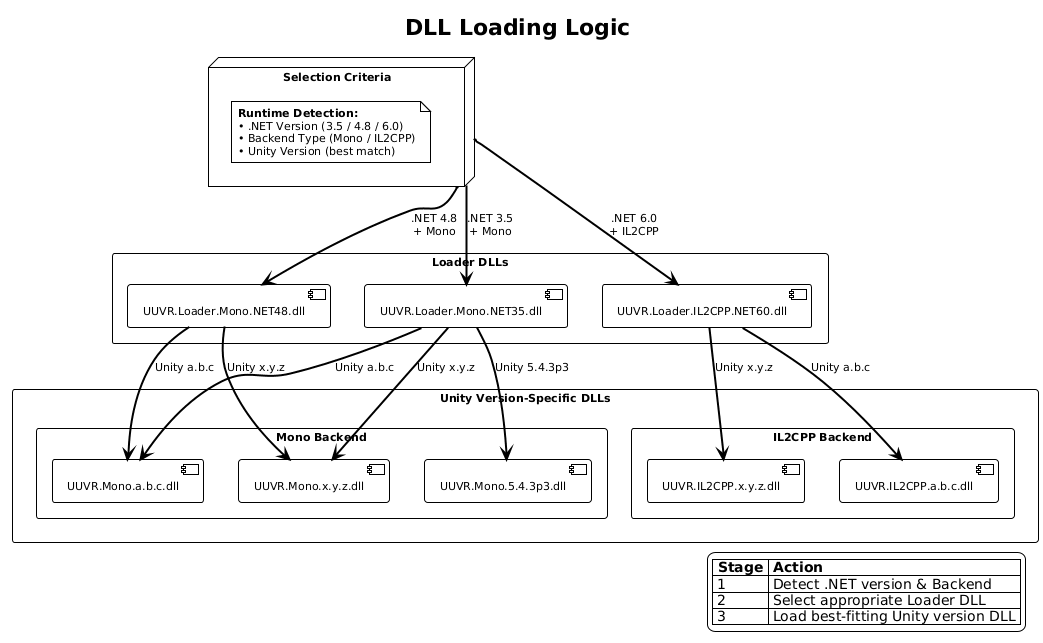
The following dll loading structure will handle each case:
/
├─ UUVR.Patcher/            # Execute pre-runtime logic like copying XR dlls into Unity Plugin folder.
├─ UUVR.Loader/             # Load implementations based on Unity version and backend
├─ UUVR.Implementation/     # Implementation of general and Unity specific code. Separated by #ifdef pragmas.
|  ├─ namespace UUVR.Core
|  ├─ namespace UUVR.Camera
|  ├─ namespace UUVR.Input
|  ├─ namespace UUVR.Util
|  ├─ ...
├─ UUVR.SteamVR-2.6.1/      # Some legacy Unity versions need a different SteamVR version
├─ UUVR.SteamVR-2.8.5/
├─ UUVR.SteamVR-2.8.5/
├─ UUVR.Rewired/            # Special handling for some Game specific needs and logic.
Based on Unity version and backend needs, we will have the following DLLs compiled:
patcher/
├─ UUVR
|  ├─ UUVR.Patcher.dll                     # Possibility to copy different .dlls for general XR additional to Unity's Plugins/ folder.
plugins/
├─ UUVR
│  ├─ UUVR.Loader.Mono.NET35.dll           # Contains general BepInEx plugin logic (different for each backend type)
│  ├─ UUVR.Loader.IL2CPP.NET60.dll
│  ├─ implementation
│  │  ├─ UUVR.Mono.543p3.dll               # Unity version + backend specific compilations
│  │  ├─ UUVR.Mono.2019xx.dll
│  │  ├─ UUVR.Mono.6xx.dll
│  │  ├─ UUVR.IL2CPP.6xx.dll
│  ├─ tools
│  │  ├─ UUVR.SteamVR.2.6.1.dll            # Unity 5.4-5.6 needs a different SteamVR version.
│  │  ├─ UUVR.SteamVR.latest.dll
│  ├─ game-plugins
│  │  ├─ UUVR.Rewired.dll                  # Some games might need special handling. Load this logic based on game configuration.
To ensure the different versions of Unity and its backends are tested (at least compile time), loading of libs also changes:
- Each major Unity version loads specific stripped Unity-*.dlls
- For CI, there will be an additional repository where these .dlls reside
- A build-all test script can be leveraged to test it locally too
Example:
Build UUVR.Mono.5.dll -> Use build time dependencies at /lib/Mono/5/*
UUVR.Mono.2019.dll    -> Use build time dependencies at /lib/Mono/2019/*
UUVR.Mono.6.dll       -> Use build time dependencies at /lib/Mono/6/*
UUVR.IL2CPP.6.dll     -> Use build time dependencies at /lib/IL2CPP/6/*