


A non-opinionated and easily configurable PostgreSQL backplane for SignalR
Currently in beta and happy for your feedback!
PostgreSignalR is an attempt to create a backplane for SignalR using Postgres. What does that all mean? SignalR is an ASP.NET library for developing websocket applications, allowing bidirectional client and server communication. This is especially useful for applications where I want to send real-time notifications from my server to my clients. Websocket applications have an inherent horizontal scaling problem: if there are two server replicas with clients connected to each server, how would a client connected to Server A be able to be notified about an event originating on Server B?
SignalR introduces a backplane concept to solve this problem: a single Redis instance that multiple SignalR servers connect to, allowing SignalR to route internal messages between distributed servers. This way when Server A sends a websocket message, SignalR can notify its peers across Redis, allowing Server B to deliver the same message to its clients.
This is great, but what if I really like Postgres and want to use that instead of Redis? Postgres has pub/sub functionality not dissimilar to Redis, so it should be able to be used. While Microsoft only maintains an official backplane for Redis, it does expose the interfaces I need to implement in order to create a backplane using Postgres. This repository is an attempt to do just that; in fact, the Redis backplane is open source under MIT, so this repository is built entirely off that codebase. The ASP MIT license has been copied to this repo.
Setting up the Postgres backplane for SignalR is very simple. If you've configured the official Redis backplane before these steps will be quite simple.
- You'll need a Postgres server of course; deploy a new one or use your existing database
- Install the PostgreSignalR Nuget package in your server project
- In your ASP setup logic, add the Postgres backplane to the service builder:
builder.Services.AddSignalR().AddPostgresBackplane("<your_postgres_connection_string>");That is all you need to get up and going! PostgreSignalR aims to be very extensible though, so there are some extra options you might find useful. PostgreSignalR will use your connection string to build an NpgsqlDataSource, so if you already have a data source you can provide that directly:
var dataSource = new NpgsqlDataSourceBuilder("<your_postgres_connection_string>").Build();
builder.Services.AddSignalR().AddPostgresBackplane(dataSource);You can configure options for the backplane. All of the options are presented below and documented in detail in the wiki:
var dataSource = new NpgsqlDataSourceBuilder("<your_postgres_connection_string>").Build();
builder.Services.AddSignalR().AddPostgresBackplane(dataSource, options =>
{
    options.Prefix = "myapp";
    options.ChannelNameNormaization = ChannelNameNormaization.Truncate;
    options.OnInitialized += () => { /* Do something */ };
});By default, PostgreSignalR will send message payloads within the notification event payload in Postgres. Postgres limits the size of these payloads to 8kb. This limit is more than enough for most use cases, but PostgreSignalR does include a mechanism to handle payloads of any size by storing the payloads in a table and only passing references to that table in the notification event payload.
builder.Services.AddSignalR()
    .AddPostgresBackplane(dataSource)
    .AddBackplaneTablePayloadStrategy();
The payload table strategy comes with its own configuration options as well. All of the options are presented below and documented in detail in the wiki:
builder.Services.AddSignalR()
    .AddPostgresBackplane(dataSource)
    .AddBackplaneTablePayloadStrategy(options =>
    {
        options.StorageMode = PostgresBackplanePayloadTableStorage.Auto;
        options.SchemaName = "backplane";
        options.TableName = "payloads";
        options.AutomaticCleanup = true;
        options.AutomaticCleanupTtlMs = 1000;
        options.AutomaticCleanupIntervalMs = 3600000;
    });
The payload table strategy allows you to create your own table in Postgres, but for ease-of-use it also includes a default table implementation which you can use:
builder.Services.AddSignalR()
    .AddPostgresBackplane(dataSource)
    .AddBackplaneTablePayloadStrategy();

var app = builder.Build();

await app.InitializePostgresBackplanePayloadTableAsync();
For more advanced use cases, PostgreSignalR allows you to create a custom payload strategy.
Note: more benchmarks are TBD! I'm always happy to include help with benchmarking if you're good at benchmarks :)
The benchmarks directory contains the benchmark code and instructions on how to run the benchmarks. Because benchmarks are incredibly hardware-dependent, and because variables might cause significant differences from the environment you're targeting, I'd encourage you to run the benchmarks with your own numbers to see if PostgreSignalR behaves appropriately for your use case.
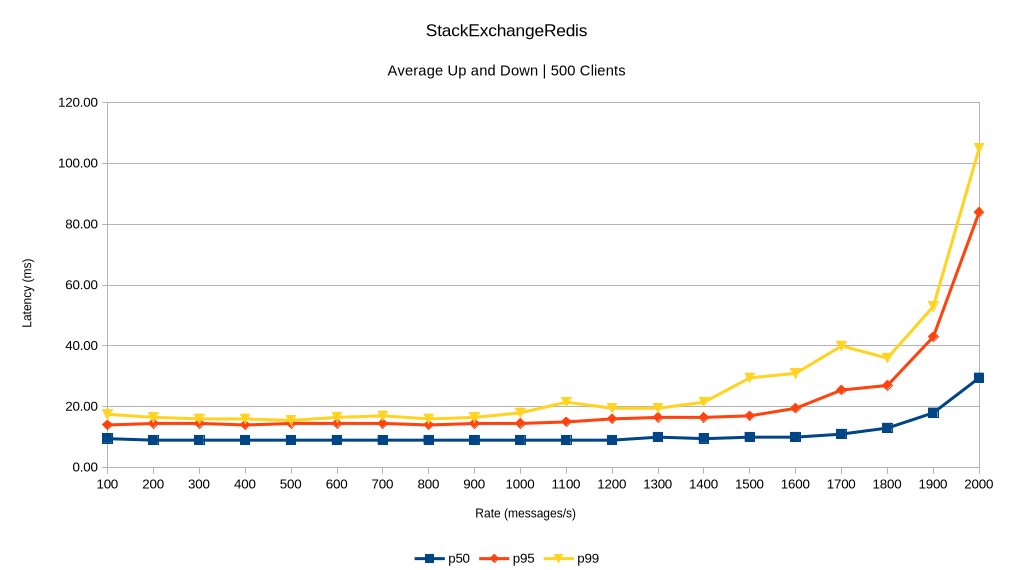
Running the benchmarks on my hardware, the comparison between PostgreSignalR and the Redis backplane are favorable. The benchmark tests end-to-end message latency under load. With 500 connections and 128 maximum concurrent requests from the test server:
StackExchangeRedis Benchmark Results
Sweep up:
| Rate (msg/s) | p50 (ms) | p95 (ms) | p99 (ms) | Max (ms) |
|---|---|---|---|---|
| 100 | 9.0 | 14.0 | 16.0 | 22.0 |
| 200 | 9.0 | 15.0 | 17.0 | 39.0 |
| 300 | 9.0 | 14.0 | 15.0 | 17.0 |
| 400 | 9.0 | 13.0 | 15.0 | 17.0 |
| 500 | 9.0 | 14.0 | 15.0 | 21.0 |
| 600 | 9.0 | 14.0 | 16.0 | 46.0 |
| 700 | 9.0 | 14.0 | 17.0 | 28.0 |
| 800 | 9.0 | 14.0 | 16.0 | 32.0 |
| 900 | 9.0 | 14.0 | 16.0 | 30.0 |
| 1000 | 9.0 | 14.0 | 16.0 | 31.0 |
| 1100 | 9.0 | 15.0 | 24.0 | 76.0 |
| 1200 | 9.0 | 16.0 | 19.0 | 38.0 |
| 1300 | 10.0 | 16.0 | 19.0 | 33.0 |
| 1400 | 9.0 | 16.0 | 21.0 | 39.0 |
| 1500 | 10.0 | 17.0 | 37.0 | 69.1 |
| 1600 | 10.0 | 19.0 | 28.0 | 58.0 |
| 1700 | 11.0 | 24.0 | 32.0 | 48.0 |
| 1800 | 13.0 | 27.0 | 37.0 | 55.0 |
| 1900 | 17.0 | 41.0 | 52.0 | 63.0 |
| 2000 | 30.0 | 63.0 | 80.1 | 100.0 |
Sweep down:
| Rate (msg/s) | p50 (ms) | p95 (ms) | p99 (ms) | Max (ms) |
|---|---|---|---|---|
| 2000 | 29.0 | 105.0 | 130.0 | 158.1 |
| 1900 | 19.0 | 45.0 | 54.0 | 71.0 |
| 1800 | 13.0 | 27.0 | 35.0 | 57.0 |
| 1700 | 11.0 | 27.0 | 48.0 | 66.0 |
| 1600 | 10.0 | 20.0 | 34.0 | 63.0 |
| 1500 | 10.0 | 17.0 | 22.0 | 49.0 |
| 1400 | 10.0 | 17.0 | 22.0 | 48.0 |
| 1300 | 10.0 | 17.0 | 20.0 | 67.0 |
| 1200 | 9.0 | 16.0 | 20.0 | 48.0 |
| 1100 | 9.0 | 15.0 | 19.0 | 42.0 |
| 1000 | 9.0 | 15.0 | 20.0 | 63.0 |
| 900 | 9.0 | 15.0 | 17.0 | 22.0 |
| 800 | 9.0 | 14.0 | 16.0 | 19.0 |
| 700 | 9.0 | 15.0 | 17.0 | 55.0 |
| 600 | 9.0 | 15.0 | 17.0 | 23.0 |
| 500 | 9.0 | 15.0 | 16.0 | 19.0 |
| 400 | 9.0 | 15.0 | 17.0 | 46.0 |
| 300 | 9.0 | 15.0 | 17.0 | 19.0 |
| 200 | 9.0 | 14.0 | 16.0 | 17.0 |
| 100 | 10.0 | 14.0 | 19.0 | 19.0 |
PostgreSignalR Benchmark Results
Sweep up:
| Rate (msg/s) | p50 (ms) | p95 (ms) | p99 (ms) | Max (ms) |
|---|---|---|---|---|
| 100 | 9.0 | 14.0 | 22.0 | 23.0 |
| 200 | 9.0 | 16.0 | 18.0 | 20.0 |
| 300 | 9.0 | 15.0 | 18.0 | 20.0 |
| 400 | 9.0 | 15.0 | 17.0 | 41.0 |
| 500 | 8.0 | 14.0 | 16.0 | 36.0 |
| 600 | 9.0 | 14.0 | 16.0 | 20.0 |
| 700 | 9.0 | 14.0 | 17.0 | 21.0 |
| 800 | 9.0 | 14.0 | 16.0 | 22.0 |
| 900 | 9.0 | 14.0 | 17.0 | 41.0 |
| 1000 | 9.0 | 15.0 | 17.0 | 53.0 |
| 1100 | 9.0 | 16.0 | 19.0 | 37.0 |
| 1200 | 10.0 | 17.0 | 23.0 | 66.0 |
| 1300 | 10.0 | 18.0 | 26.0 | 44.0 |
| 1400 | 11.0 | 18.0 | 25.0 | 52.0 |
| 1500 | 11.0 | 20.0 | 29.0 | 54.0 |
| 1600 | 11.0 | 22.0 | 31.0 | 53.0 |
| 1700 | 12.0 | 25.0 | 36.0 | 73.0 |
| 1800 | 17.0 | 40.0 | 61.0 | 89.0 |
| 1900 | 23.0 | 79.0 | 129.0 | 167.0 |
| 2000 | 26.0 | 86.0 | 211.1 | 294.1 |
Sweep down:
| Rate (msg/s) | p50 (ms) | p95 (ms) | p99 (ms) | Max (ms) |
|---|---|---|---|---|
| 2000 | 25.0 | 78.0 | 101.1 | 125.1 |
| 1900 | 22.0 | 72.1 | 138.1 | 172.0 |
| 1800 | 15.0 | 40.0 | 58.0 | 82.0 |
| 1700 | 12.0 | 23.0 | 30.0 | 42.0 |
| 1600 | 11.0 | 24.0 | 39.0 | 69.1 |
| 1500 | 11.0 | 19.0 | 27.0 | 51.0 |
| 1400 | 10.0 | 17.0 | 21.0 | 44.0 |
| 1300 | 10.0 | 17.0 | 21.0 | 56.0 |
| 1200 | 10.0 | 17.0 | 19.0 | 40.0 |
| 1100 | 9.0 | 16.0 | 20.0 | 44.0 |
| 1000 | 9.0 | 15.0 | 17.0 | 67.0 |
| 900 | 9.0 | 15.0 | 17.0 | 46.0 |
| 800 | 9.0 | 15.0 | 18.0 | 36.0 |
| 700 | 9.0 | 15.0 | 18.0 | 68.0 |
| 600 | 9.0 | 15.0 | 17.0 | 56.0 |
| 500 | 9.0 | 16.0 | 17.0 | 26.0 |
| 400 | 9.0 | 16.0 | 20.0 | 48.0 |
| 300 | 9.0 | 15.0 | 17.0 | 34.0 |
| 200 | 9.0 | 15.0 | 17.0 | 19.0 |
| 100 | 8.0 | 15.0 | 16.0 | 20.0 |
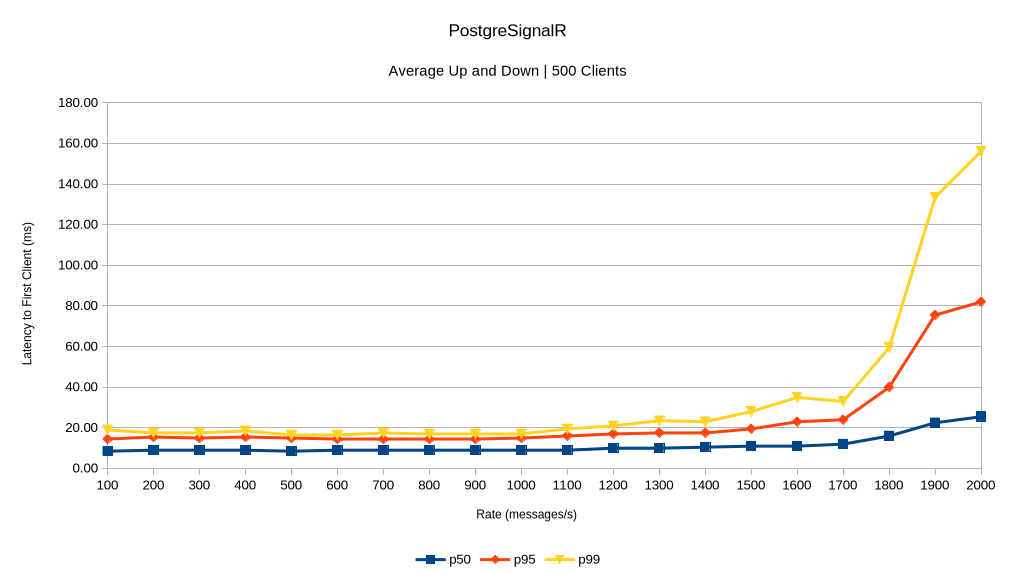
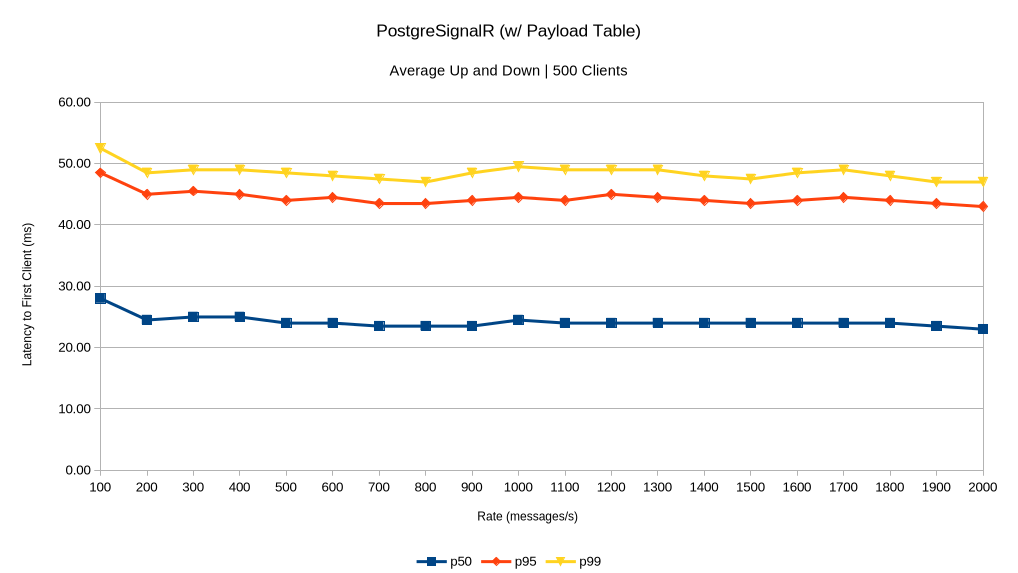
We can see that both backplanes begin to buckle at 1800 messages/second, and PostgreSignalR seems to have higher latency at the 99th percentile than Redis when the message load increases beyond this point. Importantly, performance is relatively identical between the two (with the exception of PostgreSignalR's higher latency at the tail under heavier load) and no messages were lost in either run.
This indicates to me that PostgreSignalR is a viable alternative to Redis as a backplane for SignalR and will behave well in typical scenarios.
An unexpected result is that PostgreSignalR behaves much more consistently when using the payload table. Past 1800 messages/sec in these benchmarks it appears that the payload table would be preferred. YMMV of course!
To stress again though - these results are with one particular configuration on one particular machine and almost certainly don't represent the performance you may see.
This library is brand-new, so while it should support all SignalR features it hasn't been thoroughly tested and vetted for production use. The immediate next steps are aimed at making this production-ready:
- Automated tests to ensure the functionality of the library
- Performance tests and benchmarks to optimize the code and find at-scale bugs
- Writing one or several example applications utilizing all of the SignalR features
- Adding additional configuration options to allow more flexibility in error handling
- Observe in production or production-like scenarios
Right now the library has been released on Nuget in a beta version, which I mean to be an indication that this is a viable product, though it requires more thorough testing and vetting in production scenarios. The API is still subject to change.
- Alpha: The viability of the product is being tested, there are known major bugs
- Beta: Testing has given confidence that this is a viable product and major bugs and performance issues have been resolved
- RC: Further changes to the interface are unlikely and testing has indicated that the product is stable
- Prod: The library is ready for use in production systems
Alpha and beta versions will progress through 0.x.0-alpha and 0.x.0-beta, while the release candidates will start at 1.0.0-rc.x. 1.0.0 will be the first production release.
I'm liking at a relatively quick timeline through RC and prod, though I do only get so many hours to work on this. Contributions are welcome!
The backplane code tracks very closely to that of the official Redis backplane, in fact this project started by cloning that code and changing it to use Postgres' notify/listen in lieu of Redis' pub/sub. Postgres and Redis function quite similarly, for these purposes, so nothing major is changed in this repo. While there are a number of helper classes constructed to handle things like messagepack and acks, all of the main code is in PostgresHubLifetimeManager, which implements the essential HubLifetimeManager base class.
One important difference between Redis and Postgres is that Npgsql requires a blocked thread in order to listen to notifications in real-time. This required developing a new listener class to maintain a separate listening thread. Another departure from the reference code is implementing the logger extension pattern to provide more logging in a performance-sensitive way.
Going forward, there is no requirement that this codebase conforms to the architecture or general structure of the Redis backplane, this implementation was chosen for ease. If any opportunities to improve the library come about and require a change to this structure, I'm happy to entertain that change.
Being an inherently network-related product, integration tests provide the greatest source of confidence in the functionality of the backplane. The integration test project is set up well to be able to test various scenarios involving multiple servers and clients. These tests use Testcontainers to create a Postgres server with an individual Postgres database per test. They also have a standalone SignalR server providing functionality to cover all of the SignalR use cases. The integration tests can create multiple, separate instances of this server on Docker, and for each server can create multiple, separate clients. This makes it easy to cover various scenarios:
[RetryFact]
public async Task Test()
{
    await using var server1 = await CreateServerAsync();
    await using var server2 = await CreateServerAsync();
    await using var client1 = await server1.CreateClientAsync();
    await using var client2 = await server2.CreateClientAsync();

    await client1.Send.SendToAll("hello");
    var msg1 = await client2.ExpectMessageAsync(nameof(IClient.Receive));

    Assert.Equal("hello", msg1.Arg<string>(0));
}To build, all you'll need is the .NET 10 SDK. If you're interested in setting up a separate local project to use your development version of this library, you can follow Microsoft's guide on local Nuget feeds.
In order to execute the tests locally, you'll need to have Docker installed. I recommend installing Docker Desktop for ease of use, but any Docker-compatible container engine/interface should work fine. Docker Desktop works out of the box, for the most part. Your favorite C# IDE should have a test explorer, you can run the tests like normal from there, just be sure Docker is running before you run the tests. If you're using VSCode like I am, I recommend installing the C# Dev Kit.
Thank you for wanting to contribute! I'm very happy to accept any contributions. At the present moment the most required work is testing - either writing automated tests or manually testing on real SignalR applications. However, if you want to contribute in any other way that is also always welcome.
Development should typically progress through: discussion, triaging into one or more issues, assigning issues, and opening a pull request. You can slot into any point in this process; for example, if there's an open issue you want to work on I'm happy to assign it to you even if you weren't part of the discussion before creating the issue! Below I've got some simple guidelines for different cases:
- ❓ Questions should be asked by opening a discussion. To help keep things tidy, please read through the existing discussions and issues first in case your question is already answered or can be asked within one of those spaces.
- 🛠️ Issues which are open and not assigned can be claimed - comment in the issue that you want to take it on and I'm happy to assign it to you! Be sure to mention if you ever need any assistance or clarification, I'll be able to help. If you take an issue on and it becomes apparent you're not going to be able to finish the work, that is OK too - just be sure to keep the issue informed about that development. If you take an issue on and go for a long period of time without checking in, I will reassign the issue.
- 🐞 Bugs can be reported by opening an issue directly. Before submitting the bug please be sure you can answer the four bug questions: "What did you do?", "What happened?", "What did you expect to happen instead?", "Why did you expect that to happen?". Provide as much detail in your bug report as you can. Bug reports which can't provide enough detail to replicate or that can't answer the four bug questions will be rejected.
- 🔬 New Tests or Example Apps can be submitted directly with a PR, though anticipate some conversation in the PR to ensure that the new code is fitting into the broader picture correctly. It's good to start with a PR though, as a conceptual conversation around a specific test (for example) is unlikely to yield a productive result without having tangible code to look at.
- 💡 New Features or Ideas should start by opening a discussion instead of an issue. If that conversation results in wanting to move forward with the idea, one or more issues will be created that can then be taken on.
When in doubt: ask a question! If you feel more comfortable you can also feel free to reach me directly for anything.

![@dependabot[bot]](https://avatars.githubusercontent.com/in/29110?s=64&v=4)
