
XerifeTv CMS is a content management system (CMS) developed for Over-The-Top (OTT) streaming platforms. This project enables efficient organization and management of movies, series, episodes, and TV channels, providing a comprehensive solution for digital content providers.
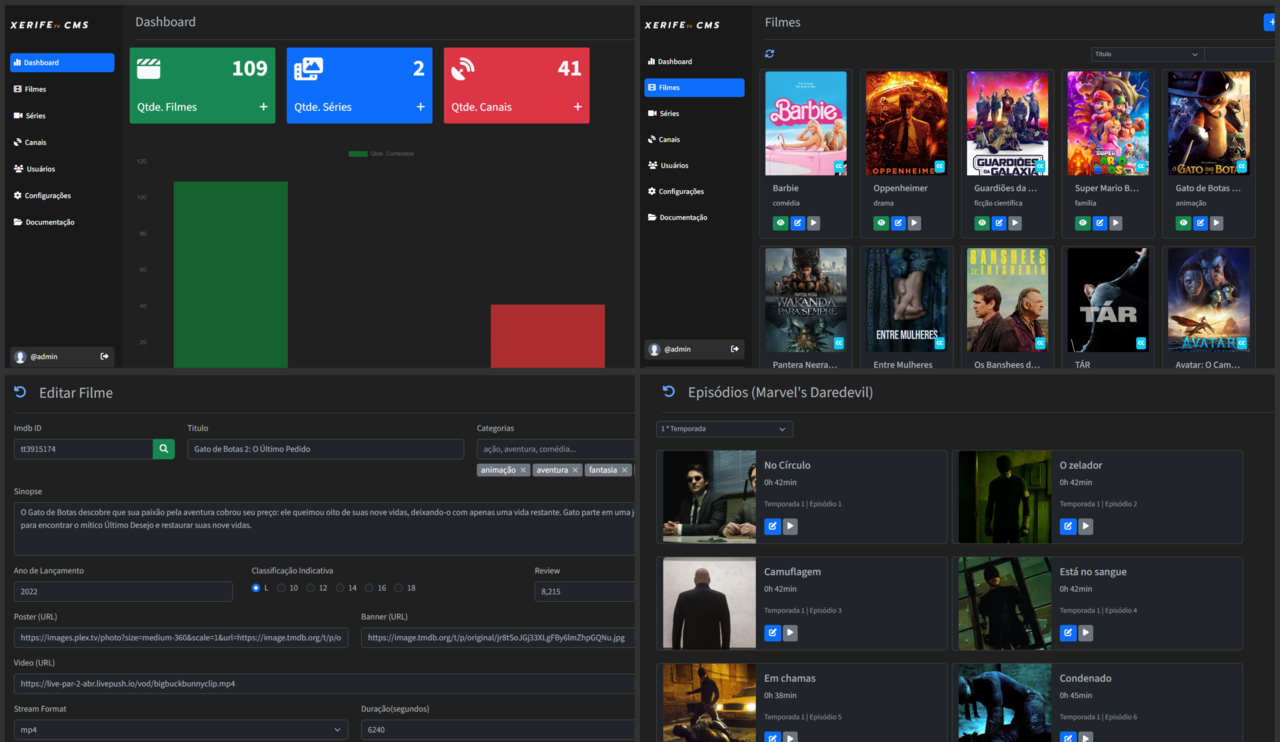
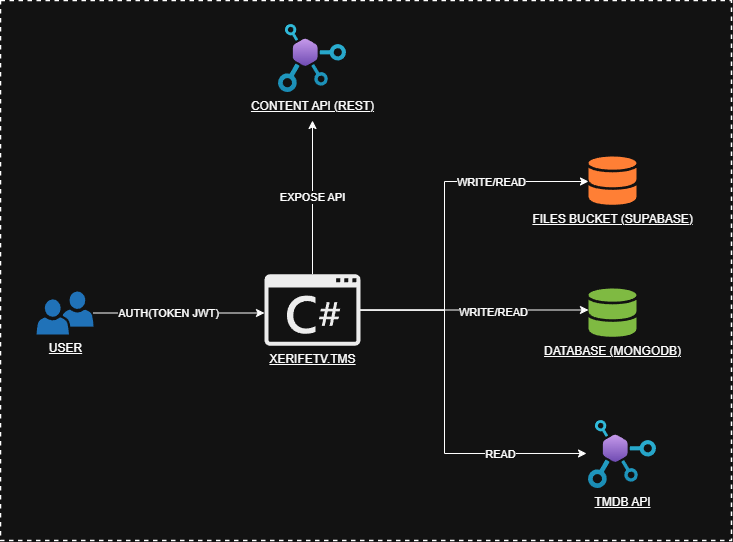
- Content Management: Easily register, edit, and organize movies, series, episodes, and TV channels.
- Batch Upload: Import multiple movies, channels, or full series with episodes at once using spreadsheets (.xlsx).
- TMDB API Integration: Fetch and autocomplete movie and series data — with automatic import of all episodes — using The Movie Database (TMDB) API.
- Supabase Storage Integration: Store media files (.vtt, images, etc.) securely in a Supabase bucket.
- User Roles & Permissions: Granular access control for administrators, content managers, and viewers.
- JWT Authentication: Secure authentication using JSON Web Tokens (JWT).
- Google OAuth2: Sign in with Google.
- Refresh Token Implementation: Improve session security with access and refresh token flow.
- External Content API: Public REST API to expose registered content for external apps or clients.
- API Caching: Improve API response times by caching data from the external content API.
- Swagger Documentation: All REST endpoints are documented using Swagger/OpenAPI.
- Light/Dark Theme: Allow users to toggle between light and dark modes for better UX.
- C#
- ASP.NET Core
- Razor Pages
- Bootstrap
- JWT Authentication
- Google OAuth2
- MongoDB
- MVC Architecture
- Cache In Memory
- Supabase Storage
- Swagger
- Docker
- .NET SDK version 8.0 or higher
- MongoDB running locally or accessible remotely
- A TMDB account to generate your API key
- A Supabase account to manage file storage and access API keys
- A Google Cloud Project with OAuth 2.0 Client ID configured for Web application
- Enable the Google Identity Services API
- Add authorized JavaScript origins (e.g.,
http://localhost:5003)
git clone https://github.com/GilbertSilvaa/XerifeTv.CMS.git
cd XerifeTv.CMS
{
    "MongoDBConfig": {
        "ConnectionString": "mongodb://localhost:00000",
        "DatabaseName": "xerifetv_content"
    }
}
{
    "Hash": {
        "Salt": "HASHSALT0000HASH5555HASH0000"
    }
}
{
    "Jwt": {
        "Key": "",
        "Issuer": "Xerifetvcms",
        "Audience": "Xerifetvcms",
        "ExpirationTimeInMinutes": "",
        "RefreshExpirationTimeInMinutes": ""
    }
}
{
    "Supabase": {
        "Url": "https://example8095.supabase.co",
        "Key": "example4533.exampleee.exammpple"
    }
}
{
    "Tmdb": {
        "Key": "examplekey0examplekey0examplekey"
    }
}
{
    "EmailSettings": {
        "From": "[email protected]",
        "Password": "exammpplepassword"
    }
}
{
    "baseUrl": "http://localhost:5003"
}
{
    "OAuth2Google": {
        "ClientId": "your-google-oauth2-client-id.apps.googleusercontent.com"
    }
}
dotnet restore
dotnet build
dotnet run
http://localhost:5003
This project is licensed under the MIT License.