- Support macOS 10.7 Lion through macOS 26 Tahoe installers.
- Download macOS installers exclusively from official Apple sources.
- Includes intelligent file size optimization to produce the smallest possible installer images.
Supported formats:
- ISO – True DVD/CD format compatible with Proxmox VE, QEMU, VirtualBox, and VMware
- DMG – For create bootable macOS installer USB drives on Windows with Rufus or on Linux with
dd
Available workflows:
- Recovery ISO (Recommended) – Lightweight recovery image (build takes ~2-5 min) • Best for virtualization
- Full Installer – Complete offline installer (build takes ~10-60 min, 5-18GB) • Best for offline use
Important
- Use the "Build macOS Recovery ISO image" workflow unless you really need an offline installer.
- GitHub-hosted runners are a free public resource — please use them responsibly.
- If you already have macOS VM, you can build macOS ISO/DMG image using the following command (replace
tahoewith your desired version):
curl -s https://raw.githubusercontent.com/LongQT-sea/macos-iso-builder/main/mkmaciso | bash -s tahoe
Tip
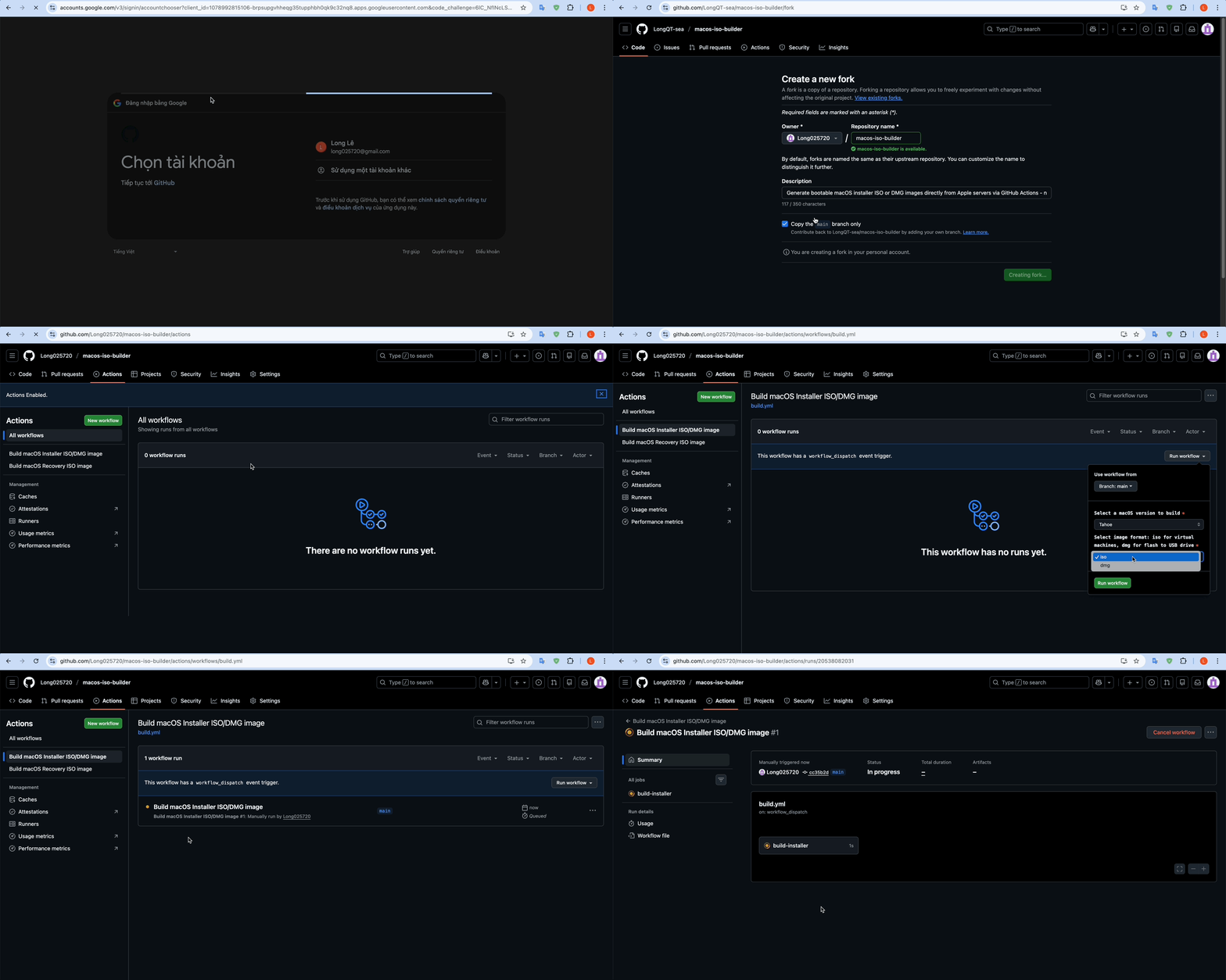
Click here to watch a GIF showing how to complete steps 1–7
-
Fork this repository (requires a GitHub account).
-
Navigate to the Actions tab in your forked repository.
-
Click the green "I understand my workflows, go ahead and enable them" button.
-
Select the "Build macOS Installer ISO/DMG image" or "Build macOS Recovery ISO image" workflow from the left sidebar.
-
Click the "Run workflow" button.
-
Configure the workflow inputs:
- macOS version – Choose a version (Sequoia, Sonoma, etc.).
- Image format – Choose
isofor virtual machines ordmgfor bootable USB drives.
-
Click the green "Run workflow" button to start the build.
-
Wait for the workflow to complete (this may take 10–60 minutes).
-
Open the completed workflow run and scroll down to the Artifacts section.
-
Download the artifact (e.g.,
macOS_Sequoia_15.7.3.iso). -
Extract the ZIP file to get your
.isoor.dmg.imgfile.
Tip
After flashing the DMG image to the USB drive with Rufus, there will be free/unallocated space remaining on the USB drive. Use Disk Management to create a new FAT32 partition and place your EFI folder there if needed.
Note
By default, artifacts are kept for 7 days. You can change this in the workflow YAML file.
Tip
- For best performance, use a macOS VM on Proxmox VE with iGPU or dGPU passthrough.
- Install macOS on Proxmox VE using LongQT-sea/OpenCore-ISO.
- For Intel GVT-d iGPU passthrough, see LongQT-sea/intel-igpu-passthru.
This tool downloads macOS images directly from Apple's servers. Users are responsible for complying with Apple's Software License Agreement.