


This project is open-source and free. If you find Ariston Lydos Boiler Card useful and want to support its development, you can make a voluntary donation.
Donations are optional and help support development and maintenance of this open-source project.
Please select “Goods and Services” when donating.
Questo progetto è open-source e gratuito. Se Ariston Lydos Boiler Card ti è utile e vuoi supportarne lo sviluppo, puoi fare una donazione volontaria.
Le donazioni sono facoltative e aiutano a sostenere lo sviluppo e la manutenzione di questo progetto open-source. Seleziona “Beni e servizi” durante il pagamento.
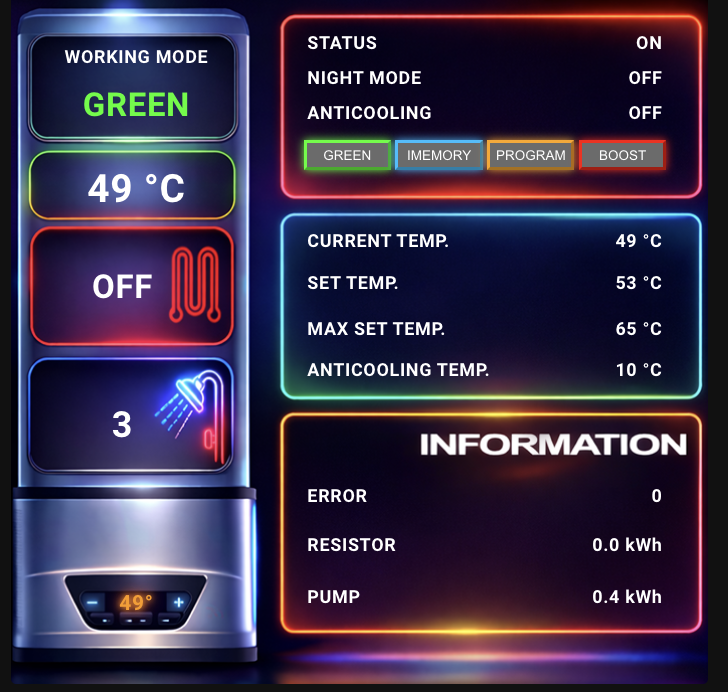


Ariston Lydos Boiler Card is a custom Lovelace card for Home Assistant designed specifically for Ariston Lydos WiFi water heaters.
It provides a clean, visual interface to monitor and control:
- Boiler status
- Operation mode (GREEN, IMEMORY, PROGRAM, BOOST)
- Current and target temperature
- Night mode
- Anticooling
- Power, pump and resistor status
- Power, pump and resistor Energy
- No pop-up, click on the status to change it!
Ariston Lydos Boiler Card è una card personalizzata per Home Assistant pensata specificamente per i boiler Ariston Lydos WiFi.
Offre un’interfaccia chiara e intuitiva per monitorare e controllare:
- Stato del boiler
- Modalità operative (GREEN, IMEMORY, PROGRAM, BOOST)
- Temperatura attuale e impostata
- Night mode
- Anticooling
- Stato resistenza e pompa
- Consumo resistenza e pompa
- Nessun pop-up, clicca sul valore per cambiarne lo stato!
- Custom Lovelace card
- Designed for Ariston Lydos WiFi
- Clickable controls
- Neon-style mode buttons
- Fully local (Home Assistant)
- Optimized layout
- Compact layout compared to the classic card
- Copy the files into: - Copia i file in questa cartella:
/config/www/community/boiler-card/
- Add the resource in Home Assistant: - Aggiungi la risorsa in Home Assistant
type: module
url: /local/community/boiler-card/boiler-card.js
-
Restart Home Assistant - Riavvia Home Assistant
-
Add the card manually to Lovelace - Aggiungi la card manualmente a Lovelance
type: custom:boiler-card
background: /local/community/boiler-card/boiler.png
mode: water_heater.lydos100wifi
showers: sensor.ariston_average_showers
current_temp: sensor.lydos_temperatura_attuale
set_temp: sensor.ariston_proc_req_temp
max_temp: number.ariston_max_setpoint_temperature
anticool: number.ariston_anti_cooling_temperature
error: sensor.ariston_errors_count
resistor: sensor.ariston_domestic_hot_water_resistor_electricity_consumption
pump: sensor.ariston_domestic_hot_water_heating_pump_electricity_consumption
power: switch.ariston_power
anticool_switch: switch.ariston_anti_cooling
boost: switch.ariston_permanent_boost
night: switch.ariston_night_mode
NOTE: Change the name of the example sensor to your sensor. NOTE: Cambia il nome del sensore nell'esempio con il tuo sensore di riferimento.
- Open - Apri HACS
- Click on the three dots (top right) - Clicca sui tre puntini (in alto a destra) → Custom repositories
- Add - Aggiungi:
https://github.com/djtech84/boiler-card
Category - Categoria: Lovelace
- Search Ariston Lydos Boiler Card - Cerca Ariston Lydos Boiler Card
- Install and restart Home Assistant - Installa e riavvia Home Assistant
- Add the card resource automatically if prompted - Aggiungi automaticamente la risorsa della carta se richiesto
This project is not affiliated with Ariston. Use at your own risk.
Questo progetto non è affiliato ad Ariston. Usalo a tuo rischio.
❤️ Support the project ❤️ Supporta il progetto
If you enjoy this project and want to support future updates: Please select “Goods and Services” when donating. Se questo progetto ti è stato utile e vuoi supportarne lo sviluppo: Seleziona “Beni e servizi” durante il pagamento.
Your support is appreciated but never required ❤️ Il tuo supporto è apprezzato ma mai obbligatorio ❤️
📜 Licenza MIT License