


Advanced Filament Swap is a powerful browser extension designed to enhance your 3D printing workflow on Moonraker-based printers. It integrates directly into your web interface (such as Mainsail or Fluidd) to provide a guided, interactive, and highly configurable filament change process.
Whether you're dealing with a mid-print filament change (M600), runouts, or just swapping colors between prints, AFS takes the guesswork out of the process with a visual timeline, automated macros, and smart safeguards.
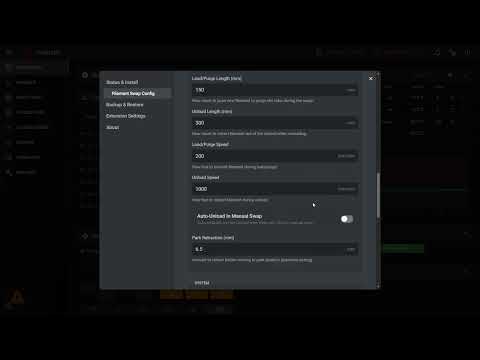
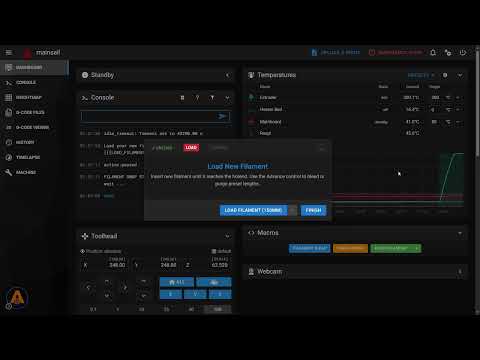
- 🖥️ Seamless Integration: Works on top of any Moonraker-based web interface. The extension injects a non-intrusive control button directly into your dashboard.
- 🔄 Guided Workflow: A clear, step-by-step visual timeline guides you through heating, unloading, loading, and purging.
- ⚙️ Complete Customization:
- Configure load/unload lengths, speeds, and temperatures.
- Set "Smart Park" coordinates with automatic max-travel detection.
- Customize purge amounts and retraction settings.
- 🧩 Powerful Macro System:
- Trigger custom G-code or existing macros at specific stages (Pre-Load, Post-Unload, etc.).
- Fully compatible with your existing Klipper macros.
- 🔊 Smart Alerts:
- Browser-based audio notifications for Filament Runout and M600 events.
- Plays M300 tunes directly through your browser (no beeper required on the printer!).
- 🌍 Multi-Language Support: Available in English, Spanish, German, French, and Chinese.
- 💾 Backup & Restore: Easily export your AFS configuration to JSON and restore it on other machines.
This extension is designed to work with standard Moonraker installations.
- Moonraker: Requires a standard installation with access to the
printer.objects.subscribeAPI and file management endpoints (/server/files/config). Most modern versions (post-2021) support this out of the box. - Klipper: No specific version requirements, but must support standard macro definition features.
- Web Interface: Compatible with Mainsail, Fluidd, or any other interface that runs on top of Moonraker via a Web Browser.
-
Chrome Coming Soon!
-
Edge (Desktop) + Edge Canary (Android): Microsoft Add-ons
-
Firefox: Mozilla Add-ons
- Download the Source: Clone this repository or download the ZIP and extract it to a folder on your computer.
git clone https://github.com/92jackson/Advanced-Filament-Swap.git
- Open Extensions Management:
- In Chrome, go to
chrome://extensions. - In Edge, go to
edge://extensions.
- In Chrome, go to
- Enable Developer Mode: Toggle the switch in the top right corner.
- Load Unpacked: Click the "Load unpacked" button and select the folder where you extracted the extension.
- Access: Open your printer's web interface (e.g.,
http://mainsail.local). You should see a new AFS icon button in the interface (usually bottom-left).
- Click the AFS icon in your web interface to open the Settings Modal.
- First Run: The extension may prompt you to perform an initial setup or check for configuration conflicts.
- Customize: Navigate through the tabs to adjust temperatures, speeds, and parking positions to match your printer's capabilities.
- Save: Changes are saved to your browser's local storage and synced with your printer where applicable.
Need help? Found a bug? Want to request a feature?
- Discord: Join the community on Discord for real-time support and discussions.
- GitHub Issues: Report bugs or suggest enhancements on our Issues Page.
Find this project useful?
