
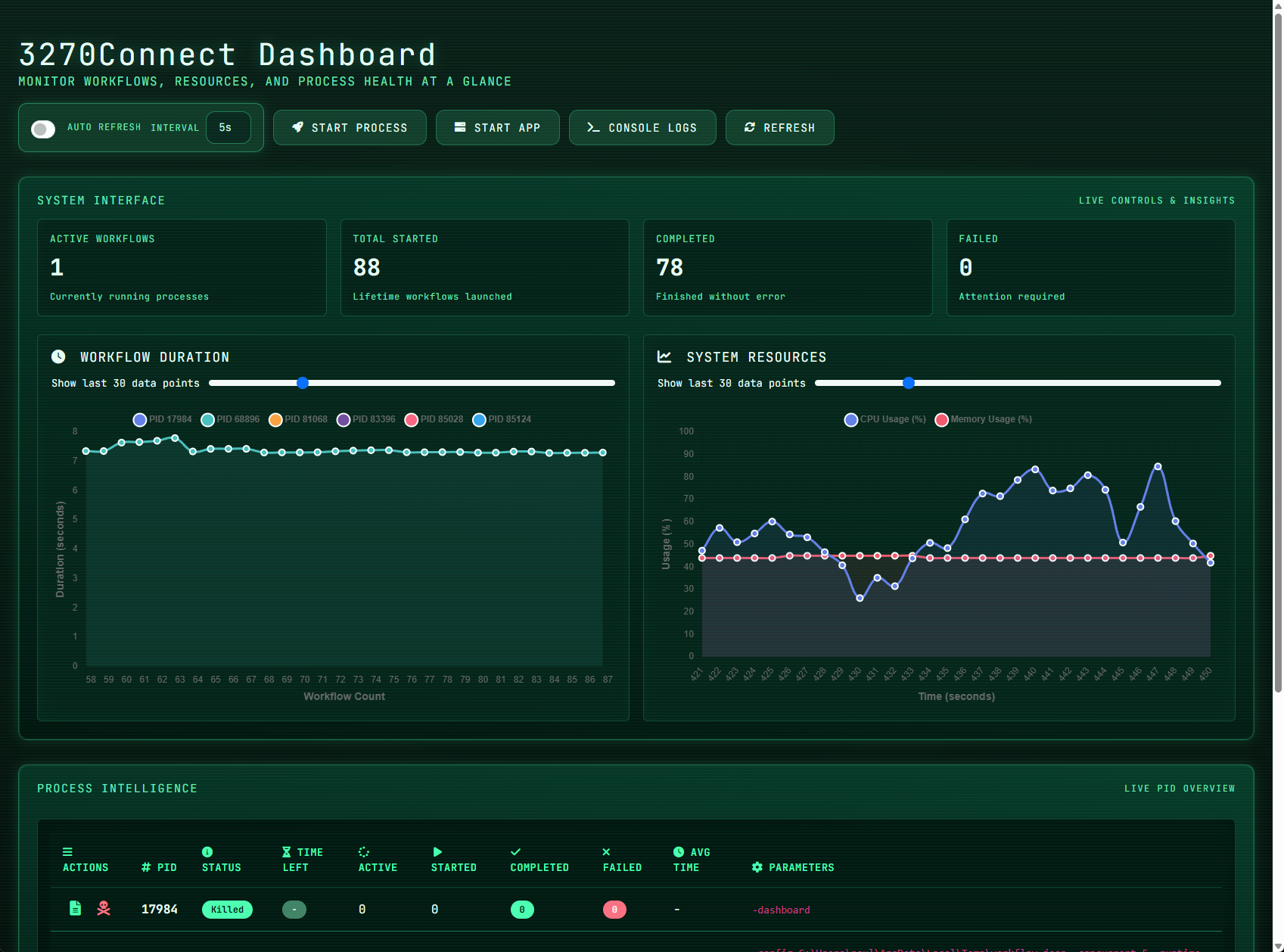
3270Connect is a robust automation toolkit that provides both a command-line utility and a browser-based web console for enhancing productivity and efficiency when managing and automating interactions with mainframe 3270 applications. It acts as a bridge between modern computing environments and the traditional mainframe terminals, providing a suite of tools that facilitate automated tasks and workflows in a terminal session.
The utility is used by system administrators, developers, and testers who frequently interact with mainframe systems, which are still pivotal in various industries such as banking, insurance, and government services. With 3270Connect, users can script complex sequences of tasks, automate data entry, perform complex online operations, and capture terminal screens for logging or debugging purposes.
One of the main reasons for using 3270Connect is its ability to save time on repetitive tasks by automating them. This can be especially beneficial in testing scenarios where the same set of operations needs to be performed repeatedly. Moreover, the utility provides a way to integrate mainframe operations with modern CI/CD pipelines, thereby modernizing the development and deployment workflows that involve mainframe systems.
With 3270Connect, users can:
- Define and execute automated workflows through a configuration file, enhancing repeatability and reliability in interactions with terminal screens.
- Capture the state of the 3270 terminal screens at any point during a workflow, which is invaluable for documentation and troubleshooting.
- Execute multiple workflows in parallel, optimizing time and resources, especially in complex test environments.
- Operate in a headless mode, allowing the automation to run in the background or in environments without a graphical interface, such as servers or continuous integration systems.
- Utilize a verbose output mode for an in-depth understanding of workflow execution, which assists in monitoring and debugging.
- Surface failure-only logging with
-verboseFailuresto collect concise diagnostics at high concurrency without the noise of full verbose output. - Run 3270Connect as an API server, enabling advanced automation scenarios and facilitating load and performance testing of mainframe applications.
Through these features, 3270Connect empowers organizations to integrate their legacy systems into modern automated processes, reducing errors, and increasing efficiency.
Here are the key features of 3270Connect:
- Running workflows defined in a configuration file.
- Command-line interface for scripting and running automation from the terminal.
- Capturing the 3270 screens as the workflow executes.
- Running workflows concurrently with options for controlling the number of concurrent workflows and runtime duration.
- Dashboard and web console to visually provide metrics on concurrency usage and manage runs.
- Headless mode for running workflows without a graphical user interface.
- Verbose mode for detailed output, plus failure-only logging with
-verboseFailuresfor noisy test loads. - API mode for advanced automation.
- Runtime RSA token injection using the
-tokenflag or APITokenproperty, keeping one-time passwords out of workflow files. - Running a 3270 sample application to assist with testing workflow features.
- The emulator script connection uses a 5-second TCP dial timeout (
scriptDialTimeout) and a 30-second I/O deadline (scriptIOTimeout) when communicating with the embedded x3270/s3270 instance.
Source:connect3270/emulator.go. - Establishing a TN3270 session runs through
Emulator.Connect, which retries up to 10 times with a 1-second delay between attempts (maxRetries/retryDelay). Starting the emulator process itself is also retried up to 10 times before surfacing an error.
Source:connect3270/emulator.go. - After a successful
Connect, the workflow waits for the terminal to unlock an input field (WaitForField) using a 1-second timeout and up to 10 retries by default. Disable this with top-levelWaitForField: falsein the config and/or add explicitWaitForFieldsteps where needed.
Source:go3270Connect.go. - Connection failures for the workflow Connect step are informational by default and do not increment the failed workflow counter; pass
-showConnectionErrorsif you want connection failures to be treated as errors and surfaced in the failure tally.
Use-verboseFailuresto log failing steps without enabling full verbose when you need concise failure diagnostics at scale.
Source:go3270Connect.go. - The
/testConnectionAPI endpoint that probes host reachability uses a 5-second TCP dial timeout when opening the socket to the TN3270 host.
Source:go3270Connect.go.
This project is licensed under the MIT License - see the LICENSE file for details.
go-bindata -o binaries/bindata.go -pkg binaries ./binaries/...
CGO_ENABLED=1 GOOS=linux GOARCH=amd64 go build -o 3270Connect go3270Connect.go
CGO_ENABLED=1 GOOS=windows GOARCH=amd64 go build -o 3270Connect.exe go3270Connect.go
.\3270Connect -runApp 1 ./3270Connect -verbose -headless
mkdocs build
Run .\update-binaries.ps1 from the repo root after you update binaries/linux or binaries/windows. The script now simply runs go-bindata -o binaries/bindata.go -pkg binaries ./binaries/... against the assets that already live in those directories, so make sure the native executables you need are in place beforehand.