| 📚 Documentation | 🔧 Setup | 🚀 Deployment |
|---|---|---|
| 📖 Installation | ⚙️ Setup & Config | 📦 Deployment |
| 📚 API Docs | 🏗️ Architecture | 🧪 Testing |
| 🤝 Contributing | 📝 License | 🙏 Acknowledgments |
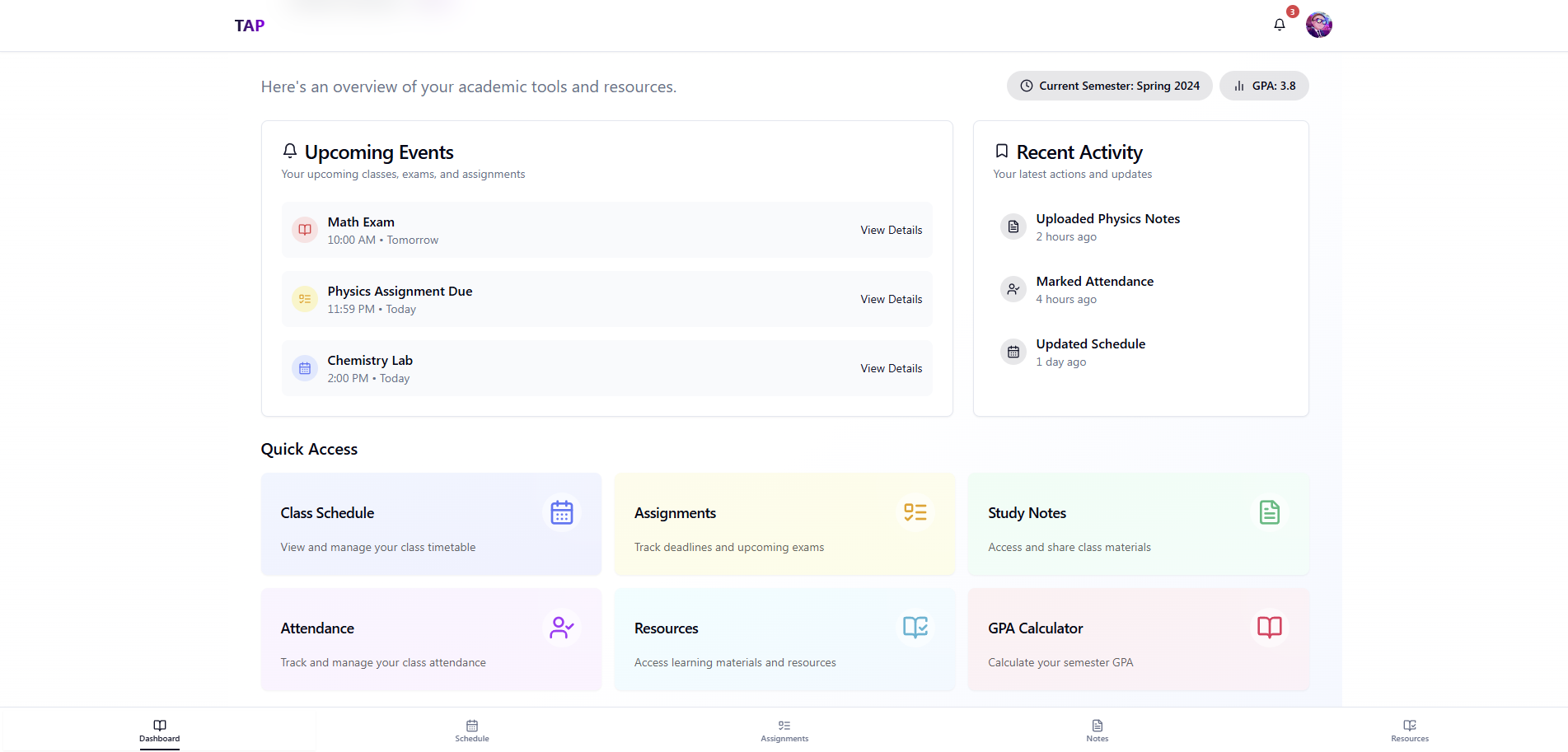
TAP (Training, Academics, and Placement) is a comprehensive campus management application designed to revolutionize how educational institutions handle academic activities and enhance the student experience. Built with modern web technologies, TAP provides an intuitive, responsive interface for managing schedules, assignments, study materials, and placement activities.
Traditional campus management systems often suffer from:
- Complex, outdated user interfaces
- Limited mobile accessibility
- Poor integration between academic and placement services
- Lack of real-time updates and notifications
TAP addresses these challenges by providing:
- Modern UI/UX: Clean, intuitive interface built with React and Tailwind CSS
- Real-time Updates: Live notifications and instant data synchronization
- Mobile-First Design: Fully responsive across all devices
- Unified Platform: Integrated academic and placement management
- Scalable Architecture: Built with modern, maintainable technologies
TAP follows a modern three-tier architecture with clear separation of concerns:
- Frontend: React 18 with TypeScript, Vite, and Tailwind CSS
- Backend: Express.js with Node.js and MongoDB
- Database: MongoDB with Mongoose ODM
For detailed architecture information, see ARCHITECTURE.md
For detailed feature information, see FEATURES.md
- 📅 Interactive Schedule: Daily, weekly, and monthly calendar views
- 📝 Assignment Tracking: Create, submit, and grade assignments
- 📚 Study Materials: Upload and organize course materials
- ✅ Attendance System: Track and manage student attendance
- 🎯 Grade Management: Comprehensive grading system with analytics
- 🌓 Theme Support: Dark/light mode with system preference detection
- 📱 Responsive Design: Optimized for mobile, tablet, and desktop
- 🎯 Intuitive Navigation: Sidebar navigation with breadcrumbs
- 🔔 Real-time Notifications: Push notifications for important updates
- 🌍 Accessibility: WCAG 2.1 compliant with keyboard navigation
- 🔐 JWT Authentication: Secure token-based authentication
- 👥 Role-Based Access: Different permissions for students, faculty, and admin
- 🛡️ API Security: Rate limiting, input validation, and sanitization
- 🔒 Data Privacy: Encrypted sensitive data storage
- 📈 Performance Analytics: Student performance tracking
- 📊 Attendance Reports: Comprehensive attendance analytics
- 📋 Assignment Statistics: Submission and grading metrics
- 🎯 Placement Analytics: Job placement statistics and trends
- Framework: React 18.3.1 with TypeScript 5.5.3
- Build Tool: Vite 5.4.1
- Styling: Tailwind CSS 3.4.11 + shadcn/ui components
- State Management:
- React Query (@tanstack/react-query 5.56.2)
- React Hook Form 7.53.0 with Zod 3.23.8
- Routing: React Router DOM 6.26.2
- UI Components: Radix UI primitives
- Icons: Lucide React 0.462.0
- Charts: Recharts 2.12.7
- Animations: Framer Motion 12.6.5
- Date Handling: date-fns 3.6.0, react-day-picker 8.10.1
- Runtime: Node.js (v18+ recommended)
- Framework: Express.js 4.18.2
- Database: MongoDB with Mongoose 7.6.3
- Authentication:
- JWT (jsonwebtoken 9.0.2)
- Password Hashing (bcryptjs 2.4.3)
- File Upload: Multer 2.0.2
- Environment: dotenv 16.3.1
- Development: nodemon 3.0.1
- Security: CORS 2.8.5, helmet (recommended)
- Code Quality: ESLint 9.9.0 with TypeScript support
- Type Checking: TypeScript 5.5.3
- Package Management: npm 9+
- Version Control: Git
- API Testing: Postman (recommended)
# Clone and setup automatically
git clone https://github.com/phoenixdev100/tap.git
cd tap
npm run setupEnsure you have the following installed:
- Node.js: Version 18.0.0 or higher
- npm: Version 9.0.0 or higher
- MongoDB: Version 6.0 or higher (local or Atlas)
- Git: For version control
Check versions:
node --version  # Should be v18+
npm --version   # Should be 9+
mongod --version # Should be 6+git clone https://github.com/phoenixdev100/tap.git
cd tap# Install frontend dependencies
cd frontend
npm install
# Install backend dependencies
cd ../backend
npm install
# Return to root
cd ..Option A: MongoDB Atlas (Cloud)
- Create a free account at MongoDB Atlas
- Create a new cluster
- Get your connection string
Option B: Local MongoDB
# Install MongoDB locally
# Windows: Download from mongodb.com
# macOS: brew install mongodb-community
# Linux: sudo apt-get install mongodb

# Start MongoDB service
mongodCreate environment files in both frontend and backend directories:
Backend Environment (backend/.env):
# Database
MONGODB_URI=mongodb://localhost:27017/tap
# or for Atlas: mongodb+srv://username:[email protected]/tap

# Authentication
JWT_SECRET=your_super_secret_jwt_key_here
JWT_EXPIRE=7d

# Server
PORT=5000
NODE_ENV=development

# File Upload
MAX_FILE_SIZE=10485760
UPLOAD_PATH=./uploads

# Email (optional)
EMAIL_HOST=smtp.gmail.com
EMAIL_PORT=587
EMAIL_USER=[email protected]
EMAIL_PASS=your_app_password
Frontend Environment (frontend/.env):
# API
VITE_API_URL=http://localhost:5000
VITE_API_TIMEOUT=10000

# App
VITE_APP_NAME=TAP
VITE_APP_VERSION=1.0.0

# Features
VITE_ENABLE_ANALYTICS=false
VITE_ENABLE_NOTIFICATIONS=true# Start backend server (in terminal 1)
cd backend
npm run dev
# Start frontend development server (in terminal 2)
cd frontend
npm run dev- Frontend: http://localhost:5173
- Backend API: http://localhost:5000
For detailed setup instructions, see INSTALLATION.md and SETUP.md
Complete documentation is available in separate files:
- 📖 Installation Guide - Detailed setup instructions
- ⚙️ Setup & Configuration - Initial setup and configuration
- 📚 API Documentation - Complete API reference
- 🏗️ Architecture - System design and architecture
- 🧪 Testing Guide - Testing strategies and examples
- 📦 Deployment Guide - Production deployment options
- 🤝 Contributing Guide - How to contribute to the project
This project is licensed under the MIT License. See the LICENSE file for details.
MIT License

Copyright (c) 2025 Deepak

Permission is hereby granted, free of charge, to any person obtaining a copy
of this software and associated documentation files (the "Software"), to deal
in the Software without restriction, including without limitation the rights
to use, copy, modify, merge, publish, distribute, sublicense, and/or sell
copies of the Software, and to permit persons to whom the Software is
furnished to do so, subject to the following conditions:

The above copyright notice and this permission notice shall be included in all
copies or substantial portions of the Software.
- React - The UI library
- Tailwind CSS - The CSS framework
- shadcn/ui - The component library
- MongoDB - The database
- Express.js - The backend framework
- Vite - The build tool
- All contributors who help improve this project
- The open-source community for amazing tools and libraries
- Educational institutions that provided valuable feedback