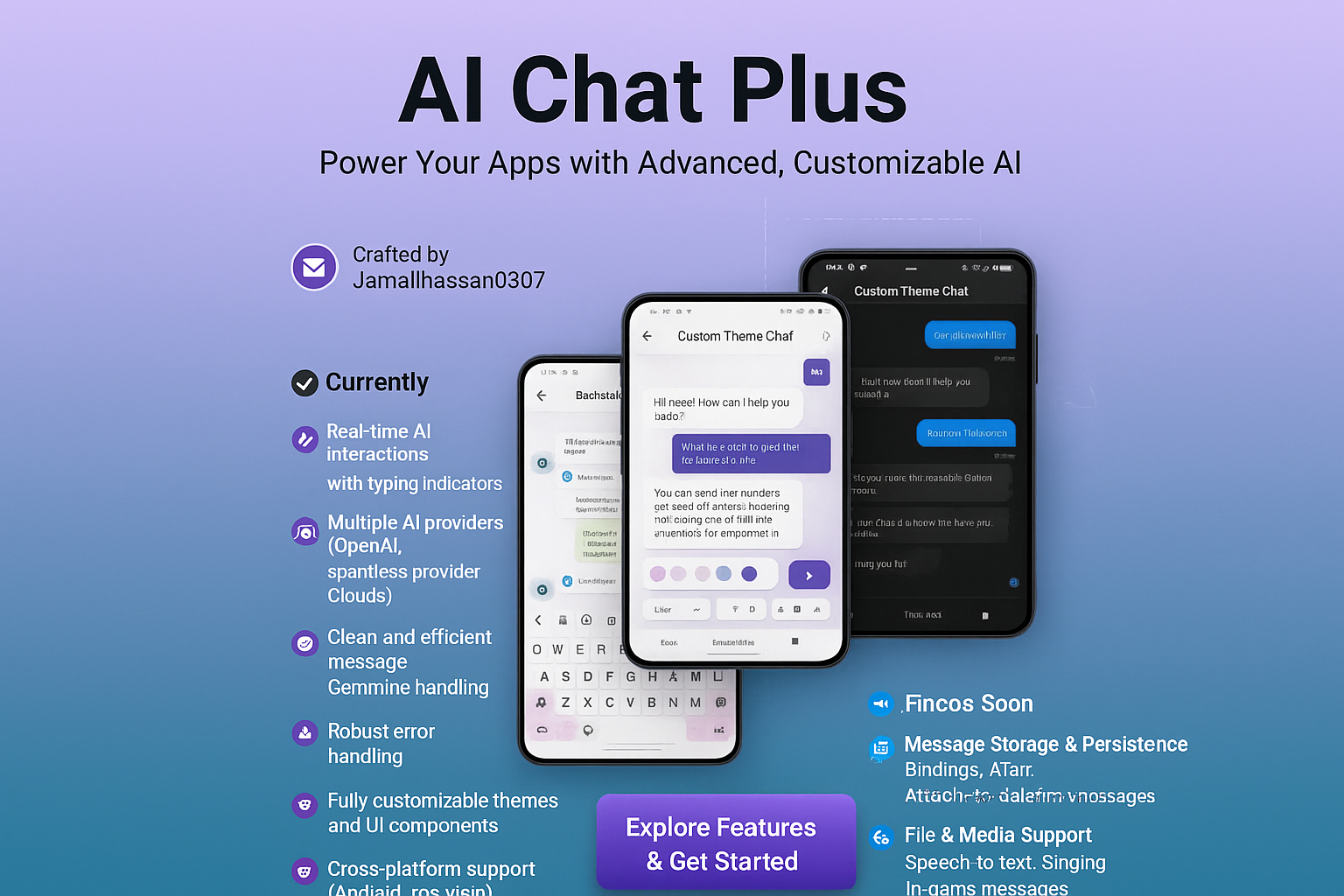
A powerful Flutter package for AI chat integration with OpenAI, Google Gemini, and Claude AI









🌟 Experience the future of chat interfaces with AI Chat Plus - where intelligent chat meets modern design. Featuring seamless AI integration, real-time interactions, and multiple provider support. Built with Flutter, powered by cutting-edge AI.

Quick setup with prebuilt components 📋 Implementation Details• Single file setup |
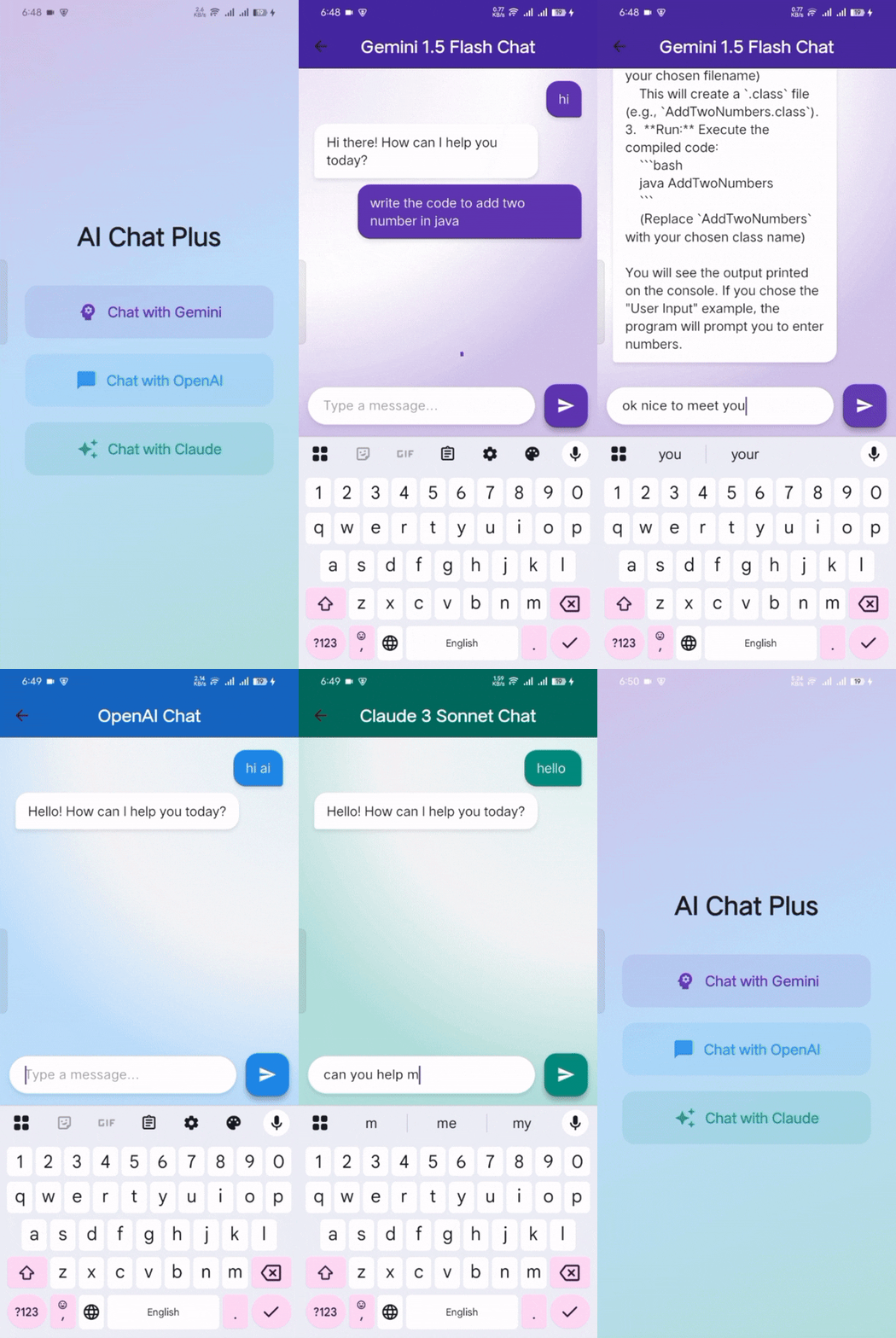
Multiple AI providers with seamless switching 📋 Implementation Details• OpenAI GPT support |
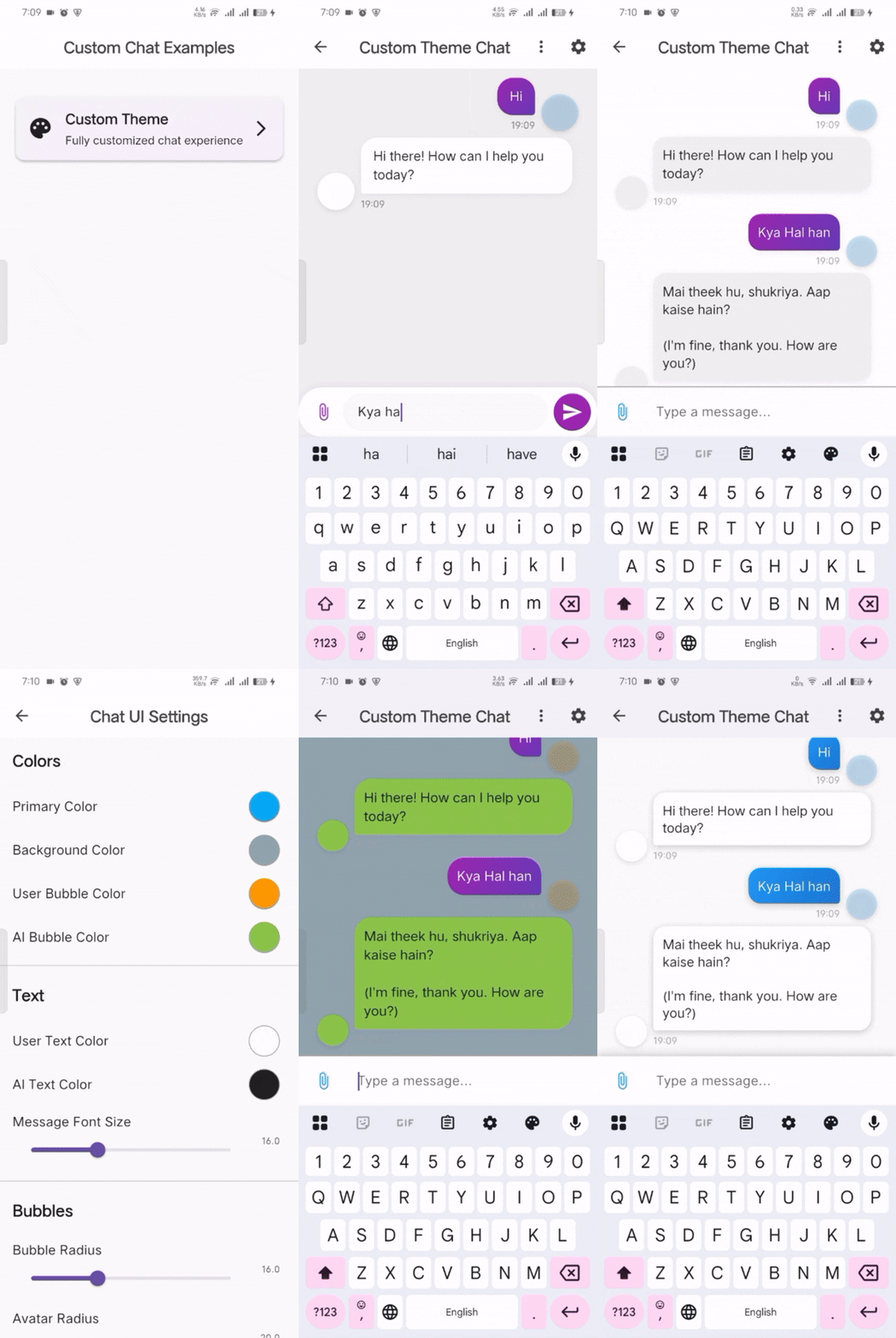
Fully customizable chat UI with themes 📋 Implementation Details• Dynamic theme switching |
💡 Note: Large GIF files (up to 12MB) may take a moment to load. Click on any demo image to view the full-size version.
Transform your chat experience with:
- ⚡ Real-time AI interactions with typing indicators
- 🤖 Multiple AI providers (OpenAI, Gemini, Claude)
- 🔄 Seamless provider switching
- 📱 Clean and efficient message handling
- ✨ Type-safe API implementation
- 🛡️ Robust error handling
- 🎨 Fully customizable themes and UI components
- 📊 Message persistence (Coming Soon)
- Creator: Jam Ali Hassan
- Portfolio: View Portfolio
- Email: [email protected]
- LinkedIn: Connect on LinkedIn
// Initialize OpenAI
final openAIConfig = AIModelConfig(
  provider: AIProvider.openAI,
  apiKey: 'YOUR_OPENAI_API_KEY',
  modelId: OpenAIModel.gpt35Turbo.modelId,
);

// Initialize Gemini
final geminiConfig = AIModelConfig(
  provider: AIProvider.gemini,
  apiKey: 'YOUR_GEMINI_API_KEY',
  modelId: GeminiModel.geminiFlash.modelId,
);

// Initialize Claude
final claudeConfig = AIModelConfig(
  provider: AIProvider.claude,
  apiKey: 'YOUR_CLAUDE_API_KEY',
  modelId: ClaudeModel.claude3Sonnet.modelId,
);AIChat(
apiKey: 'YOUR_API_KEY',
provider: AIProvider.gemini,
modelId: GeminiModel.geminiFlash.modelId,
onError: (error) {
print('Error: $error');
},
)CustomChatUI(
messages: messages,
onSendMessage: handleMessage,
isTyping: isTyping,
onError: handleError,
)Explore our detailed examples to get started quickly:
📍 Location: example/simple_chat/main.dart
// Quick start with minimal setup
AIChat(
  apiKey: 'YOUR_API_KEY',
  provider: AIProvider.gemini,
  modelId: GeminiModel.geminiFlash.modelId,
)📍 Location: example/ai_integration/
- Main App:
main.dart- Navigation between AI providers - OpenAI Chat:
pages/openai_page.dart- GPT integration - Gemini Chat:
pages/gemini_page.dart- Google Gemini - Claude Chat:
pages/claude_page.dart- Anthropic Claude
📍 Location: example/customizable_chatui/
- Main App:
main.dart- Custom theme showcase - Home Page:
pages/home_page.dart- Theme selection - Custom Chat:
pages/chat_pages/custom_chat_page.dart- Full customization - Settings:
pages/chat_pages/chat_settings_page.dart- Theme configuration
📍 Location: example/prebuilt_simple_chatui/
- Main App:
main.dart- App setup - Test Chat:
test_chat_page.dart- Ready-to-use chat interface
- 🤖 OpenAI GPT Integration (GPT-3.5, GPT-4, GPT-4-turbo)
- 🧠 Google Gemini Integration (Gemini Flash, Gemini Pro)
- � Claude AI Integration (Claude 3 Sonnet, Opus, Haiku)
- �🔄 Streaming responses support
- 🎯 Type-safe API implementation
- ⚡ Fast and efficient message handling
- 🔄 Real-time provider switching
- ⌨️ Typing indicators and animations
- 🚨 Enhanced error handling and recovery
- 🎨 Customizable themes and UI components
- 📱 Multiple chat UI options (Simple, Custom, Prebuilt)
- 🌐 Cross-platform support (Android, iOS, Web)
- 🛡️ Secure API key management
- 💾 Message Storage & Persistence
- 🔥 Firebase Firestore integration
- 📱 Local SQLite storage
- ☁️ Cloud sync capabilities
- 📊 Chat history management
- 🎤 Voice Features
- 🗣️ Speech-to-text integration
- 🔊 Text-to-speech responses
- 🎵 Voice message support
- 📁 File & Media Support
- 📎 File attachments
- 🖼️ Image sharing and analysis
- 📄 Document processing
- 🔍 Advanced Features
- 🔍 Message search functionality
- 🏷️ Chat categorization and tagging
- 📈 Usage analytics and insights
- 🌍 Multi-language support
- 🎮 Enhanced UI/UX
- 🌙 Dark/Light theme auto-switching
- 📱 Adaptive design improvements
- ✨ Animation enhancements
- 🎨 More theme presets
Add this to your package's pubspec.yaml file:
dependencies:
  ai_chat_plus: ^1.2.3
Then run:
flutter pub getimport 'package:ai_chat_plus/ai_chat_plus.dart';
Future<void> initOpenAI() async {
final config = AIModelConfig(
provider: AIProvider.openAI,
apiKey: 'YOUR_OPENAI_API_KEY',
modelId: OpenAIModel.gpt35Turbo.modelId,
);
final aiService = AIServiceFactory.createService(AIProvider.openAI);
await aiService.initialize(config);
// Generate response
final response = await aiService.generateResponse("Hello, how are you?");
print(response);
}import 'package:ai_chat_plus/ai_chat_plus.dart';
Future<void> initGemini() async {
final config = AIModelConfig(
provider: AIProvider.gemini,
apiKey: 'YOUR_GEMINI_API_KEY',
modelId: GeminiModel.geminiFlash.modelId,
);
final aiService = AIServiceFactory.createService(AIProvider.gemini);
await aiService.initialize(config);
// Generate response
final response = await aiService.generateResponse("What is quantum computing?");
print(response);
}import 'package:ai_chat_plus/ai_chat_plus.dart';
Future<void> initClaude() async {
final config = AIModelConfig(
provider: AIProvider.claude,
apiKey: 'YOUR_CLAUDE_API_KEY',
modelId: ClaudeModel.claude3Sonnet.modelId,
);
final aiService = AIServiceFactory.createService(AIProvider.claude);
await aiService.initialize(config);
// Generate response
final response = await aiService.generateResponse("What is artificial intelligence?");
print(response);
}To create a chat application with both OpenAI and Gemini support:
- Create separate pages for each service:
// Create OpenAI chat page
class OpenAIChatPage extends StatefulWidget {
  // ... implementation in example/pages/openai_page.dart
}

// Create Gemini chat page
class GeminiChatPage extends StatefulWidget {
  // ... implementation in example/pages/gemini_page.dart
}- Set up navigation between services:
class ChatScreen extends StatefulWidget {
  @override
  State<ChatScreen> createState() => _ChatScreenState();
}

class _ChatScreenState extends State<ChatScreen> {
  int _selectedIndex = 0;
  final List<Widget> _pages = [
    const GeminiChatPage(),
    const OpenAIChatPage(),
  ];

  @override
  Widget build(BuildContext context) {
    return Scaffold(
      body: _pages[_selectedIndex],
      bottomNavigationBar: BottomNavigationBar(
        items: const <BottomNavigationBarItem>[
          BottomNavigationBarItem(
            icon: Icon(Icons.psychology),
            label: 'Gemini',
          ),
          BottomNavigationBarItem(
            icon: Icon(Icons.chat_bubble),
            label: 'OpenAI',
          ),
        ],
        currentIndex: _selectedIndex,
        onTap: (index) => setState(() => _selectedIndex = index),
      ),
    );
  }
}Get started in minutes with our prebuilt chat interface:
AIChat(
  apiKey: 'YOUR_API_KEY',
  provider: AIProvider.gemini,
  modelId: GeminiModel.geminiFlash.modelId,
  primaryColor: Theme.of(context).primaryColor,
  backgroundColor: Colors.grey[100],
  // Provider switching
  onProviderChanged: (AIProvider newProvider) {
    return AIModelConfig(
      provider: newProvider,
      apiKey: getApiKeyForProvider(newProvider),
      modelId: getDefaultModelForProvider(newProvider),
    );
  },
  // Error handling
  onError: (error) {
    ScaffoldMessenger.of(context).showSnackBar(
      SnackBar(content: Text(error.toString())),
    );
  },
)For complete customization, use our custom chat components:
CustomChatUI(
  messages: _messages,
  onSendMessage: _handleSendMessage,
  isTyping: _isTyping,
  theme: ChatTheme(
    primaryColor: Colors.purple,
    backgroundColor: const Color(0xFFF0F0F0),
    userBubbleGradient: const LinearGradient(
      colors: [Colors.purple, Colors.deepPurple],
    ),
    aiBubbleColor: Colors.white,
    bubbleRadius: 20,
    // ... more customization options
  ),
  userAvatarUrl: 'https://example.com/user-avatar.png',
  aiAvatarUrl: 'https://example.com/ai-avatar.png',
  enableAttachments: true,
)Create an app with multiple AI providers:
class ChatApp extends StatefulWidget {
  @override
  State<ChatApp> createState() => _ChatAppState();
}

class _ChatAppState extends State<ChatApp> {
  AIProvider _currentProvider = AIProvider.gemini;

  @override
  Widget build(BuildContext context) {
    return Scaffold(
      appBar: AppBar(
        title: Text('AI Chat Plus'),
        actions: [
          PopupMenuButton<AIProvider>(
            onSelected: (provider) {
              setState(() => _currentProvider = provider);
            },
            itemBuilder: (context) => [
              PopupMenuItem(value: AIProvider.openAI, child: Text('OpenAI')),
              PopupMenuItem(value: AIProvider.gemini, child: Text('Gemini')),
              PopupMenuItem(value: AIProvider.claude, child: Text('Claude')),
            ],
          ),
        ],
      ),
      body: AIChat(
        apiKey: _getApiKey(_currentProvider),
        provider: _currentProvider,
        modelId: _getDefaultModel(_currentProvider),
      ),
    );
  }
}Prebuilt UI Features:
- 🔄 Built-in provider switching (OpenAI, Gemini, Claude)
- 🎨 Customizable themes and colors
- 🚨 Error handling and loading states
- 💬 Message bubble customization
- ⌨️ Input field styling
- 📱 Responsive design
Custom UI Features:
- 🎛️ Complete theme control
- 👤 Custom avatars and profiles
- 📎 Attachment support
- ✨ Animation customization
- 🌈 Gradient backgrounds
- 📐 Flexible layouts
For detailed implementation examples, check:
- Simple Usage:
example/simple_chat/ - AI Integration:
example/ai_integration/ - Custom Themes:
example/customizable_chatui/ - Prebuilt UI:
example/prebuilt_simple_chatui/
- OpenAI API Key: Get from OpenAI Platform
- Gemini API Key: Get from Google AI Studio
- Claude API Key: Get from Claude AI Platform
OpenAI Models:
OpenAIModel.gpt35Turbo- Fast and efficientOpenAIModel.gpt4- Most capable modelOpenAIModel.gpt4Turbo- Optimized GPT-4
Gemini Models:
GeminiModel.geminiFlash- Fast responsesGeminiModel.geminiPro- Balanced performanceGeminiModel.geminiPro15- Enhanced capabilities
Claude Models:
ClaudeModel.claude3Haiku- Fast and lightweightClaudeModel.claude3Sonnet- Balanced performanceClaudeModel.claude3Opus- Most capable Claude model
// ✅ Good: Use environment variables
final apiKey = const String.fromEnvironment('OPENAI_API_KEY');

// ❌ Bad: Hardcoded API keys
final apiKey = 'sk-your-actual-key-here'; // Never do this!

// ✅ Good: Error handling
try {
  final response = await aiService.generateResponse(message);
  // Handle success
} catch (e) {
  // Handle error gracefully
  print('Error: $e');
}

// ✅ Good: Proper cleanup
@override
void dispose() {
  aiService.dispose();
  super.dispose();
}// Custom service configuration
final config = AIModelConfig(
provider: AIProvider.openAI,
apiKey: 'YOUR_API_KEY',
modelId: OpenAIModel.gpt4Turbo.modelId,
// Optional: Custom parameters
maxTokens: 2048,
temperature: 0.7,
topP: 1.0,
);
// Initialize service with custom config
final aiService = AIServiceFactory.createService(AIProvider.openAI);
await aiService.initialize(config);- Service Reuse: Initialize services once and reuse them
- Proper Disposal: Always dispose services to prevent memory leaks
- Error Handling: Implement robust error handling for better UX
- Streaming: Use streaming for real-time responses where supported
- Model Selection: Choose appropriate models based on your use case
- 🔥 Firebase Firestore integration for message persistence
- 📱 Local SQLite storage for offline capabilities
- 🎤 Voice message recording and playback
- 📷 Image upload and analysis support
- 🔍 Advanced search functionality
- 🏷️ Message categorization and tagging
- 📊 Usage analytics and insights
- 🌍 Multi-language support
- 🎨 Enhanced theme system with more presets
- 🤖 Custom AI model integration support
- 📱 Improved mobile responsiveness
- ⚡ Performance optimizations
We welcome contributions! Please see our Contributing Guidelines for details.
- 🐛 Report bugs and issues
- 💡 Suggest new features
- 📝 Improve documentation
- 🧪 Add tests
- 🎨 Enhance UI/UX
- 📋 Issues: GitHub Issues
- 💬 Discussions: GitHub Discussions
- 📧 Email: [email protected]
- 🐦 Follow Updates: GitHub
If you find AI Chat Plus helpful, please:
- ⭐ Star the repository on GitHub
- 👍 Like the package on pub.dev
- 📢 Share with other developers
- 💝 Consider sponsoring the project
This project is licensed under the MIT License - see the LICENSE file for details.

Jam Ali Hassan
Passionate Flutter developer creating innovative solutions for the mobile development community.



📧 Email: [email protected]
Made with ❤️ by Jam Ali Hassan
© 2024 AI Chat Plus. All rights reserved.