


Project Skripsi UNINDRA: Aplikasi Penyewaan Online Lapangan Futsal Berbasis Android pada KBC Futsal.
This React Native application allows customers to browse available futsal schedules, book fields online, and manage their reservations from an Android device.
It is designed for small futsal businesses that need a simple, mobile-first booking and management system.
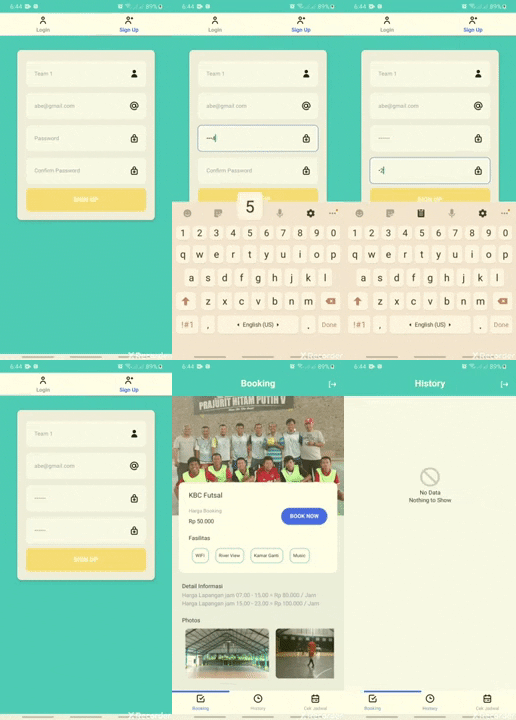

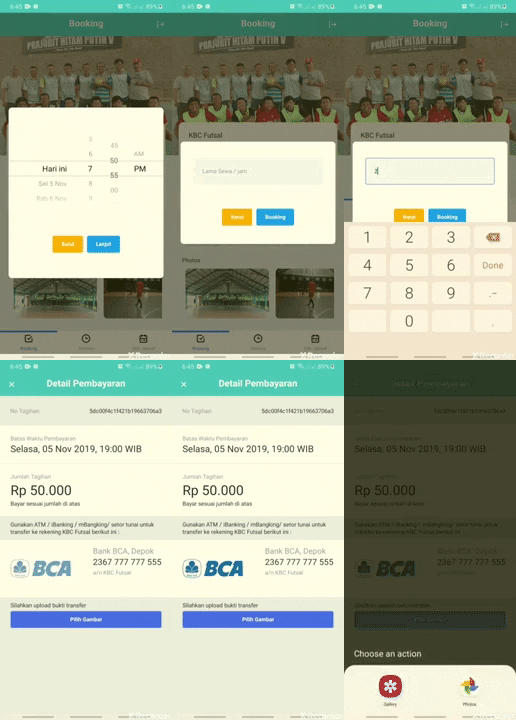
- Online futsal field browsing and booking
- Time-slot based scheduling with real-time availability
- Booking history and basic reservation management
- Simple and intuitive Android UI built with React Native
- API-driven architecture ready for backend integration
- Suitable as a reference project for final-year thesis (Skripsi)
 |
 |
 |
|---|---|---|
| Home & schedule overview | Booking flow | Booking history / profile |
Note: Paths are examples; update them to match your actual screenshot files or adjust as needed.
These instructions will help you set up the project on your local machine for development and testing.
Make sure you have the following installed:
- Node.js (v14 or later)
- npm or yarn
- Java JDK and Android SDK (for Android development)
- React Native CLI environment set up
See the official guide: https://reactnative.dev/docs/environment-setup
Clone the repository and install dependencies:
git clone https://github.com/abewartech/kbc-futsal.git
cd kbc-futsal

# Using npm
npm install

# Or using yarn
yarn install# Using npm
npm start
# Or using yarn
yarn startIn a new terminal:
# Using React Native CLI via npm
npx react-native run-android
Or, if you have the CLI installed globally:
react-native run-androidThe application should now build and open on your Android emulator or connected device.
If the app talks to a backend API, you will typically find configuration in src/ (for example src/config.js):
// Example only – adjust to your real config file
export const API_BASE_URL = 'https://your-backend.example.com/api';
Update the URL above to point to your own backend service.
A high-level overview of important files and directories:
App.js– Main application entry point and root componentindex.js– React Native entry bootstrapsrc/– Application source code (screens, components, services, utilities)assets/– Images, icons, and other static resourcesandroid/– Native Android project (Gradle, manifests, native configuration)ios/– Native iOS project (if/when used)__tests__/– Jest test suites and mockspackage.json– Project metadata, scripts, and dependenciesmetro.config.js/babel.config.js– Metro bundler and Babel configuration
Refer to the individual folders for more detailed structure.
Core stack and tooling used in this project:
– Mobile app framework
– Primary language
– Dependency and tooling runtime
– Target platform
– Unit testing framework
- Other ecosystem tools from the React Native CLI and Metro bundler




Contributions are welcome. To propose changes:
- Fork the repository.
- Create a feature branch:
git checkout -b feature/your-feature-name
- Make your changes and add tests where appropriate.
- Run tests (if configured):
npm test
# or
yarn test
- Commit your changes with a clear message.
- Push your branch and open a Pull Request against the
mainbranch, describing:- What you changed
- Why the change is needed
- Any relevant screenshots or testing notes
Please keep code style consistent with the existing project (ESLint/Prettier settings are provided in the repo).
- Rahmad Al Habib Khasary – Initial work and project concept
This project is licensed under the MIT License.
You are free to use, modify, and distribute this software under the terms of the license.
If a LICENSE file is not present, you can create one with the standard MIT text:
https://opensource.org/licenses/MIT