A repository-local AI framework that plugs into a developer’s existing workflow. Instead of external chat tools, it uses GitHub Issues for conversation, Git for persistent versioned memory, and GitHub Actions for execution. Installed by adding one folder to a repo, it delivers low-infrastructure, auditable, user-owned automation by committing every prompt/response and code change to the codebase.
- Copy
.github/workflows/github-gstack-intelligence-agent.ymlinto your repo's.github/workflows/directory. - Add the LLM API key
OPENAI_API_KEYas a repository secret under [Settings → Secrets and variables → Actions]. Any supported LLM provider can work but to quick start OpenAI GPT 5.4 is pre-configured. - Go to [Actions → github-gstack-intelligence-agent → Run workflow] to install the agent files automatically, subsequent runs perform upgrades.
- Open an issue — the agent will reply.

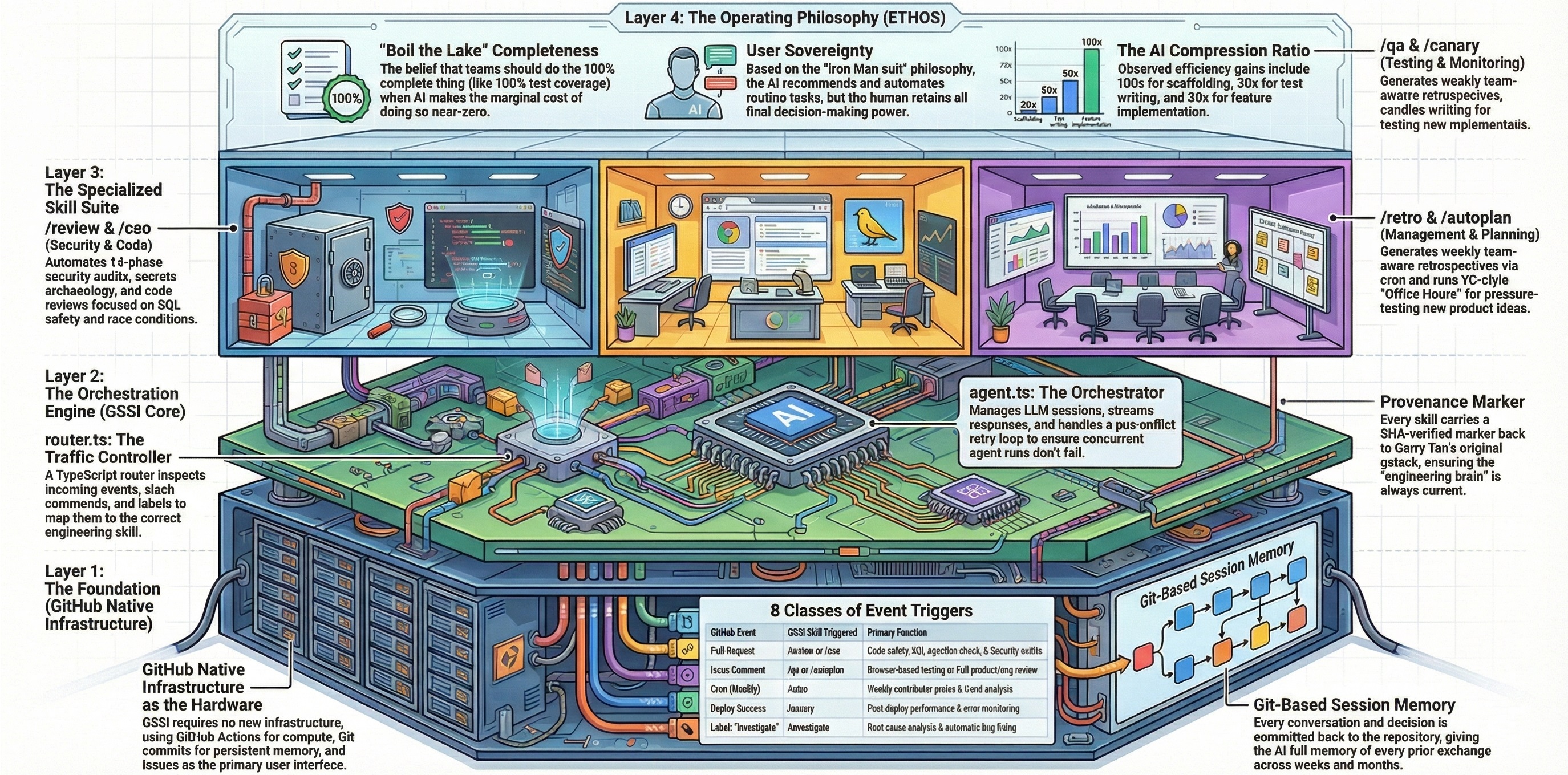


Powered by pi-mono, conversation history is committed to git, giving your agent long-term memory across sessions. It can search prior context, edit or summarize past conversations, and all changes are versioned.
With a typical LLM, a developer constantly moves between their repository and someone else’s interface. They ask the model to explain code, trace bugs, suggest refactors, write tests, draft documentation, or plan changes, but each prompt and response lives outside the repo itself. Code is copied out of chat windows and pasted back into editors, while the reasoning, decisions, and project-specific knowledge built along the way end up scattered across browser tabs, chat histories, and third-party platforms instead of being preserved with the code.
GStack Intelligence flips that model. Every prompt you write and every response the agent produces is committed directly to your repository as part of its normal workflow. There is nothing to copy, nothing to paste, and nothing stored outside your control.
- Ask a question → the answer is already in your repo.
- Request a file change → the agent commits the edit for you.
- Continue a conversation weeks later → the full history is right there in git.
Your repository is the AI workspace. The questions, the results, the code, the context - it all lives where your work already lives, versioned and searchable, owned entirely by you.
| Capability | Why it matters |
|---|---|
| Single workflow, any repo | Add one workflow file, run it once, and the agent installs itself. Nothing to host or maintain. |
| Zero infrastructure | Runs on GitHub Actions with your repo as the only backend. |
| Persistent memory | Conversations are committed to git - the agent remembers everything across sessions. |
| Full auditability | Every interaction is versioned; review or roll back any change the agent made. |
| Multi-provider LLM support | Works with Anthropic, OpenAI, Google Gemini, xAI, DeepSeek, Mistral, Groq, and any OpenRouter model. |
| Modular skill system | Agent capabilities are self-contained Markdown files - user-extensible and composable. |
This project is a Githubification of gstack — Garry Tan's collection of AI specialist skills for software development. Where gstack runs locally inside Claude Code sessions with a developer in the loop, GitHub GStack Intelligence transforms those skills into GitHub-native workflows that run autonomously on Actions. Of gstack's thirty-nine skills, twenty-six are adapted for GitHub — the remainder depend on local-only capabilities (persistent browser daemons, interactive terminal sessions, cookie import, deploy configuration) that don't translate to ephemeral Actions runners.
Githubification is the act of converting a repository into GitHub-as-infrastructure. Instead of cloning a repo and running the software on your machine, the repo becomes something that runs on GitHub itself. Four GitHub primitives serve four roles:
| GitHub Primitive | Role |
|---|---|
| GitHub Actions | Compute — the runner that executes the agent |
| Git | Storage and memory — state is committed, versioned, searchable |
| GitHub Issues | User interface — each issue is a conversation or task |
| GitHub Secrets | Credential store — API keys, never hardcoded |
gstack's value is in its skill definitions — the prompt engineering, workflow structure, and quality standards — not in its local execution model. The adaptation maps each skill's workflow to GitHub events and replaces interactive prompts with issue-driven interfaces:
| Local (gstack) | GitHub-Native (this project) |
|---|---|
Developer types /review in Claude Code |
PR opened → workflow triggers → review skill runs |
AskUserQuestion pauses for user input |
Agent posts a comment and waits for the next issue_comment event |
| Browse daemon on localhost | Playwright launched fresh per workflow run |
| Results shown in terminal | Results posted as issue/PR comments in Markdown |
State in ~/.gstack/sessions/ |
State committed to .github-gstack-intelligence/state/ |
Twenty-six specialist skills are extracted from upstream gstack and adapted for GitHub:
| Skill | What it does |
|---|---|
| review | Pre-landing PR review with checklist-driven quality gates |
| cso | Security audit using OWASP Top 10 and STRIDE frameworks |
| ship | Full shipping workflow — tests, review, version bump, PR |
| benchmark | Performance regression detection against committed baselines |
| retro | Weekly retrospective from git history |
| document-release | Release notes generation from commit history |
| qa | QA testing with browser automation via Playwright |
| qa-only | Report-only QA testing — captures issues without code changes |
| design-review | Visual design audit with iterative screenshot-driven fixes |
| plan-design-review | Designer's-eye plan review — rates 7 design dimensions 0–10 |
| investigate | Root-cause debugging with 4-phase methodology and scope lock |
| canary | Post-deploy monitoring and anomaly detection |
| office-hours | YC office hours — startup forcing questions or builder brainstorm |
| plan-ceo-review | CEO/founder plan review — scope, strategy, 10-star vision |
| plan-eng-review | Engineering plan review — architecture, data flow, test coverage |
| design-consultation | Full design system builder — typography, color, layout, spacing |
| autoplan | One-command CEO + Design + Engineering review pipeline |
| careful | Safety guardrails — warns before destructive commands |
| design-html | Design finalization — production-quality HTML/CSS from mockups |
| design-shotgun | Rapid design exploration — generate and compare multiple variants |
| devex-review | Live developer experience audit with DX scorecard |
| guard | Full safety mode — destructive command warnings + directory-scoped edits |
| health | Code quality dashboard — weighted composite 0–10 score with trends |
| land-and-deploy | Land and deploy workflow — merge PR, wait for CI, verify production |
| learn | Manage project learnings — review, search, prune, and export |
| plan-devex-review | Interactive developer experience plan review with DX scoring |
Skills are automatically extracted from garrytan/gstack and adapted for GitHub by the run-refresh-gstack workflow dispatch function (triggered via Actions → github-gstack-intelligence-agent → Run workflow). The extraction source, commit SHA, and file manifest are tracked in skills/source.json. Re-running the refresh pulls the latest upstream changes without overwriting any custom configuration.
The entire system runs as a closed loop inside your GitHub repository. When you open an issue (or comment on one), a GitHub Actions workflow launches the AI agent, which reads your message, thinks, responds, and commits its work - all without leaving GitHub.
flowchart TD
    A["START<br/>An Issue is created<br/>or commented"] --> B["START WORKFLOW"]
    B --> C{"Is GitHub User<br/>Authorised?"}
    C -- No --> D["Show Rejected<br/>👎"]
    C -- Yes --> E["Show Launched<br/>🚀"]
    E --> F["LOAD DEPENDENCIES"]
    F --> G{"Is this an<br/>Existing Session?"}
    G -- Yes --> H["LOAD SESSION"]
    G -- No --> I["CREATE SESSION"]
    H --> J["AGENT PROCESS<br/>pi-mono and LLM"]
    I --> J
    J --> K["PROCESS<br/>Issue Mapping"]
    K --> L["SAVE STATE<br/>Commit and Push"]
    L --> M["SAVE REPLY<br/>Issue Comment<br/>👍"]
    M --> N["END<br/>User sees the reply"]

    style A fill:#504CAF,color:#fff
    style B fill:#4CAF50,color:#fff
    style C fill:#AF4C7A,color:#fff
    style D fill:#AF504C,color:#fff
    style E fill:#4CAF50,color:#fff
    style F fill:#4CAF50,color:#fff
    style G fill:#AF4C7A,color:#fff
    style H fill:#4CAF50,color:#fff
    style I fill:#4CAF50,color:#fff
    style J fill:#ABAF4C,color:#fff
    style K fill:#4CAF50,color:#fff
    style L fill:#4CAF50,color:#fff
    style M fill:#4CAF50,color:#fff
    style N fill:#504CAF,color:#fff
A technical framework designed to integrate a repository-local AI agent directly into a developer's existing workflow. Unlike external chat platforms, this system uses GitHub Issues as a conversational interface and leverages Git as a persistent memory bank, ensuring all interactions and code changes are versioned and owned by the user. Operating entirely through GitHub Actions, the tool provides a low-infrastructure solution that can be installed by adding a single folder to any repository. The project emphasizes full auditability and data sovereignty by committing every prompt and response to the codebase, allowing the agent to perform tasks such as editing files and summarizing long-term project history.
| Concept | Description |
|---|---|
| Issue = Conversation | Each GitHub issue maps to a persistent AI conversation. Comment again to continue where you left off. |
| Git = Memory | Session transcripts are committed to the repo. The agent has full recall of every prior exchange. |
| Actions = Runtime | GitHub Actions is the only compute layer. No servers, no containers, no external services. |
| Repo = Storage | All state - sessions, mappings, and agent edits - lives in the repository itself. |
All state lives in the repo:
.github-gstack-intelligence/state/
  issues/
    1.json          # maps issue #1 → its session file
  sessions/
    2026-02-04T..._abc123.jsonl    # full conversation for issue #1
Each issue number is a stable conversation key - issue #N → state/issues/N.json → state/sessions/<session>.jsonl. When you comment on an issue weeks later, the agent loads that linked session and continues. No database, no session cookies - just git.
- A GitHub repository (new or existing)
- An API key from your chosen LLM provider (see Supported providers below)
In your GitHub repo, go to Settings → Secrets and variables → Actions and create a secret for your chosen provider:
| Provider | Secret name | Where to get it |
|---|---|---|
| Anthropic | ANTHROPIC_API_KEY |
console.anthropic.com |
| OpenAI | OPENAI_API_KEY |
platform.openai.com |
| Google Gemini | GEMINI_API_KEY |
aistudio.google.com |
| xAI (Grok) | XAI_API_KEY |
console.x.ai |
| DeepSeek (via OpenRouter) | OPENROUTER_API_KEY |
openrouter.ai |
| Mistral | MISTRAL_API_KEY |
console.mistral.ai |
| Groq | GROQ_API_KEY |
console.groq.com |
You open an issue
    → GitHub Actions triggers the agent workflow
    → The agent reads your issue, thinks, and responds
    → Its reply appears as a comment (🚀 shows while it's working, 👍 on success)
    → The conversation is saved to git for future context
Comment on the same issue to continue the conversation. The agent picks up where it left off.
Use the 🥚 Hatch issue template (or create an issue with the hatch label) to go through a guided conversation where you and the agent figure out its name, personality, and vibe together.
This is optional. The agent works without hatching, but it's more fun with a personality.
.github-gstack-intelligence/
  .pi/                              # Agent personality & skills config
    settings.json                   # LLM provider, model, and thinking level
    APPEND_SYSTEM.md                # System prompt loaded every session
    BOOTSTRAP.md                    # First-run identity prompt
    skills/                         # Modular skill packages
  install/
    GSTACK-INTELLIGENCE-AGENTS.md               # Default agent identity template (copied to AGENTS.md on install)
    settings.json                                # Default LLM settings template (copied to .pi/settings.json on install)
  lifecycle/
    agent.ts                # Core agent orchestrator
    router.ts               # Event → skill routing
    refresh.ts              # Upstream gstack extraction
    browser.ts              # Playwright browser utilities
  skills/                           # Extracted GitHub-native gstack skill prompts (26 skills)
    references/                     # Shared checklists, templates, and source references (38 files)
    source.json                     # Upstream extraction source metadata
  help/                             # User-facing command documentation (30 files)
  docs/                             # Technical and architectural documentation
  state/                            # Session history and issue mappings (git-tracked)
    issues/                         # Issue → session file mappings
    sessions/                       # Conversation transcripts (JSONL)
    results/                        # Skill execution results
    benchmarks/                     # Performance baselines
  config.json                       # Skill enablement, triggers, and global defaults
  logo.png                          # Agent logo
  AGENTS.md                         # Agent identity file
  ETHOS.md                          # Builder principles
  VERSION                           # Installed version
  package.json                      # Runtime dependencies
Change the model - edit .github-gstack-intelligence/.pi/settings.json:
OpenAI - GPT-5.4 (default)
{
  "defaultProvider": "openai",
  "defaultModel": "gpt-5.4",
  "defaultThinkingLevel": "high"
}
Requires OPENAI_API_KEY.
Anthropic
{
  "defaultProvider": "anthropic",
  "defaultModel": "claude-opus-4-6",
  "defaultThinkingLevel": "high"
}
Requires ANTHROPIC_API_KEY.
OpenAI - GPT-5.3 Codex Spark
{
  "defaultProvider": "openai",
  "defaultModel": "gpt-5.3-codex-spark",
  "defaultThinkingLevel": "medium"
}
Requires OPENAI_API_KEY.
DeepSeek (via OpenRouter)
{
  "defaultProvider": "openrouter",
  "defaultModel": "deepseek/deepseek-r1",
  "defaultThinkingLevel": "medium"
}
Requires OPENROUTER_API_KEY.
xAI - Grok
{
  "defaultProvider": "xai",
  "defaultModel": "grok-3",
  "defaultThinkingLevel": "medium"
}
Requires XAI_API_KEY.
Google Gemini - gemini-2.5-pro
{
  "defaultProvider": "google",
  "defaultModel": "gemini-2.5-pro",
  "defaultThinkingLevel": "medium"
}
Requires GEMINI_API_KEY.
Google Gemini - gemini-2.5-flash
{
  "defaultProvider": "google",
  "defaultModel": "gemini-2.5-flash",
  "defaultThinkingLevel": "medium"
}
Requires GEMINI_API_KEY. Faster and cheaper than gemini-2.5-pro.
xAI - Grok Mini
{
  "defaultProvider": "xai",
  "defaultModel": "grok-3-mini",
  "defaultThinkingLevel": "medium"
}
Requires XAI_API_KEY. Lighter version of Grok 3.
DeepSeek Chat (via OpenRouter)
{
  "defaultProvider": "openrouter",
  "defaultModel": "deepseek/deepseek-chat",
  "defaultThinkingLevel": "medium"
}
Requires OPENROUTER_API_KEY.
Mistral
{
  "defaultProvider": "mistral",
  "defaultModel": "mistral-large-latest",
  "defaultThinkingLevel": "medium"
}
Requires MISTRAL_API_KEY.
Groq
{
  "defaultProvider": "groq",
  "defaultModel": "deepseek-r1-distill-llama-70b",
  "defaultThinkingLevel": "medium"
}
Requires GROQ_API_KEY.
OpenRouter (any model)
{
  "defaultProvider": "openrouter",
  "defaultModel": "your-chosen-model",
  "defaultThinkingLevel": "medium"
}
Requires OPENROUTER_API_KEY. Browse available models at openrouter.ai.
Make it read-only - add --tools read,grep,find,ls to the agent args in lifecycle/agent.ts.
Filter by label - edit .github/workflows/github-gstack-intelligence-agent.yml to only trigger on issues with a specific label.
Adjust thinking level - set defaultThinkingLevel to "low", "medium", or "high" in settings.json for different task complexities.
.pi supports a wide range of LLM providers out of the box. Set defaultProvider and defaultModel in .github-gstack-intelligence/.pi/settings.json and add the matching API key to your workflow:
| Provider | defaultProvider |
Example model | API key env var |
|---|---|---|---|
| OpenAI | openai |
gpt-5.4 (default), gpt-5.3-codex, gpt-5.3-codex-spark |
OPENAI_API_KEY |
| Anthropic | anthropic |
claude-sonnet-4-20250514 |
ANTHROPIC_API_KEY |
| Google Gemini | google |
gemini-2.5-pro, gemini-2.5-flash |
GEMINI_API_KEY |
| xAI (Grok) | xai |
grok-3, grok-3-mini |
XAI_API_KEY |
| DeepSeek | openrouter |
deepseek/deepseek-r1, deepseek/deepseek-chat |
OPENROUTER_API_KEY |
| Mistral | mistral |
mistral-large-latest |
MISTRAL_API_KEY |
| Groq | groq |
deepseek-r1-distill-llama-70b |
GROQ_API_KEY |
| OpenRouter | openrouter |
any model on openrouter.ai | OPENROUTER_API_KEY |
Tip: The
piagent supports many more providers and models. Runpi --helpor see the pi-mono docs for the full list.
The workflow only responds to repository owners, members, and collaborators. Random users cannot trigger the agent on public repos.
If you plan to use gstack-intelligence for anything private, make the repo private. Public repos mean your conversation history is visible to everyone, but get generous GitHub Actions usage.
The repo is overwhelmingly dominated by node_modules (~99%). The actual project files (README, LICENSE, config, GitHub workflows, GMI state/lifecycle) are only about ~1 MB.
